If you accidentally deleted your form submissions, or need to restore recently deleted results, you can do so from your form's Submissions page.
- Locate your form in your Paperform dashboard.
- Click "X Results" next to your form.
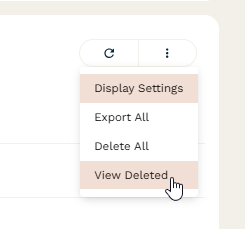
- Locate the three-dots menu icon top-right of the page.
- Click "View Deleted" from the dropdown menu.
- You can now restore individual submissions or select a range (or all) results of results to restore in bulk.
Gotchas
- We also offer the option to permanently delete records from your deleted submissions page. When a submission is permanently deleted, it cannot be recovered.
- We only retain deleted submissions for a maximum of 25 days after initial deletion. Deleted submissions older than 25 days cannot be recovered.
- Note that file uploads submitted by respondents must be manually requested to be removed as they are stored separately to submission data, should you wish to delete these files, please contact our support team via live chat or email at support@paperform.co to request this action. We will delete and confirm that these have been deleted upon request.