
If you aren’t using automation to your advantage you’re missing out. Whether you’re trying to be more efficient at work or you’re managing your own business, Zapier integrations eliminate manual tasks and save you tons of time in the process.
By connecting the applications you use to manage the day-to-day tasks, you no longer have to deal with siloed data, files, and disparate to-do lists. You can streamline your approach to work by getting more done in the same amount of time.
To start, you need to get familiar with how Zapier integrations work and what apps you can use to optimize triggers and actions. Below we’ll walk through a list of ways to get started working smarter (not harder!) with Zapier integrations.
What is a Zapier integration?
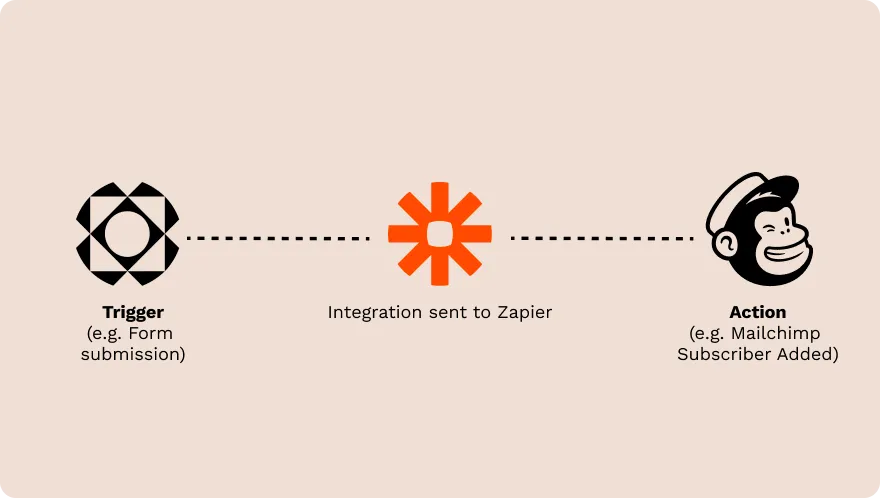
Zapier is a codeless digital automation tool that connects different apps and platforms to automate repetitive tasks. With Zapier, you can connect more than 4,000 apps and have them seamlessly communicate with each other.
With automated triggers, Zapier streamlines your business processes and workflows. For instance, say you want to create a Zap that sends an automatic email response to whoever fills out your Paperform questionnaire.
Within the Zapier editor, you’d set up a trigger (a questionnaire is submitted) which would kick off an action (an automated email gets sent with your ESP). That setup is what you call a “Zap.” Just like this example, it’s possible to create a Zap for all kinds of tasks, including multi-step triggers and actions.
With the multi-step editor, you can build tons of different automated triggers and actions that work in the background for you. Nice, right? However, that example is only scratching the surface regarding the benefits of integrating Zapier into your app stack.
What are the benefits of workflow automation?
Workflow automation is about making your work easier in a variety of ways. Some of the biggest benefits of workflow automation are:
1. Save time on manual tasks
While you could outsource busy work to a virtual assistant, some tasks don’t require the extra hassle of hiring someone to tackle your manual to-do list. A long list of manual tasks can be automated and tweaked to fit the needs of your business as priorities change. Setting up Zapier integrations saves you time, which is one of your most valuable resources.
2. Achieve more with less effort
Automated Zaps make achieving more with less effort a reality. Not only do you get to save time, but you also save money, energy, and you have the peace of mind that the managerial tasks necessary to run your business aren’t slipping through the cracks.
3. Scale your business faster
Scaling requires focusing on higher ROI tasks within your business. Automating manual tasks lets you make time to win more customers, spend less time producing work, and it helps you maintain the level of consistency necessary to scale.
By automating recurring and mundane tasks, you free up more mental space, time, and energy to focus on the projects that’ll scale your business faster.
4. Improve collaboration and communication
Eliminating any friction that stands in the way of team collaboration and communication can do a lot in keeping you and your team productive. Automating triggers and actions with apps like Slack, Google Calendar, Outlook, or Gmail enables you to communicate more effectively across apps.
What tasks should you automate?
Anything you don’t have to do manually should be automated. Specifically, any tasks that meet one or all of the following criteria are eligible for automation:
- It needs to be done frequently
- It doesn’t require creativity or deep thinking
- Has to be done on a schedule
- Involves moving files or data from one app to another
- Requires frequent tracking
- Requires regular reporting
Additionally, common business tasks like marketing, invoicing, and emails can easily be automated once you’ve set up Zaps with the right applications. Here’s a quick list of some of the specific business tasks you can automate:
- Social media posts
- Canned email responses
- Form submissions
- Invoicing
- Creating project management tasks
- Tracking hourly work
- Surveying your audience
- Recording marketing campaign information
- Saving email attachments
- Tracking social media mentions
- Creating calendar events
- Sending team notifications
[CTA]
How to use Zapier integrations to improve your work
From Google Sheets to Gmail and even Feedly, there are plenty of Zaps you can create that make your life easier by integrating them with Zapier. Here’s a walkthrough of some of the most useful example Zaps you can snag and use yourself.
1. Collect feedback and other data from forms
Feedback is a great way to course-correct and do more of what’s already working. But only if you have an organized way to track it so that it’s easier to spot recurring patterns like frequent comments on the same issue. Consider using some of the example Zaps below to automate the feedback process.
Example Zaps:
- Paperform → Google Sheets: Collect new Paperform responses as rows on Google Sheets.
- Paperform → Trello: Create Trello cards from new Paperform responses.
- Paperform → Dropbox: Save new Paperform entries to Dropbox text files.
- Paperform → Mailchimp: Add new Paperform entries to a Mailchimp list.
→ 📹 Send files and submissions directly to Dropbox with Paperform
2. Get notifications and reminders in Slack
Notifications keep you on track and make sure your to-do list gets done. The problem is a lot of those notifications are probably living in different apps, which makes it hard to keep track of them all. However, once you integrate Zapier with apps like Paperform and Slack, you can stay on top of every notification sent your way.
Example Zaps:
- Google Calendar → Slack: Send Google Calendar events to Slack.
- Gmail → Slack: Send new Gmail emails as Slack channel messages.
- Email by Zapier → Slack: Send incoming emails to Slack a channel.
- Paperform → Slack: Share Paperform responses in a Slack channel.
3. Keep your calendar and tasks in sync
Syncing Google Calendar with apps like Evernote and Todoist helps you stay on top of your most important events. While each app is beneficial on its own, syncing them with Zapier increases visibility across all your tasks and events.
For example, if you use Todoist to keep track of tasks, you can sync your Google Calendar with Todoist to turn meetings and events into tasks. As a result, you won’t have to toggle between tasks and have disjointed to-do lists with different tasks living in each of them.
Example Zaps:
- Google Calendar → Todoist: Add new Google Calendar events to Todoist as tasks.
- Google Calendar → Trello: Create Google Calendar events from new Trello cards.
- Evernote → Google Calendar: Create Google Calendar events from Evernote reminders.
- Paperform → Google Calendar: Schedule new detailed events on Google Calendar for new Paperform submissions.
4. Save email attachments to the cloud
Have you ever wanted to automatically save email attachments to the cloud? Zapier makes it possible to extract attachments and store them in the Dropbox or Google Drive folder of your choice every time you receive an email with an attachment.
No more clicking or dragging and dropping. Simply set up the automation with Zapier and let the triggers work in the background. It’s an effective solution to all the time you’d otherwise spend hunting down important email attachments without creating extra work for yourself.
Example Zaps:
- Gmail → Google Drive: Save new Gmail attachments to Google Drive.
- Dropbox → Gmail: Save new attachments in Gmail to Dropbox.
- Email by Zapier → OneDrive: Add files to OneDrive with new emails.
- Box → Gmail: Save Gmail attachments to Box in their original file format.
5. Optimize your customer support
Whether you need to keep track of Zendesk tickets or need to keep an eye on Help Scout conversations, optimizing your customer support efforts can boil down to creating the right automations.
For instance, if you use Paperform to create a support request form, you can create a trigger that automatically starts a Help Scout conversation with their support questions once they hit submit.
Example Zaps:
- Paperform → Help Scout: Create Help Scout Conversations from Paperform submissions.
- Paperform → Zendesk: Create a Zendesk ticket from new form submissions.
- Freshdesk → Slack: Get slack notifications for new Freshdesk tickets.
- Gmail → Twitter: Send email alerts for any tweet mentioned via Gmail.
6. Better manage your meetings
Meetings don’t have to be a waste of time if you know how to manage them effectively. As a management solution, Zapier enables you to integrate Zoom with Google Drive so you can keep recorded meetings in one centralized dashboard.
Want to make sure you don’t miss the next Google Calendar event? You can integrate Zapier’s SMS functionality with Google Calendar so you get a text message with a heads up about your next event.
Example Zaps:
- Google Calendar → Google Docs: Create a Google Doc agenda for new Google Calendar events.
- Google Drive → Zoom: Upload new Zoom recordings to Google Drive.
- Google Calendar → SMS by Zapier: Get SMS alerts for new approaching Google Calendar events.
- Microsoft Outlook → Trello: Create Trello cards from new Microsoft Outlook events.
7. Monitor your ecommerce store
The beauty of Zapier integrations is that they can also help you monitor your business. Have an ecommerce store and want to know every time a payment fails or a customer support ticket is created? Set it up by integrating Stripe and Slack or Shopify and Zendesk for a streamlined management workflow.
Example Zaps:
- Slack → Stripe: Post failed Stripe payments to Slack
- ShipStation → SMS by Zapier: Get SMS messages for new shipped orders.
- Big Cartel → QuickBooks: Create new QuickBooks customers from new Big Cartel orders.
- Shopify → Zendesk: Generate tickets in Zendesk from newly-paid orders in Shopify.
8. Backup important files and information
Losing valuable files is a business owner’s worst nightmare. Yet with Zapier, you can set up Zaps to backup published content, contact data, notes, or any Excel sheets with key business information. In less than a few minutes, you can make sure all of your most important files and data are backed up as they’re created.
Example Zaps:
- Google Drive → OneNote: Create OneNote notes from new files added to the Google Drive folder.
- Dropbox → WordPress: Backup WordPress posts to Dropbox.
- Paperform → Microsoft Excel: Add new Paperform submissions to Excel spreadsheet rows.
- Google Sheets → HubSpot: Record new contacts from HubSpot lists in Google Sheets spreadsheets.
9. Distribute your content across multiple platforms
Content distribution is a critical part of getting your business out there and growing a customer base. Thankfully, content distribution is yet another task you don’t have to spend all your time doing manually. Take advantage of Zap triggers that let you Tweet new content updates and share posts on different social platforms.
Example Zaps:
- Twitter → YouTube: Tweet new YouTube videos.
- Brightmove → LinkedIn: Share new Brightmove jobs on LinkedIn.
- Pocket → Buffer: Send favourited items to your Buffer queue.
- Feedly → Hootsuite: Create new Hootsuite posts for articles on Feedly.
10. Stop copying & pasting in spreadsheets and databases
Sure, copy and paste keys save you a lot of time. But why keep using them if there’s a faster way to track information and keep your database up to date? By combining Zapier with the likes of Google Sheets, Paperform, or Notion you can be well on your way to creating a centralized datasheet where all your most important data points can live.
Example Zaps:
- Airtable → Paperform: Add new Paperform entries to Airtable as records.
- Airtable → Google Sheets: Save new Google Sheets rows to Airtable.
- Email by Zapier → Notion: Create items in Notion databases with new emails.
- ClickUp → Notion: Add new ClickUp tasks to databases in Notion.
Start saving time today
Automations make it possible to hand off some of the more tedious business tasks. While you may not be able to completely eliminate the need for administrative or repetitive work tasks, they can be managed with the power of codeless automation features.
Much like Zapier, customizable apps like Paperform integrate with over 2,000 other apps you’re probably already using. Check out the full list to see how you can integrate Paperform’s powerful form-building features into your business workflow.
It’s not only easy to use but intuitive too. Try it out free for 7 days.