Best Jotform Alternatives for 2026
Jotform has spent 20 years adding features. The result is a platform that can technically do almost anything: 20,000+ templates, 40+ payment gateways, e-signatures, PDF generation, approval workflows, a mobile app builder, AI agents, and a spreadsheet-like data viewer. On paper that breadth is unmatched. In practice, the sheer volume of features creates a cluttered, sometimes laggy experience where individual capabilities don't work as smoothly as competitors that do fewer things better.
People leave Jotform less because it can't do what they need and more because finding and using what they need takes longer than it should. The drag-and-drop builder hasn't aged as gracefully as newer editors. Documentation gaps leave users guessing. And the focus on quantity, with more templates, more integrations, and more product lines, has come at the cost of the polish and coherence that newer, more focused platforms deliver.
The alternatives below prioritise quality over quantity. For a direct comparison, see our Paperform vs Jotform breakdown. For how Jotform compares to free options, see Google Forms vs Jotform.

| Feature | Jotform | Paperform | Typeform | Google Forms | Cognito Forms | Formstack | Gravity Forms | HubSpot Forms |
|---|---|---|---|---|---|---|---|---|
| Form Building | ||||||||
| Document-style editor | No | Yes | No | No | No | No | No | No |
| AI form creation | Yes starter | Yes | Yes | Yes | Yes | Yes forms | No | No |
| Field types | 30+ (starter) | 26+ | 20+ | 11 | 20+ | 15 | No | No |
| Guided mode (one question at a time) | Yes starter | Yes | Yes | No | No | Yes forms | Yes Elite | No |
| Calculations field | Yes starter | Yes essentials | Yes plus | No | Yes | Yes forms | Yes Basic | No |
| Payments | ||||||||
| Stripe payments | Yes starter | Yes | Yes basic | No | Yes | Yes forms | Yes Pro | Yes starter |
| PayPal payments | Yes starter | Yes | No | No | Yes team | Yes forms | Yes Pro | No |
| Square payments | Yes starter | Yes | No | No | Yes team | No | Yes Pro | No |
| Braintree payments | Yes starter | Yes | No | No | No | No | No | No |
| Google Pay | Yes starter | Yes | No | No | No | No | Yes Pro | No |
| Design & Customization | ||||||||
| Template gallery | 20,000+ (starter) | 30,000+ | 1,500+ | 20+ | Yes | Yes forms | Yes Basic | Yes |
| Rich media (images, GIFs, videos) | Yes starter | Yes | Yes | Yes | Yes | Yes forms | Yes Basic | No |
| Form themes | Yes starter | No | No | No | No | No | No | No |
| Language translation | Yes starter | Yes | Yes basic | No | Yes pro | No | Yes Basic | No |
| Advanced theming | Yes starter | Yes pro | Yes plus | No | Yes pro | Yes forms | Yes Basic | Yes starter |
| Analytics | ||||||||
| Form analytics | Yes starter | No | No | No | No | No | No | No |
| Google Analytics integration | Yes starter | No | No | No | No | No | No | No |
| Partial submissions | No | Yes pro | Yes plus | No | No | Yes forms | Yes Elite | No |
| AI report insights | No | Yes pro | Yes business | Yes Business Standard | No | No | No | No |
| Paperform analytics | No | Yes pro | No | No | No | Yes forms | No | No |
| Collaboration | ||||||||
| Advanced permissions & admin | Yes enterprise | Yes enterprise | Yes enterprise | Yes Business Starter | Yes enterprise | Yes enterprise | No | Yes enterprise |
| Form sharing | Yes starter | No | No | No | No | No | No | No |
| Assign forms | Yes enterprise | No | No | No | No | No | No | No |
| Form sharing (templates) | No | Yes | Yes | Yes | Yes | Yes forms | Yes Basic | Yes |
| Spaces and tag management | No | Yes | No | No | No | Yes forms | No | No |
| Security | ||||||||
| SOC 2 Type II | Yes enterprise | Yes | Yes | Yes | No | No | No | Yes |
| HIPAA compliant | Yes gold | No | Yes enterprise | No | No | No | No | No |
| 256-bit SSL | Yes starter | No | No | No | No | No | No | No |
| Two-factor authentication | Yes starter | Yes | Yes | Yes | Yes | Yes forms | No | Yes |
| SSO (SAML) | Yes enterprise | Yes business | Yes enterprise | Yes Business Plus | Yes enterprise | Yes enterprise | No | Yes enterprise |
| Integrations & API | ||||||||
| Native integrations | 150+ (starter) | 2,000+ | 120+ (basic) | No | No | No | No | Yes |
| Make (Integromat) | Yes starter | Yes | Yes basic | Yes | Yes | No | No | Yes starter |
| Webhooks | Yes starter | Yes pro | Yes basic | No | Yes | Yes forms | Yes Elite | Yes starter |
| API | Yes starter | No | Yes basic | No | No | No | No | Yes |
| WordPress plugin | Yes starter | Yes | Yes | No | Yes | Yes forms | Yes Basic | Yes |
 Paperform — Best Overall Jotform Alternative

If your frustration with Jotform is the cluttered interface and inconsistent feature quality, Paperform is the strongest answer. Its document-style editor works differently: instead of dragging widgets into grid slots, you write content and add fields inline, the way you'd edit a document. Finished forms look like professionally designed landing pages rather than generic widgets, because every form is already a landing page. Headings, paragraphs, images, and fields coexist on the same canvas without needing a separate page builder.
The calculation engine is where Paperform pulls ahead on substance, not just style. Jotform has basic calculation fields, but Paperform's Excel-style formulas drive dynamic pricing, scoring systems, tax calculations, and conditional logic across questions, pages, emails, integrations, and success pages. A real estate agent can build a property valuation calculator; a SaaS company can create an interactive pricing configurator; an accountant can generate tax estimates with conditional rates. These power real business workflows, not just data collection.
Five payment gateways on all plans (including free), built-in e-signatures through Papersign, and workflow automation through Stepper round out a cleaner, more cohesive platform. Jotform assembled its capabilities through 20 years of incremental additions; Paperform built them as a single system. The difference shows in daily use: less hunting through menus, fewer documentation gaps, and a consistent design language across the platform. Bootstrapped and profitable since 2016, Paperform has the focused development model Jotform's sprawling product surface can't match. For a full side-by-side, see our Paperform vs Jotform comparison.
Strengths over Jotform
- Superior design quality — document-style editor produces polished, branded forms without custom CSS
- More powerful calculations — Excel-style formulas that cascade across the entire form experience
- Cleaner, more focused interface — less feature bloat, faster to learn and use daily
- Built-in e-signatures (Papersign) and workflow automation (Stepper) included at no extra cost
- Lower entry price — $24/month Essentials versus Jotform's $39/month Bronze
Key limitations
- Fewer payment gateways (5 versus Jotform's 40+) — covers the most popular options but not niche gateways
- Smaller template library (30,000+ versus Jotform's 20,000+ dedicated form templates)
- No HIPAA compliance (Jotform offers this on paid plans)
- No native mobile app for form building
Best for: Teams that prioritise design quality, calculation power, and a clean editing experience over Jotform's breadth.
 Typeform — Best for Short Engagement Surveys

If your Jotform complaint is the cluttered, overwhelming interface, Typeform sits at the design-forward extreme. Every form presents one question per screen with smooth transitions, creating a focused, distraction-free experience. For short surveys, quizzes, and lead qualification flows under 10 questions, the conversational format drives higher completion rates than Jotform's traditional multi-field layouts. Typeform claims 3.5x better completion rates for short-form interactions, and independent reviews support the claim.
The trade-off: Typeform costs more ($39/month for 100 responses), has Stripe-only payments locked behind the $91/month Business tier, and forces every form into the one-question format, so you can't build traditional multi-field forms. You're swapping one constraint (Jotform's complexity) for another (Typeform's rigidity). If your forms are exclusively short surveys and quizzes, the swap works. If you need the versatility Jotform provided but with better design, Paperform's hybrid approach (both conversational and traditional layouts) is a better fit.
Strengths over Jotform
- Dramatically cleaner user experience — one-question format eliminates visual clutter
- Higher completion rates on short forms — Typeform claims 3.5x better than traditional layouts
- Stronger default aesthetics — forms look polished without any design effort
Key limitations
- More expensive than Jotform at every tier
- Stripe-only payments at $91/month (Jotform has 40+ gateways on lower plans)
- Locked into one-question format — no traditional form layouts
- Smaller template library (~1,500 versus Jotform's 20,000+)
Best for: Teams that build short engagement surveys and value design polish over feature breadth.
 Google Forms — Best Completely Free Alternative

If Jotform's complexity drives you crazy and you only need basic data collection, Google Forms eliminates both the cost and the clutter. It gives you unlimited forms, unlimited responses, automatic Google Sheets integration, and almost no learning curve. It doesn't try to do what Jotform does: no payments, no calculations, no e-signatures, no 20,000 templates. It collects data and puts it in a spreadsheet. For internal surveys, feedback forms, and quick data gathering, that simplicity is exactly the point.
Moving from Jotform to Google Forms means giving up features in exchange for a big gain in simplicity and cost. The users who benefit are those who discovered they were using a fraction of Jotform's capabilities and paying $39+/month for the privilege. If your forms don't need payments, calculations, or conditional logic, Google Forms does the data collection job at zero cost with no interface complexity. For more advanced needs with Google Sheets integration, Paperform and other alternatives above offer Sheets connectivity alongside their full feature sets.
Strengths over Jotform
- Completely free — no form limits, no response limits, no storage limits
- Instant Sheets integration — responses flow directly into Google Sheets for analysis
- Zero learning curve — anyone with a Google account can build forms in minutes
Key limitations
- No payments, no e-signatures, no calculations, no advanced logic
- Roughly 11 field types versus Jotform's 100+
- No custom branding beyond colour themes
- No integrations outside Google's ecosystem (without third-party tools)
Best for: Internal data collection and teams that need simplicity over Jotform's feature sprawl.
 Cognito Forms — Best Value for Logic-Heavy Forms
Cognito Forms is the underrated option for teams leaving Jotform over cost or feature-gating. Its free tier includes unlimited forms, conditional logic, calculations, e-signatures, and Stripe payments, a combination Jotform charges $39+/month for, and paid plans start at just $19/month. The calculation and logic capabilities rival Jotform's at a fraction of the price, with cleaner form-building workflows. The trade-off is design: Cognito's forms are functional but won't win aesthetics awards, and the template library is much smaller than Jotform's.
For healthcare teams, Cognito Forms offers HIPAA compliance at $19/month, the most affordable HIPAA-compliant form builder on the market. Jotform also offers HIPAA, but at $39+/month on paid plans. If compliance and budget are both priorities, Cognito Forms delivers it at less than half the cost. The builder interface is cleaner than Jotform's, though less flexible than Paperform's document-style editor.
Strengths over Jotform
- Most generous free plan — unlimited forms, calculations, e-signatures, and Stripe payments at $0
- HIPAA compliance at $19/month (Jotform requires paid plans at $39+/month)
- Cleaner logic builder — less cluttered than Jotform's conditional logic interface
Key limitations
- Limited design customisation — functional forms, not visually striking ones
- Smaller template library and integration ecosystem
- Fewer payment gateways (Stripe-focused versus Jotform's 40+)
Best for: Budget-conscious teams needing calculations, e-signatures, and HIPAA compliance without Jotform's price tag.
Full Feature Comparison
Every feature across all alternatives, grouped by category. Jotform included for reference, Paperform highlighted.
| Feature | Jotform | Paperform | Typeform | Google Forms | Cognito Forms | Formstack | Gravity Forms | HubSpot Forms |
|---|---|---|---|---|---|---|---|---|
| Form Building | ||||||||
| Document-style editor | No | Yes | No | No | No | No | No | No |
| AI form creation | Yes starter | Yes | Yes | Yes | Yes | Yes forms | No | No |
| Field types | 30+ (starter) | 26+ | 20+ | 11 | 20+ | 15 | No | No |
| Multi-page forms | Yes starter | Yes | Yes basic | Yes | Yes | Yes forms | Yes Basic | Yes starter |
| Guided mode (one question at a time) | Yes starter | Yes | Yes | No | No | Yes forms | Yes Elite | No |
| Conditional logic | Yes starter | Yes | Yes basic | Yes | Yes | Yes forms | Yes Basic | Yes professional |
| Calculations field | Yes starter | Yes essentials | Yes plus | No | Yes | Yes forms | Yes Basic | No |
| Scoring | Yes starter | Yes essentials | Yes plus | Yes | Yes | No | Yes Elite | No |
| Answer piping | Yes starter | Yes | Yes basic | No | Yes | Yes forms | Yes Basic | No |
| Pre-filling and hidden fields | Yes starter | Yes essentials | Yes basic | Yes | Yes | Yes forms | Yes Basic | Yes |
| Save and resume | Yes starter | Yes | No | No | Yes pro | Yes forms | Yes Basic | No |
| Auto-close by number | Yes starter | Yes essentials | Yes basic | Yes | Yes | No | No | No |
| Auto-close by date | Yes starter | Yes pro | Yes basic | Yes | Yes | No | No | No |
| Appointment/booking field | Yes starter | Yes | Yes basic | No | No | No | No | No |
| Signature field | Yes starter | Yes | Yes basic | No | Yes team | Yes suite | Yes Elite | No |
| Color picker field | No | Yes | No | No | No | No | No | No |
| File uploads | Yes starter | Yes | Yes basic | Yes | Yes | No | No | Yes |
| Drag-and-drop builder | Yes starter | No | No | No | No | Yes forms | Yes Basic | No |
| Form widgets | Yes starter | No | No | No | No | No | No | No |
| Template gallery | 20,000+ (starter) | No | No | No | No | No | No | No |
| AI calculations assistant | No | Yes essentials | No | No | No | No | No | No |
| API-powered dropdowns | No | Yes business | No | No | Yes | Yes forms | No | No |
| Google address search | No | Yes business | No | No | Yes | No | No | No |
| AI follow-up questions | No | No | Yes business | No | No | No | No | No |
| AI extended thinking & memory | No | No | Yes growth | No | No | No | No | No |
| Workflow / automation builder | No | No | Yes growth | No | No | No | No | No |
| AI-moderated research (Research Flow) | No | No | Yes enterprise | No | No | No | No | No |
| Video questions | No | No | Yes basic | No | No | No | No | No |
| 30+ field types | No | No | No | No | No | No | Yes Basic | No |
| Question types | No | No | No | No | No | No | No | Yes |
| Form unpublishing | No | No | No | No | No | No | No | Yes |
| Automatic lead enrichment | No | No | No | No | No | No | No | Yes professional |
| Automatic deal creation from forms | No | No | No | No | No | No | No | Yes professional |
| Payments | ||||||||
| Stripe payments | Yes starter | Yes | Yes basic | No | Yes | Yes forms | Yes Pro | Yes starter |
| PayPal payments | Yes starter | Yes | No | No | Yes team | Yes forms | Yes Pro | No |
| Square payments | Yes starter | Yes | No | No | Yes team | No | Yes Pro | No |
| Braintree payments | Yes starter | Yes | No | No | No | No | No | No |
| Google Pay | Yes starter | Yes | No | No | No | No | Yes Pro | No |
| 40+ payment gateways | Yes starter | No | No | No | No | No | No | No |
| Product sales (eCommerce) | Yes starter | Yes essentials | No | No | Yes | No | Yes Basic | No |
| Subscriptions | Yes starter | Yes essentials | Yes basic | No | No | No | Yes Pro | No |
| Coupons and discounts | Yes starter | Yes essentials | No | No | Yes | Yes forms | Yes Elite | No |
| Custom pricing rules | Yes starter | Yes essentials | No | No | Yes | Yes forms | No | No |
| Tax calculations | Yes starter | Yes | No | No | Yes | No | No | No |
| No transaction fees | Yes starter | No | No | No | No | No | No | No |
| Quotes/invoices | No | Yes | No | No | Yes team | No | No | No |
| Refunds | No | Yes | No | No | No | No | Yes Pro | No |
| 3D Secure | No | Yes | Yes basic | No | No | No | Yes Pro | No |
| Design & Customization | ||||||||
| Template gallery | 20,000+ (starter) | 30,000+ | 1,500+ | 20+ | Yes | Yes forms | Yes Basic | Yes |
| Rich media (images, GIFs, videos) | Yes starter | Yes | Yes | Yes | Yes | Yes forms | Yes Basic | No |
| Form themes | Yes starter | No | No | No | No | No | No | No |
| Language translation | Yes starter | Yes | Yes basic | No | Yes pro | No | Yes Basic | No |
| Advanced theming | Yes starter | Yes pro | Yes plus | No | Yes pro | Yes forms | Yes Basic | Yes starter |
| Custom form URL | No | Yes pro | Yes plus | No | No | Yes forms | No | No |
| Custom domains | Yes enterprise | Yes pro | No | No | No | Yes forms | No | No |
| Custom HTML & CSS | Yes starter | Yes pro | Yes business | No | Yes pro | Yes forms | Yes Basic | Yes starter |
| Remove branding | Yes bronze | Yes pro | Yes plus | No | Yes pro | Yes forms | Yes Basic | Yes starter |
| Custom email domains | No | Yes business | No | Yes Business Starter | No | No | Yes Elite | No |
| Unsplash and Giphy integration | No | Yes | Yes | No | No | No | No | No |
| Image editor | No | Yes | No | No | No | No | No | No |
| Adobe Creative Cloud | No | Yes | No | No | No | No | No | No |
| Analytics | ||||||||
| Submission results and reports | Yes starter | Yes | Yes | Yes | Yes | Yes forms | Yes Basic | Yes |
| Form analytics | Yes starter | No | No | No | No | No | No | No |
| Google Analytics integration | Yes starter | No | No | No | No | No | No | No |
| Partial submissions | No | Yes pro | Yes plus | No | No | Yes forms | Yes Elite | No |
| AI report insights | No | Yes pro | Yes business | Yes Business Standard | No | No | No | No |
| Paperform analytics | No | Yes pro | No | No | No | Yes forms | No | No |
| Drop-off analysis | No | Yes pro | Yes business | No | No | No | No | No |
| Google Analytics & Facebook Pixel | No | Yes essentials | Yes basic | No | Yes pro | Yes forms | Yes Elite | Yes |
| Custom analytics scripts | No | Yes pro | Yes basic | No | No | No | Yes Basic | No |
| Conversion analytics | No | No | No | No | No | No | No | Yes professional |
| Collaboration | ||||||||
| Multi-user accounts | Yes bronze | Yes pro | Yes plus | Yes | Yes pro | Yes forms | Yes Basic | Yes |
| User permissions and management | Yes enterprise | Yes pro | Yes plus | Yes | Yes team | Yes forms | Yes Basic | Yes starter |
| Advanced permissions & admin | Yes enterprise | Yes enterprise | Yes enterprise | Yes Business Starter | Yes enterprise | Yes enterprise | No | Yes enterprise |
| Form sharing | Yes starter | No | No | No | No | No | No | No |
| Assign forms | Yes enterprise | No | No | No | No | No | No | No |
| Form sharing (templates) | No | Yes | Yes | Yes | Yes | Yes forms | Yes Basic | Yes |
| Spaces and tag management | No | Yes | No | No | No | Yes forms | No | No |
| Workspace organization | No | No | Yes | No | No | No | No | No |
| Security | ||||||||
| SOC 2 Type II | Yes enterprise | Yes | Yes | Yes | No | No | No | Yes |
| GDPR compliant | Yes starter | Yes | Yes | Yes | Yes | Yes forms | Yes Basic | Yes |
| HIPAA compliant | Yes gold | No | Yes enterprise | No | No | No | No | No |
| SSL encryption | Yes starter | Yes | Yes | Yes | Yes | Yes forms | Yes Basic | Yes |
| 256-bit SSL | Yes starter | No | No | No | No | No | No | No |
| Two-factor authentication | Yes starter | Yes | Yes | Yes | Yes | Yes forms | No | Yes |
| SSO (SAML) | Yes enterprise | Yes business | Yes enterprise | Yes Business Plus | Yes enterprise | Yes enterprise | No | Yes enterprise |
| reCAPTCHA | Yes starter | Yes | Yes business | No | Yes | Yes forms | Yes Basic | No |
| Data residency | Yes enterprise | No | No | No | No | No | No | Yes enterprise |
| Form encryption | Yes starter | No | No | No | No | No | No | No |
| PCI DSS | Yes starter | No | Yes | No | No | No | No | No |
| Enforce 2FA for all users | No | Yes business | No | Yes Business Starter | No | Yes enterprise | No | No |
| Local data residency | No | Yes enterprise | No | Yes Business Plus | No | No | Yes Basic | No |
| Custom S3 storage (BYO) | No | Yes business | No | No | No | No | No | No |
| ISO 27001 | No | No | Yes | No | No | No | No | No |
| Custom S3 storage | No | No | No | No | No | No | No | No |
| Integrations & API | ||||||||
| Native integrations | 150+ (starter) | 2,000+ | 120+ (basic) | No | No | No | No | Yes |
| Zapier | Yes starter | Yes | Yes basic | Yes | Yes | Yes forms | Yes Pro | Yes starter |
| Make (Integromat) | Yes starter | Yes | Yes basic | Yes | Yes | No | No | Yes starter |
| Webhooks | Yes starter | Yes pro | Yes basic | No | Yes | Yes forms | Yes Elite | Yes starter |
| API | Yes starter | No | Yes basic | No | No | No | No | Yes |
| WordPress plugin | Yes starter | Yes | Yes | No | Yes | Yes forms | Yes Basic | Yes |
| Salesforce AppExchange | Yes starter | No | No | No | No | No | No | No |
| Embed options | Yes starter | No | Yes | No | No | No | No | Yes |
| Mobile apps | Yes starter | No | No | No | No | No | No | No |
| Standard API | No | Yes pro | No | Yes | No | Yes forms | Yes Basic | No |
| Business API | No | Yes business | No | No | No | Yes enterprise | No | No |
| oEmbed support | No | Yes | No | No | Yes | No | No | No |
| Claude / MCP server | No | No | Yes basic | No | No | No | No | No |
| AI data enrichment | No | No | Yes growth | No | No | No | No | No |
| 2000+ integrations | No | No | No | No | No | No | No | No |
| 50+ official add-ons | No | No | No | No | No | No | Yes Basic | No |
| Stepper workflow automation | No | No | No | No | No | No | No | No |
Pricing Comparison
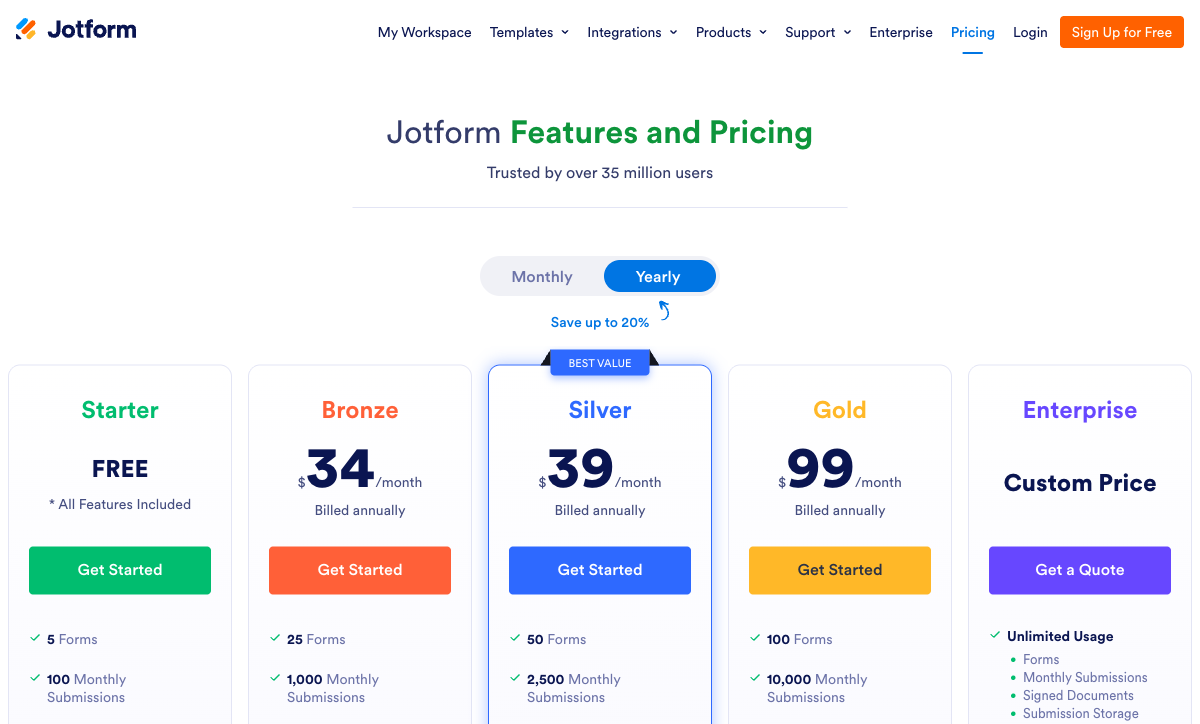
Jotform's paid plans aren't cheap for what you get. Here's how every alternative compares on cost and included features.
Paperform
Jotform
| Product | Plan | Monthly Price | Annual Price (per month) | Free Plan | Free Trial | Limits |
|---|---|---|---|---|---|---|
| Jotform | Starter | Free | Free | Yes | No | forms: 5, submissions: 100/month, storage: 100 MB, users: 1 |
| Jotform | Bronze | $39/mo | $34/mo billed annually | forms: 25, submissions: 1,000/month, storage: 1 GB, users: 1 | ||
| Jotform | Silver | $49/mo | $39/mo billed annually | forms: 50, submissions: 2,500/month, storage: 10 GB, users: 1 | ||
| Jotform | Gold | $129/mo | $99/mo billed annually | forms: 100, submissions: 10,000/month, storage: 100 GB, users: 1 | ||
| Paperform | Free | Free | Free | Yes | 14 days | forms: Unlimited, submissions: 30/month, storage: 100 submissions, users: 1, file uploads: 100 MB |
| Paperform | Essentials | $29/mo | $24/mo billed annually | forms: Unlimited, submissions: 100/month, storage: 1,000 submissions, users: 1, file uploads: 1 GB | ||
| Paperform | Pro | $59/mo | $49/mo billed annually | forms: Unlimited, submissions: 1,000/month, storage: 10,000 submissions, users: 3, file uploads: 10 GB | ||
| Paperform | Business | $129/mo | $99/mo billed annually | forms: Unlimited, submissions: 10,000/month, storage: 100,000 submissions, users: 5, file uploads: 100 GB | ||
| Typeform | Free | Free | Free | Yes | No | forms: 10, submissions: 10/month, users: 1 |
| Typeform | Basic | $39/mo | $28/mo billed annually | forms: Unlimited, submissions: 100/month, users: 1 | ||
| Typeform | Plus | $79/mo | $56/mo billed annually | forms: Unlimited, submissions: 1,000/month, users: 3 | ||
| Typeform | Business | $129/mo | $91/mo billed annually | forms: Unlimited, submissions: 10,000/month, users: 5 | ||
| Typeform | Growth Flow | $379/mo | $266/mo billed annually | forms: Unlimited, submissions: Expanded, users: Expanded | ||
| Typeform | Talent | $169/mo | $119/mo billed annually | forms: Unlimited, users: HR teams | ||
| Google Forms | Free (Personal) | Free | Free | Yes | 14 days | forms: Unlimited, submissions: Unlimited, storage: 15 GB (shared across Google Drive), users: 1, file uploads: Included in 15 GB storage |
| Google Forms | Business Starter | $8.4/mo | $7/mo billed annually | forms: Unlimited, submissions: Unlimited, storage: 30 GB per user, users: Up to 300, file uploads: Included in storage | ||
| Google Forms | Business Standard | $16.8/mo | $14/mo billed annually | forms: Unlimited, submissions: Unlimited, storage: 2 TB per user, users: Up to 300, file uploads: Included in storage | ||
| Google Forms | Business Plus | $26.4/mo | $22/mo billed annually | forms: Unlimited, submissions: Unlimited, storage: 5 TB per user, users: Up to 300, file uploads: Included in storage | ||
| Cognito Forms | Individual (Free) | Free | Free | Yes | 14 days | forms: Unlimited, submissions: 100/month, storage: 100 MB, users: 1 |
| Cognito Forms | Pro | $19/mo | $16/mo billed annually | forms: Unlimited, submissions: 2,000/month, storage: 1 GB, users: 2 | ||
| Cognito Forms | Team | $39/mo | $33/mo billed annually | forms: Unlimited, submissions: 10,000/month, storage: 10 GB, users: 5 | ||
| Cognito Forms | Enterprise | $129/mo | $109/mo billed annually | forms: Unlimited, submissions: Unlimited, storage: 100 GB, users: 20 | ||
| Formstack | Forms | $99/mo | $83/mo billed annually | No | 14 days | forms: 25, submissions: 1,000/form, storage: 2 GB, users: 1, file uploads: 2 GB |
| Formstack | Suite | $299/mo | $250/mo billed annually | forms: 100, submissions: 5,000/form, storage: 10 GB, users: 3, file uploads: 10 GB | ||
| Gravity Forms | Basic | Not listed | $59/mo billed annually | No | No | forms: Unlimited, submissions: Unlimited, storage: WordPress database (self-hosted), users: Unlimited (WordPress users) |
| Gravity Forms | Pro | Not listed | $159/mo billed annually | forms: Unlimited, submissions: Unlimited, storage: WordPress database (self-hosted), users: Unlimited (WordPress users) | ||
| Gravity Forms | Elite | Not listed | $259/mo billed annually | forms: Unlimited, submissions: Unlimited, storage: WordPress database (self-hosted), users: Unlimited (WordPress users) | ||
| Gravity Forms | Nonprofit | Not listed | $129/mo billed annually | forms: Unlimited, submissions: Unlimited, storage: WordPress database (self-hosted), users: Unlimited (WordPress users) | ||
| HubSpot Forms | Free | Free | Free | Yes | 14 days | forms: Unlimited, submissions: Unlimited, users: 2 |
| HubSpot Forms | Marketing Hub Starter | $20/mo | $20/mo billed annually | forms: Unlimited, submissions: Unlimited, users: Per seat | ||
| HubSpot Forms | Marketing Hub Professional | $890/mo | $890/mo billed annually | forms: Unlimited, submissions: Unlimited, users: 3 included (additional seats extra) | ||
| HubSpot Forms | Marketing Hub Enterprise | $3600/mo | $3600/mo billed annually | forms: Unlimited, submissions: Unlimited, users: 5 included (additional seats extra) |
Review Ratings Across Platforms
Weighted average ratings from G2, Capterra, Trustpilot, and other major review sites.
Who Should Stay With Jotform?
Jotform's breadth is a genuine advantage for specific use cases. Not everyone needs to switch, and the platform works well when its strengths align with your requirements.
- Users who need 40+ payment gateways: If you require a specific niche payment gateway that Paperform's five gateways don't cover, such as regional processors, cryptocurrency gateways, or industry-specific providers, Jotform's 40+ gateway support is hard to beat.
- Mobile field data collection: Jotform's native iOS and Android apps allow form building and data collection on mobile devices. No SaaS alternative on this list offers a comparable mobile app. For teams collecting data in the field (inspections, audits, inventory), Jotform's mobile app is a genuine differentiator.
- HIPAA compliance on standard plans: Jotform offers HIPAA compliance on its paid plans without requiring an enterprise contract. For healthcare organisations that need compliant forms at standard pricing, Jotform's HIPAA implementation is well-established.
- Users who rely on specific niche templates: With 20,000+ templates, Jotform likely has a pre-built form for your exact industry and use case. If you found a template that perfectly matches your needs, rebuilding in another platform may not be worth the effort.
How We Evaluated Jotform Alternatives
We assessed each alternative against Jotform's specific strengths and weaknesses, focusing on five criteria:
- Editor quality (25%): How does the form-building experience compare to Jotform's drag-and-drop builder? We prioritised platforms that produce professional results with less effort and less interface complexity.
- Calculation depth (20%): Jotform's calculation fields are basic. Alternatives with Excel-style formulas that cascade across the entire form experience scored highest.
- Design quality (20%): Jotform's forms are functional but rarely beautiful. Alternatives that produce polished, branded forms without custom CSS scored higher.
- Price-to-feature ratio (20%): What you get per dollar. Alternatives that include features Jotform gates behind paid plans (e-signatures, calculations, payments) at lower tiers scored highest.
- Platform stability (15%): Funding model, company age, and development velocity. Actively developed platforms with sustainable business models scored highest.
The Verdict: Which Jotform Alternative Should You Choose?
For most users frustrated with Jotform's complexity, Paperform is the best replacement. Its document-style editor is cleaner and more intuitive, the calculation engine is substantially more powerful, and the design quality of finished forms is noticeably higher. At $24/month versus Jotform's $39/month, you pay less for a more focused, polished experience. The trade-off is breadth: Jotform supports 40+ payment gateways and has a mobile app builder, while Paperform focuses on depth with five gateways and a tighter feature set.
Choose Typeform if short conversational surveys are your primary use case and you want the cleanest possible respondent experience. Choose Google Forms if you only need basic data collection and want to eliminate cost entirely. Choose Cognito Forms if budget is the primary constraint and you need calculations and HIPAA compliance at the lowest possible price.
Jotform remains the right choice if you need a specific niche gateway from its 40+ options, depend on its mobile app builder for field data collection, or need the broadest possible template library for a highly specific use case. The platform is financially stable, bootstrapped with $144.9M in revenue, so there's no risk of it disappearing. The question is whether its quantity-over-quality approach fits your needs better than a more focused, polished alternative.
For everyone else, the alternatives above deliver more quality per dollar. If Typeform and Google Forms are also on your shortlist, our three-way Typeform vs Jotform vs Google Forms breakdown compares all three head-to-head. Or see our full best form builders ranking for the wider field.
Frequently Asked Questions
Why do people switch away from Jotform in 2026?
The most common complaints are interface complexity and inconsistent feature quality. After 20 years of building features, Jotform's product surface area is enormous: 20,000+ templates, 40+ payment gateways, e-signatures, PDF generation, approval workflows, and a mobile app builder. Navigating all of it is the problem. Features exist but aren't always where you'd expect, documentation has gaps, and the builder can lag under complex forms. Individual features rarely work as smoothly as a dedicated competitor's implementation of the same capability.
Which Jotform alternative has the best form editor?
Paperform's document-style editor is the most praised form editor on the market. Unlike Jotform's drag-and-drop widget approach, Paperform treats each form like a document, where headings, paragraphs, images, and form fields coexist on a single canvas. Finished forms look like designed landing pages rather than generic form widgets. For teams where brand presentation and design quality matter, Paperform's editor produces noticeably more polished results with less effort than Jotform's builder.
Is Jotform still good for free users?
Jotform's free plan offers 5 forms, 100 submissions/month, and 100MB storage. It's decent but increasingly restrictive, and the 5-form limit means you'll hit the ceiling quickly if you run multiple projects. Google Forms is completely free with unlimited everything. Cognito Forms offers unlimited forms and 100 submissions/month with calculations, e-signatures, and Stripe payments on its free tier. Paperform offers unlimited forms with 30 submissions/month plus five payment gateways. For free-tier value, Cognito Forms and Google Forms both outperform Jotform.
Can I replace Jotform with something simpler?
Yes, and that's one of the main reasons people leave. Paperform's document-style editor is deliberately focused: you write content and add fields inline, without navigating through dozens of menus and sub-panels. Google Forms is the simplest option if you only need basic data collection. Cognito Forms provides a cleaner drag-and-drop experience with fewer moving parts than Jotform. If Jotform's complexity is your pain point, any of these three will feel less cluttered.
Which Jotform alternative is best for payment forms?
For raw gateway count, Jotform's 40+ payment gateways are hard to beat. But for payment intelligence, Paperform is stronger. Its Excel-style calculation engine powers dynamic pricing, tax calculations, subscription logic, coupon systems, and conditional totals, all of which go well beyond simply connecting a gateway. Paperform supports five gateways (Stripe, PayPal, Square, Braintree, Google Pay) on all plans including free. If you need a specific obscure gateway Paperform doesn't support, Jotform wins. If you need sophisticated payment logic, Paperform wins.
Does Jotform own my data? Can I export everything?
Jotform allows CSV, PDF, and XLSX exports of submission data on all plans. You own your data. The challenge is migration: there's no one-click tool to move form structures (not just responses) from Jotform to another platform, so you'll need to rebuild forms in your new tool. Paperform's 30,000+ templates and intuitive editor make rebuilding faster than you'd expect, and your existing Jotform templates can serve as reference for the new platform's equivalents.
Is Jotform a safe long-term platform?
Yes. Jotform is bootstrapped with $144.9M in annual revenue, 35+ million users, and zero outside funding, making it one of the most financially stable form builders on the market. Survival isn't the concern; product direction is. After 20 years, the platform carries significant legacy weight, and new features (AI agents, mobile app builder, tables) keep widening the surface area without always deepening core form-building quality. Paperform (bootstrapped since 2016) takes a more focused approach with a narrower but deeper feature set.
Which Jotform alternative is best for WordPress?
Gravity Forms is the standout for WordPress-native form building. It runs entirely within your WordPress installation, inherits your theme styling, and has the largest add-on library of any WordPress form plugin. If your site runs on WordPress and you want the closest CMS integration, Gravity Forms replaces Jotform more naturally than any SaaS alternative. The trade-off: forms don't work outside WordPress, and you have to manage a plugin rather than a hosted service.
How does Jotform compare to Paperform for calculations?
This is a significant gap. Paperform's calculation engine uses Excel-style formulas that drive dynamic pricing, scoring systems, tax calculations, and conditional logic across questions, pages, confirmation emails, integrations, and success pages. Jotform has basic calculation fields, but they're limited in scope and don't cascade across the form the way Paperform's do. For order forms, quote generators, booking calculators, or any form that needs to compute values in real time, Paperform's calculations are substantially more powerful.
What's the best Jotform alternative for HIPAA-compliant forms?
Several alternatives offer HIPAA compliance. Cognito Forms provides HIPAA on paid plans at just $19/month, the most affordable HIPAA-compliant option. Formstack offers HIPAA with BAA on its enterprise tier. Google Forms can be HIPAA-compliant within Google Workspace with a BAA. Jotform itself offers HIPAA on paid plans, so if HIPAA is your only concern, you may not need to switch. But if you need HIPAA plus better design and calculations, consider Cognito Forms or Formstack.
Sources & References
- Best Online Form Builder to Use in 2026 — Top 20 Tools — EmailToolTester, 2026
- The 13 Best Online Form Builder Apps — Zapier, 2025
- Best 120 Free Online Form Builder Software Picks — G2, 2026
Updates
We re-audit the form builders we compare on a regular cadence and log every change here — a public record of what changed and when.
- Updated June 4, 2026 — Updated Cognito Forms pricing to reflect its new $19/month entry and HIPAA-compliant plan (previously listed at $15/month), and renamed Jotform's entry-level paid tier from 'Starter' to 'Bronze'.
Last updated June 26, 2026
Ready to try Paperform?
Create beautiful forms, payment pages, and workflows — no code required.