Google Forms vs Jotform vs Typeform: Which Form Builder Wins in 2026?
For most teams, Jotform wins on raw capability (payments, logic, integrations), Typeform wins on design, and Google Forms wins on cost and simplicity. Pick Google Forms for free internal surveys, Typeform for brand-led lead capture, and Jotform when you need payments or HIPAA. If you need more than one of those strengths at once, Paperform beats all three.
These three are the names that come up most when someone is choosing a form builder, and they sit at three corners of the market. Google Forms is the tool you reach for because you already have a Google account: frictionless, free, and built into Workspace. Jotform is the 20-year veteran that has accumulated more features than anyone else in the category. Typeform is the design-led upstart that turned the form into a conversational brand experience. None is strictly "best"; the right answer depends entirely on what the form has to do.
Below we compare all three on the dimensions that actually decide a purchase, namely pricing, integrations and API, conditional logic, payments, and compliance, with current figures pulled from each product, then map out exactly when to choose which. At the end, we cover what to use when no single one of these three covers the job.
Quick verdict: who each one is for
 Google Forms
Best for: free internal surveys, quizzes, RSVPs, and any team already living inside Google Workspace that doesn't need payments or branding.
 Jotform
Best for: operational teams that need the widest toolkit (40+ payment gateways, HIPAA forms, native apps) and can work around occasional rough edges.
 Typeform
Best for: marketers and brand teams running short, high-conversion lead and feedback forms where presentation drives revenue and Stripe is the only processor needed.
Three philosophies, side by side
The clearest way to understand the difference is to look at them. The same job, collecting a few answers, produces three completely different respondent experiences.



Feature comparison
Every category across all three, side by side. The payments, customization, and integrations rows are where the philosophy gap turns into a capability gap.
| Feature | Google Forms | Jotform | Typeform |
|---|---|---|---|
| Form Building | |||
| Document-style editor | No | No | No |
| AI form creation | Yes | Yes starter | Yes |
| Field types | 11 | 30+ (starter) | 20+ |
| Multi-page forms | Yes | Yes starter | Yes basic |
| Guided mode (one question at a time) | No | Yes starter | Yes |
| Conditional logic | Yes | Yes starter | Yes basic |
| Calculations field | No | Yes starter | Yes plus |
| AI calculations assistant | No | No | No |
| Scoring | Yes | Yes starter | Yes plus |
| Answer piping | No | Yes starter | Yes basic |
| Pre-filling and hidden fields | Yes | Yes starter | Yes basic |
| Save and resume | No | Yes starter | No |
| Auto-close by number | Yes | Yes starter | Yes basic |
| Auto-close by date | Yes | Yes starter | Yes basic |
| Appointment/booking field | No | Yes starter | Yes basic |
| Signature field | No | Yes starter | Yes basic |
| Color picker field | No | No | No |
| API-powered dropdowns | No | No | No |
| Google address search | No | No | No |
| File uploads | Yes | Yes starter | Yes basic |
| Drag-and-drop builder | No | Yes starter | No |
| Form widgets | No | Yes starter | No |
| Template gallery | No | 20,000+ (starter) | No |
| AI follow-up questions | No | No | Yes business |
| AI extended thinking & memory | No | No | Yes growth |
| Workflow / automation builder | No | No | Yes growth |
| AI-moderated research (Research Flow) | No | No | Yes enterprise |
| Video questions | No | No | Yes basic |
| Payments | |||
| Stripe payments | No | Yes starter | Yes basic |
| PayPal payments | No | Yes starter | No |
| Square payments | No | Yes starter | No |
| Braintree payments | No | Yes starter | No |
| Google Pay | No | Yes starter | No |
| Product sales (eCommerce) | No | Yes starter | No |
| Subscriptions | No | Yes starter | Yes basic |
| Coupons and discounts | No | Yes starter | No |
| Custom pricing rules | No | Yes starter | No |
| Tax calculations | No | Yes starter | No |
| Quotes/invoices | No | No | No |
| Refunds | No | No | No |
| 3D Secure | No | No | Yes basic |
| 40+ payment gateways | No | Yes starter | No |
| No transaction fees | No | Yes starter | No |
| Design & Customization | |||
| Template gallery | 20+ | 20,000+ (starter) | 1,500+ |
| Rich media (images, GIFs, videos) | Yes | Yes starter | Yes |
| Unsplash and Giphy integration | No | No | Yes |
| Image editor | No | No | No |
| Adobe Creative Cloud | No | No | No |
| Language translation | No | Yes starter | Yes basic |
| Advanced theming | No | Yes starter | Yes plus |
| Custom form URL | No | No | Yes plus |
| Custom domains | No | Yes enterprise | No |
| Custom HTML & CSS | No | Yes starter | Yes business |
| Remove branding | No | Yes bronze | Yes plus |
| Custom email domains | Yes Business Starter | No | No |
| Form themes | No | Yes starter | No |
| Analytics | |||
| Submission results and reports | Yes | Yes starter | Yes |
| AI report insights | Yes Business Standard | No | Yes business |
| Paperform analytics | No | No | No |
| Google Analytics & Facebook Pixel | No | No | Yes basic |
| Custom analytics scripts | No | No | Yes basic |
| Partial submissions | No | No | Yes plus |
| Form analytics | No | Yes starter | No |
| Google Analytics integration | No | Yes starter | No |
| Drop-off analysis | No | No | Yes business |
| Collaboration | |||
| Multi-user accounts | Yes | Yes bronze | Yes plus |
| User permissions and management | Yes | Yes enterprise | Yes plus |
| Advanced permissions & admin | Yes Business Starter | Yes enterprise | Yes enterprise |
| Form sharing (templates) | Yes | No | Yes |
| Spaces and tag management | No | No | No |
| Form sharing | No | Yes starter | No |
| Assign forms | No | Yes enterprise | No |
| Workspace organization | No | No | Yes |
| Security | |||
| SOC 2 Type II | Yes | Yes enterprise | Yes |
| GDPR compliant | Yes | Yes starter | Yes |
| SSL encryption | Yes | Yes starter | Yes |
| Two-factor authentication | Yes | Yes starter | Yes |
| Enforce 2FA for all users | Yes Business Starter | No | No |
| SSO (SAML) | Yes Business Plus | Yes enterprise | Yes enterprise |
| reCAPTCHA | No | Yes starter | Yes business |
| Local data residency | Yes Business Plus | No | No |
| Custom S3 storage (BYO) | No | No | No |
| HIPAA compliant | No | Yes gold | Yes enterprise |
| 256-bit SSL | No | Yes starter | No |
| Data residency | No | Yes enterprise | No |
| Form encryption | No | Yes starter | No |
| PCI DSS | No | Yes starter | Yes |
| ISO 27001 | No | No | Yes |
| Integrations & API | |||
| Native integrations | No | 150+ (starter) | 120+ (basic) |
| Zapier | Yes | Yes starter | Yes basic |
| Make (Integromat) | Yes | Yes starter | Yes basic |
| Webhooks | No | Yes starter | Yes basic |
| Standard API | Yes | No | No |
| Business API | No | No | No |
| WordPress plugin | No | Yes starter | Yes |
| oEmbed support | No | No | No |
| API | No | Yes starter | Yes basic |
| Salesforce AppExchange | No | Yes starter | No |
| Embed options | No | Yes starter | Yes |
| Mobile apps | No | Yes starter | No |
| Claude / MCP server | No | No | Yes basic |
| AI data enrichment | No | No | Yes growth |
The five dimensions that decide it
Headline impressions aside, most buying decisions come down to five questions. Here is where each tool lands on every one.
Pricing
Google Forms is free at any scale; Jotform's paid plans start at $34/month (annual) and Typeform's at $28/month (annual). Google Forms has no Forms-specific paid tier; Google Workspace ($7/user/month annual) adds storage and admin controls but no new form features. Typeform Basic ($28/mo annual) covers just 100 responses a month; Jotform Bronze ($34/mo annual) covers 1,000 submissions with every feature unlocked. On responses-per-dollar at the entry tier, Jotform is roughly 10x cheaper than Typeform.
Integrations & API
Jotform offers 150+ native integrations, Typeform 120+, and Google Forms roughly 20, all in the Google ecosystem. All three expose a REST API, but Google Forms has no webhooks, while Jotform and Typeform both do. Google Forms is a walled garden: brilliant inside Workspace (Sheets, Drive, Classroom), but it relies on Zapier, Make, or Apps Script for anything outside Google. Jotform and Typeform both reach CRMs and marketing tools natively.
Conditional logic
Jotform offers field-level logic and calculations from the free plan; Typeform gates advanced logic and calculations to its Plus tier ($56/month annual); Google Forms supports section-level branching only. Google Forms can route someone to a different section based on a multiple-choice answer, but cannot show or hide individual questions or run any calculation. Jotform is the most capable here, with the caveat that complex logic on a busy form gets visually crowded and, per reviewers, occasionally unreliable.
Payments
Jotform supports 40+ payment processors, Typeform supports exactly one (Stripe), and Google Forms supports none. Jotform covers Stripe, PayPal, Square, Authorize.net, Mollie, and dozens of regional gateways with no added transaction fees, though payment submissions are capped per plan. Typeform works only if Stripe is your processor. Google Forms cannot collect money at all without a separate, disconnected tool.
Compliance (HIPAA / GDPR / SOC 2)
All three are GDPR, SOC 2, and ISO 27001 compliant. Jotform is HIPAA compliant on its Gold tier and above; Typeform is HIPAA compliant on its Business tier; Google Forms inherits Workspace HIPAA coverage but the Forms product lacks the audit controls most healthcare teams need. Jotform and Typeform also carry PCI DSS for payment data, and Google Forms adds FedRAMP, SOC 1, and SOC 3 through Google's infrastructure. For PHI specifically, treat Jotform Gold or Typeform Business as the floor, and don't put protected health information into Google Forms.
Google Forms: the default that's hard to beat on price
Google Forms wins a lot of decisions simply because it's already there, and that convenience is its real strength. It is genuinely free, with unlimited forms, unlimited responses, and the only ceiling being the 15 GB shared with the rest of your Google Drive, and it carries the lowest learning curve of any tool here. Anyone who can use Google Docs can build a usable form in their first sitting, and multiple people can co-edit a form in real time on the same multiplayer engine that powers Docs. For schools, nonprofits, and internal teams already inside Workspace, that combination of zero cost and zero friction is unmatched, and it shows in a 4.7 Capterra rating across more than 11,000 reviews.
The catch is that Google Forms is a utility rather than a platform. Customization stops at a header image, an accent color, and four fonts; every form is unmistakably a Google Form on a docs.google.com URL with Google branding you can't remove. There are no payments, no field-level logic, no webhooks, no custom domain, and no eSignatures or workflow automation. It's the right tool right up until a form needs to touch a customer, take money, or feed a business process, at which point its limits show immediately.
Jotform: the broadest toolkit, with rough edges
Jotform's pitch is breadth, and on a feature checklist it delivers more than anything else in this comparison. Founded in 2006 and bootstrapped to roughly $144.9M in annual revenue, it has spent two decades adding capability: 40+ payment gateways, 150+ integrations, native iOS and Android apps for offline collection, a Salesforce AppExchange listing, e-signatures, and 20,000+ templates. Unusually, every feature is available on the free Starter plan, and only the limits (5 forms, 100 submissions) scale with price. It is the #1 Online Form Builder on G2 and holds a 4.7 rating there across nearly 5,000 reviews.
The trade-off of twenty years of accumulation is that not every part is equally polished. Reviewers consistently report that advanced widgets, custom fields, and complex conditional logic can be glitchy or behave inconsistently, and that the interface grows visually crowded as forms get complex. Support response times draw frequent complaints. There are hard ceilings, too: even the Gold plan ($99/mo) caps you at 100 forms, and every individual plan from Starter to Gold is single-user, with true multi-user collaboration requiring Enterprise. Jotform gives you the most options; some of them just don't work as smoothly as the spec sheet implies.
Typeform: beautiful forms, at a price
Typeform is the best-looking tool here, and for the right job that matters a great deal. Its one-question-at-a-time conversational format, smooth animations, and considered typography produce forms that feel like a brand experience rather than a survey, and the company reports completion rates well above the traditional-form average. It is trusted by 95% of the Fortune 500, integrates cleanly with marketing tools like HubSpot, Klaviyo, and Salesforce, and has leaned hard into AI for form creation and response analysis. For a short, high-stakes lead or feedback form, Typeform's presentation can genuinely move the numbers.
What you pay for that polish is the recurring theme in its reviews, with 46% of reviewers citing pricing negatively. The free plan allows just 10 responses a month, Basic ($28/mo annual) covers only 100, and reCAPTCHA and drop-off analysis sit behind the Business tier ($91/mo annual). The conversational format is also the only format: there's no traditional layout, so a 30-question intake form makes respondents click through 30 separate screens. Payments are Stripe-only, and there's no standalone eSignature product. Typeform does one specific job extremely well, and gets expensive the moment you ask it to do anything else.
See them in action
If you'd rather watch than read, this independent walkthrough covers how the simplest of the three, Google Forms, actually builds, which is a useful baseline for judging how much extra Jotform and Typeform are really giving you.
Pricing comparison
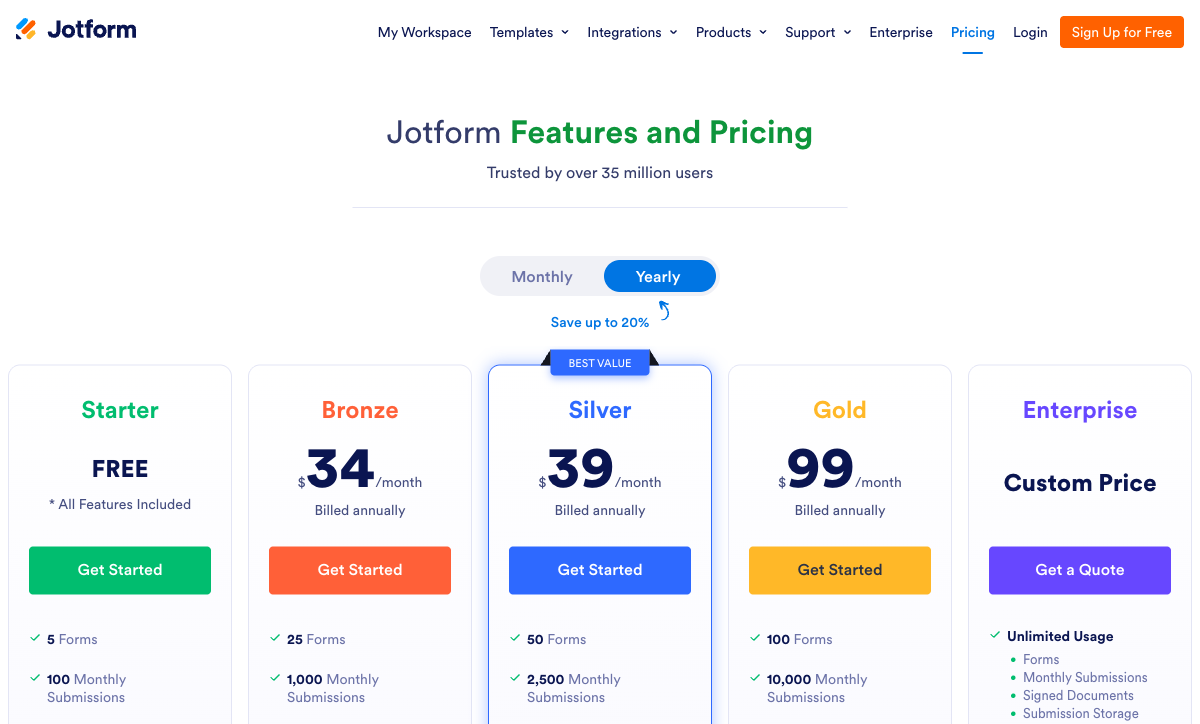
Watch the response and submission caps as closely as the headline price. Typeform meters by responses, so cost climbs directly with usage; Jotform meters by submissions with per-tier ceilings; Google Forms doesn't meter at all. At the same $30-ish entry point, Jotform Bronze gives you ten times Typeform Basic's monthly volume with every feature switched on, whereas Typeform's price buys design quality rather than capacity.
Google Forms
Jotform
| Product | Plan | Monthly Price | Annual Price (per month) | Free Plan | Free Trial | Limits |
|---|---|---|---|---|---|---|
| Google Forms | Free (Personal) | Free | Free | Yes | 14 days | forms: Unlimited, submissions: Unlimited, storage: 15 GB (shared across Google Drive), users: 1, file uploads: Included in 15 GB storage |
| Google Forms | Business Starter | $8.4/mo | $7/mo billed annually | forms: Unlimited, submissions: Unlimited, storage: 30 GB per user, users: Up to 300, file uploads: Included in storage | ||
| Google Forms | Business Standard | $16.8/mo | $14/mo billed annually | forms: Unlimited, submissions: Unlimited, storage: 2 TB per user, users: Up to 300, file uploads: Included in storage | ||
| Google Forms | Business Plus | $26.4/mo | $22/mo billed annually | forms: Unlimited, submissions: Unlimited, storage: 5 TB per user, users: Up to 300, file uploads: Included in storage | ||
| Jotform | Starter | Free | Free | Yes | No | forms: 5, submissions: 100/month, storage: 100 MB, users: 1 |
| Jotform | Bronze | $39/mo | $34/mo billed annually | forms: 25, submissions: 1,000/month, storage: 1 GB, users: 1 | ||
| Jotform | Silver | $49/mo | $39/mo billed annually | forms: 50, submissions: 2,500/month, storage: 10 GB, users: 1 | ||
| Jotform | Gold | $129/mo | $99/mo billed annually | forms: 100, submissions: 10,000/month, storage: 100 GB, users: 1 | ||
| Typeform | Free | Free | Free | Yes | No | forms: 10, submissions: 10/month, users: 1 |
| Typeform | Basic | $39/mo | $28/mo billed annually | forms: Unlimited, submissions: 100/month, users: 1 | ||
| Typeform | Plus | $79/mo | $56/mo billed annually | forms: Unlimited, submissions: 1,000/month, users: 3 | ||
| Typeform | Business | $129/mo | $91/mo billed annually | forms: Unlimited, submissions: 10,000/month, users: 5 | ||
| Typeform | Growth Flow | $379/mo | $266/mo billed annually | forms: Unlimited, submissions: Expanded, users: Expanded | ||
| Typeform | Talent | $169/mo | $119/mo billed annually | forms: Unlimited, users: HR teams |
What users say
All three land in a tight 4.5–4.7 band, but the reviews say different things. Jotform has by far the largest pool of paid-software reviews and tops G2's Online Form Builder category, with praise for breadth and recurring complaints about support speed and reliability. Typeform's reviews split cleanly between admiration for its design and frustration with its cost. Google Forms accumulates fewer traditional software reviews; its reputation rests on hundreds of millions of users for whom it simply works, which says more about its fitness for simple jobs than its competitiveness on features.
The verdict: a decision tree
- Choose Google Forms if the form is internal, the budget is zero, and you don't need payments, branding, field-level logic, or any connection outside Google Workspace. Surveys, quizzes, RSVPs, and basic feedback are its sweet spot.
- Choose Jotform if you need the widest capability set in one tool, such as multiple payment gateways, HIPAA forms (Gold and up), offline mobile collection, or Salesforce integration, and you can tolerate occasional rough edges and slower support in exchange for that breadth.
- Choose Typeform if the form is customer-facing, short, and revenue-attached, presentation drives completion, Stripe is your only payment processor, and the per-response cost is justified by the conversion lift.
Most organizations end up using more than one of these in practice: Google Forms for internal surveys, a paid tool for customer-facing work. That's a reasonable pattern. The mistake is forcing one to do a job it wasn't built for, like Google Forms for client onboarding, Typeform for a 50-field application, or Jotform for a single high-traffic lead form where its performance lag costs conversions.
The tie-breaker: Paperform doesn't make you choose
The frustrating part of this comparison is that the best parts of each are split across three products: Typeform owns the design, Jotform owns the breadth, and Google Forms owns the price, while a growing business usually needs at least two of those at once. Paperform exists because stitching together separate tools to get them isn't sustainable.
Paperform's document-style editor produces forms that look like landing pages, closer to Typeform's polish than to Jotform's drag-and-drop output, and its Guided Mode renders forms one question at a time in the conversational style Typeform built its name on, with customers reporting conversion lifts after switching. You're not locked into that one format the way Typeform locks you in. Its five-gateway payment engine (Stripe, PayPal, Square, Braintree, Google Pay) plus full eCommerce (products, subscriptions, coupons, tax) covers the use cases that push people from Typeform to Jotform, and an Excel-style calculation engine runs scoring, pricing, and routing logic across questions, pages, emails, and integrations that none of these three matches.
Paperform is SOC 2 Type II certified and GDPR compliant, bootstrapped and profitable like Jotform, with 2,000+ integrations and 30,000+ templates, the largest library in the category. Paid plans start at $24/month annual, below both Typeform Basic and Jotform Bronze, and Papersign (eSignatures) and Stepper (AI-native workflow automation) are bundled in at no extra cost. One honest caveat: if HIPAA is a hard requirement, Paperform isn't HIPAA compliant today, so a regulated healthcare team should weigh Jotform Gold or Typeform Business instead.
For the head-to-head detail, see Paperform vs Google Forms, Paperform vs Jotform, and Paperform vs Typeform. Comparing just two of these three? See Google Forms vs Jotform, Jotform vs Typeform, or Google Forms vs Typeform. For the wider field, the best form builders ranking covers every option.
Frequently Asked Questions
Does Google Forms, Jotform, or Typeform have the most advanced conditional logic?
Jotform has the most capable conditional logic of the three: field-level show/hide, calculation fields, and multi-condition rules, all available from the free Starter plan. Typeform offers visual logic mapping with calculations, but it is gated to the Plus tier ($56/month annual) and the format only ever reveals one question at a time, which makes complex branching hard to reason about. Google Forms is the weakest, supporting only section-level "go to section based on answer" branching, with no field-level logic and no calculations at all. The catch with Jotform is reliability: reviewers regularly report that advanced logic and custom widgets behave inconsistently on busy forms. If you want field-level logic and dependable calculations across the whole form, Paperform's Excel-style calculation engine runs scoring, pricing, and routing logic across questions, pages, emails, and integrations on every plan including free.
Which is HIPAA compliant — Google Forms, Jotform, or Typeform?
All three carry HIPAA coverage on paper, but the terms differ sharply. Jotform offers HIPAA-compliant forms with a signed BAA only on its Gold tier ($99/month annual) and Enterprise, so lower paid plans cannot legally collect PHI. Typeform includes HIPAA on its Business tier ($91/month annual) with a BAA. Google Forms inherits Google Workspace's HIPAA coverage, but the Forms product specifically lacks the audit logging and granular access controls most healthcare teams require, so it should not be relied on for protected health information. All three are also GDPR, SOC 2, and ISO 27001 certified; Jotform and Typeform add PCI DSS, and Google Forms adds FedRAMP. For HIPAA at the lowest entry price between these three, Typeform Business edges out Jotform Gold, though see our best form builders for healthcare guide for stronger options.
Can Typeform, Jotform, or Google Forms collect payments?
Two can, one cannot. Jotform supports 40+ payment gateways natively, including Stripe, PayPal, Square, Authorize.net, Mollie, and dozens of regional processors, although payment submissions are capped on every plan (100/month on Bronze, 1,000/month on Gold). Typeform supports exactly one processor: Stripe. No PayPal, no Square, no regional gateways. Google Forms has no payment capability of any kind. If a form needs to take money, Google Forms is immediately ruled out, and Typeform only works if Stripe is your processor. For comparison, Paperform supports five gateways (Stripe, PayPal, Square, Braintree, Google Pay) with a full eCommerce engine (products, subscriptions, coupons, and tax) built into the form rather than bolted on.
Is Jotform or Typeform better for marketing and lead-generation forms?
Typeform is the stronger lead-generation tool of the two on presentation. Its one-question-at-a-time format produces noticeably higher completion rates on short capture forms, and it integrates natively with HubSpot, Salesforce, Klaviyo, and other marketing tools out of the box. Jotform reaches more destinations overall (150+ native integrations versus Typeform's 120+) and offers Salesforce on the AppExchange, but its drag-and-drop output looks like a form rather than a brand experience. The trade-off with Typeform is cost: its lead forms get expensive fast once you exceed 100 responses a month, which is partly why marketers comparing the two also look at form builders built for marketing agencies, where design and per-response cost are both addressed.
Why does Jotform have far more integrations than Google Forms or Typeform?
Jotform lists 150+ native integrations versus Typeform's 120+ and Google Forms' 20-or-so, and the gap reflects two decades of accumulation since Jotform launched in 2006. Google Forms is the outlier for a structural reason: it is a walled garden. Inside Google Workspace (Sheets, Drive, Calendar, Classroom) everything connects with zero setup, but there are almost no native connections to outside CRMs, marketing tools, or business apps, so anything beyond Google relies on Zapier, Make, or custom Apps Script. Google Forms also has no webhooks, while both Jotform and Typeform do. Raw count favors Jotform here, but Paperform's 2,000+ integrations plus its built-in Stepper workflow automation cover a wider surface than all three combined.
Which is the safest long-term bet: Google Forms, Jotform, or Typeform?
All three are structurally stable, but for different reasons. Google Forms is backed by Alphabet and serves billions of accounts, so it is not disappearing, though Google has a track record of freezing investment in smaller products. Jotform is bootstrapped, profitable, and has run for 20 years on roughly $144.9M annual revenue with no venture capital, making it one of the most financially durable independent companies in the category. Typeform raised $193M across multiple rounds through Series C; venture funding creates pressure for aggressive monetization, which is why its free tier was cut from 100 to 10 responses per month in 2024. On pure structural durability, Google Forms and Jotform edge out Typeform.
When is none of Google Forms, Jotform, or Typeform the right answer?
When you need more than one of their best traits at the same time. Typeform has the design polish, Jotform has the payment and feature breadth, and Google Forms has the price, but most growing businesses need at least two of those at once, and stitching three tools together is not sustainable. That is the gap Paperform fills: a document-style editor that produces landing-page-quality forms, a Guided Mode that matches Typeform's conversational style, five payment gateways with full eCommerce, an Excel-style calculation engine, and Papersign (eSignatures) plus Stepper (workflow automation) included at no extra cost. It is SOC 2 Type II certified and bootstrapped like Jotform. See Paperform vs Google Forms, Paperform vs Jotform, and Paperform vs Typeform for head-to-head detail.
Sources & References
- Google Forms vs. Jotform: Which should you use? — Zapier, 2026
- Jotform vs. Typeform: Which is best? — Zapier, 2026
- Jotform vs. Typeform [2026 Guide] — Knack, 2026
- Jotform vs Typeform: 2026 comparison guide — Softr, 2026
- Google Forms Review — TechRadar, 2025
- Typeform Review 2026: We Tested Everything — Hackceleration, 2026
Last updated June 26, 2026
Ready to try Paperform?
Create beautiful forms, payment pages, and workflows — no code required.