Zapier vs Stepper: Why Small Businesses Switch to Stepper
Workflow automation has become a must-have for small businesses and solopreneurs. When you’re running lean, automations replace manual work, reduce errors, and help you scale without hiring.
For years, Zapier has been the default choice. It’s widely known, easy to start with, and connects to thousands of tools. But as businesses grow and workflows become more complex, some teams start looking for alternatives that offer more control and predictable pricing.
That’s where Stepper comes in.
In this article, we’ll take a neutral, side-by-side look at Zapier vs Stepper, focusing on what matters most for US SMBs: pricing, ease of use, workflow complexity, and long-term fit.
What Is Zapier?
Zapier is a no-code automation platform that lets you connect apps and automate tasks using “Zaps.” Each Zap follows a trigger → action model, making it easy to set up simple automations quickly.
Zapier’s biggest strength is its ecosystem. With thousands of integrations, it’s often the first tool businesses use when they want to connect their software without writing code.
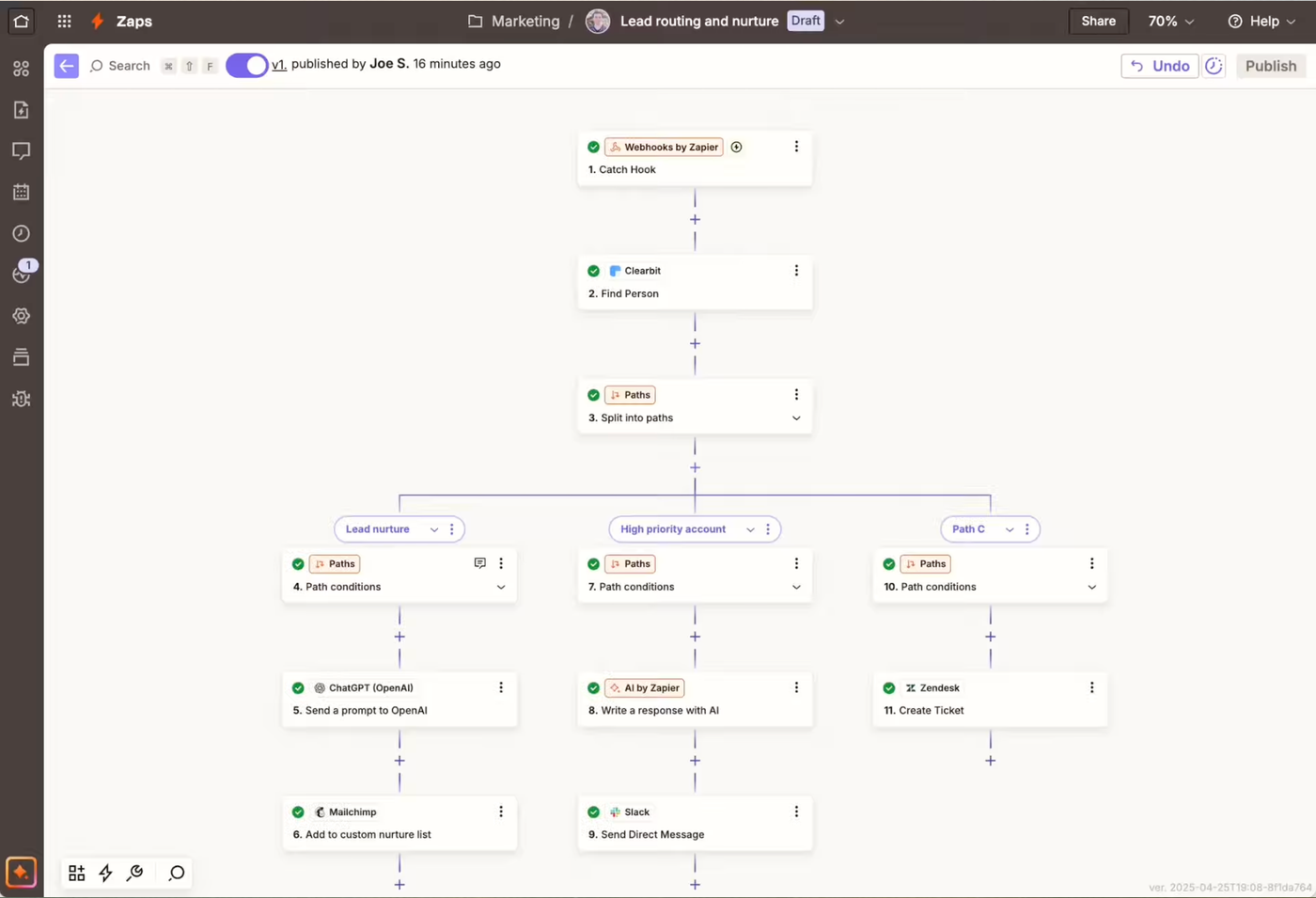
Zapier is a good fit if you:
- Need access to a very large integration library
- Are building simple, linear workflows
- Want a familiar, widely adopted platform
- Are just getting started with automation
What Is Stepper?
Stepper is an AI-native workflow builder designed for teams and solopreneurs who want more flexibility without added complexity. Instead of relying only on step-by-step configuration, Stepper allows you to describe workflows in natural language and refine them with AI. Ask questions, generate steps, or modify existing logic using the in built AI assistant
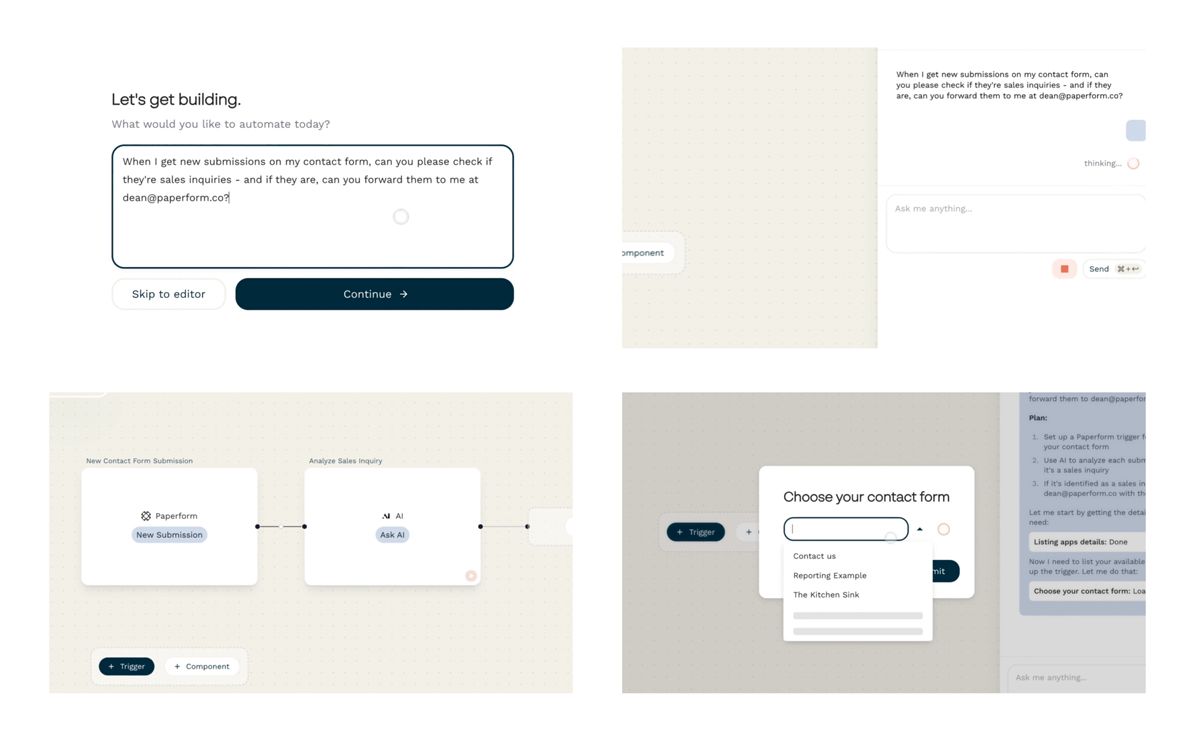
Stepper uses steps to describe the triggers and actions in its workflows. It is also built around components, reusable pieces of logic that can be saved and shared across workflows, making it easier to manage more complex automations over time. It also supports multiple triggers in the same workflow, meaning you can build related automations together in one place.
Stepper is a good fit if you:
- Build multi-step workflows that grow over time
- Want predictable pricing
- Want an AI copilot to help build complex workflows
- Prefer clarity and visibility over “black-box” automation
- Need automation that scales with your business, not against it
How Workflow Building Compares
Zapier’s approach
Zapier uses a linear editor. You choose a trigger, then add actions one by one. For basic workflows, this is fast and intuitive.
As workflows grow, however, adding filters, paths, and formatting steps can make automations harder to reason about — especially for non-technical users.
Stepper’s approach
Stepper starts with intent. You can describe what you want to build in plain English, review the suggested steps, and then let the workflow build out interactively.
You can:
- Accept or modify AI suggestions
- Switch between AI-assisted and manual editing
- Reuse components across workflows
- Run multiple logical paths within a single workflow
For SMBs, this often translates to faster setup and less rework as requirements change.
Real-World Workflow Examples
Example: Payments to notifications
Let’s test a simple workflow: “Notify me in Slack when a new Stripe payment comes in.” Both tools can handle this automation, but each with their own approach:
In Zapier, building this workflow would typically mean:
- Manually creating a Stripe trigger
- the manually creating a Slack action tied back to the trigger
- Task usage each time it runs
In Stepper:
- You describe the workflow to it’s in-built AI in natural language
- The Stepper AI suggests the trigger and action
- You review and confirm before it builds
- Test the workflow to ensure it works without burning task usage
- The workflow runs without task-based billing concerns
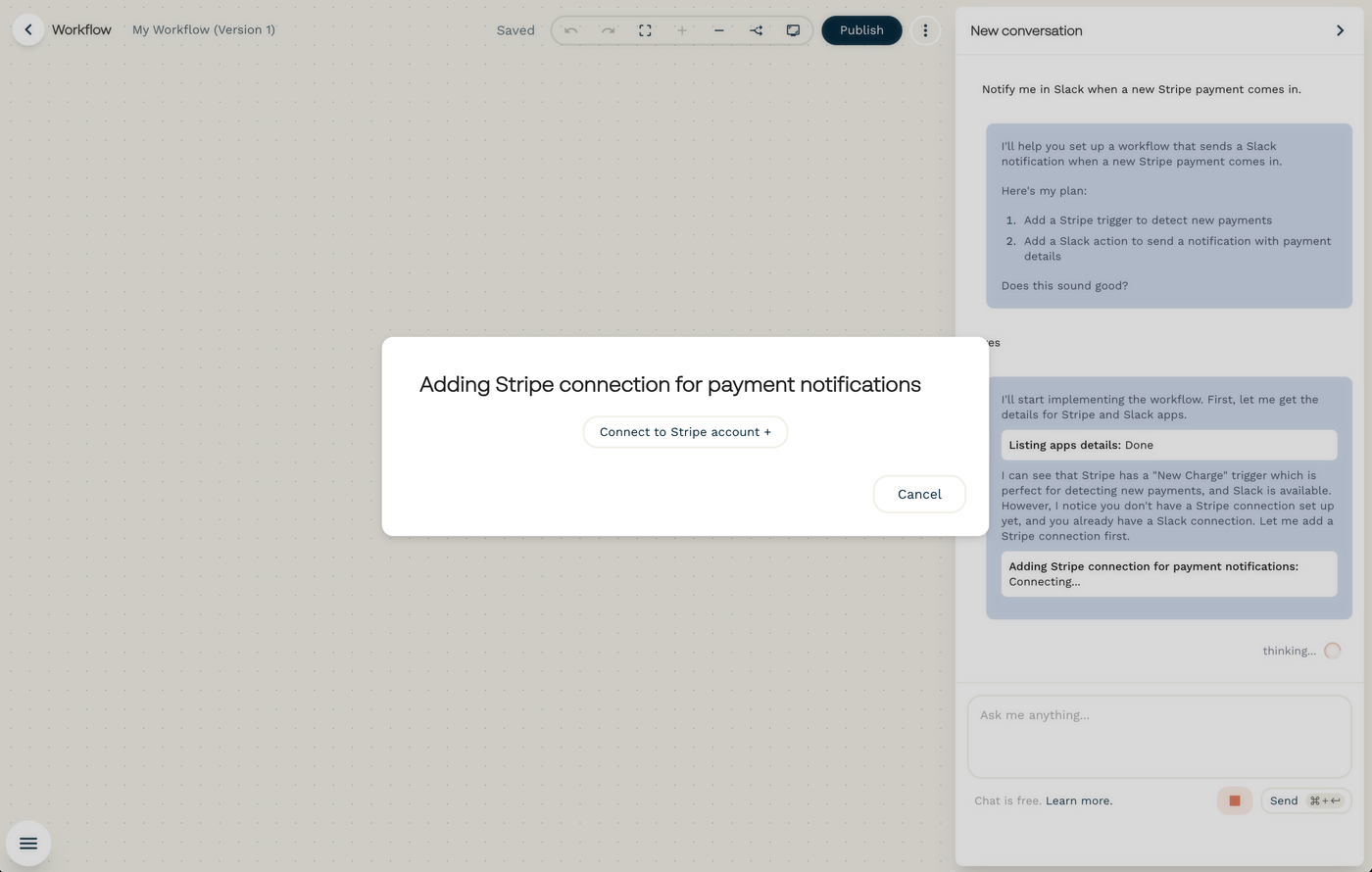
Though Zapier can handle this workflow, there is a lot of manual input needed to build it. This means time, particularly when something fails. With Stepper’s native AI you can build it, connect it, and test it without friction.
Example: Inbox automation
Now let’s try something a little more complex. A workflow that monitors incoming emails and filters filtering for partnership-related messages.
Building something like this is possible in both Zapier and Stepper. However, where Stepper becomes powerful is in it’s ability for its native AI to tackle advanced tasks in the same workflow.
You can use the Stepper AI to:
- Create draft replies automatically (which you further customize with internal prompts)
- Notify you to review drafts when they are created
- Track contacts and send info to Google Sheets
- Send internal Slack notifications in any step of the process
This kind of multi-step, conditional logic is where SMBs often feel friction with task-based pricing — and where Stepper’s component-based approach tends to feel more manageable.
Pricing Models: Predictability vs Usage
Pricing is one of the biggest differences between Zapier and Stepper.
Zapier pricing
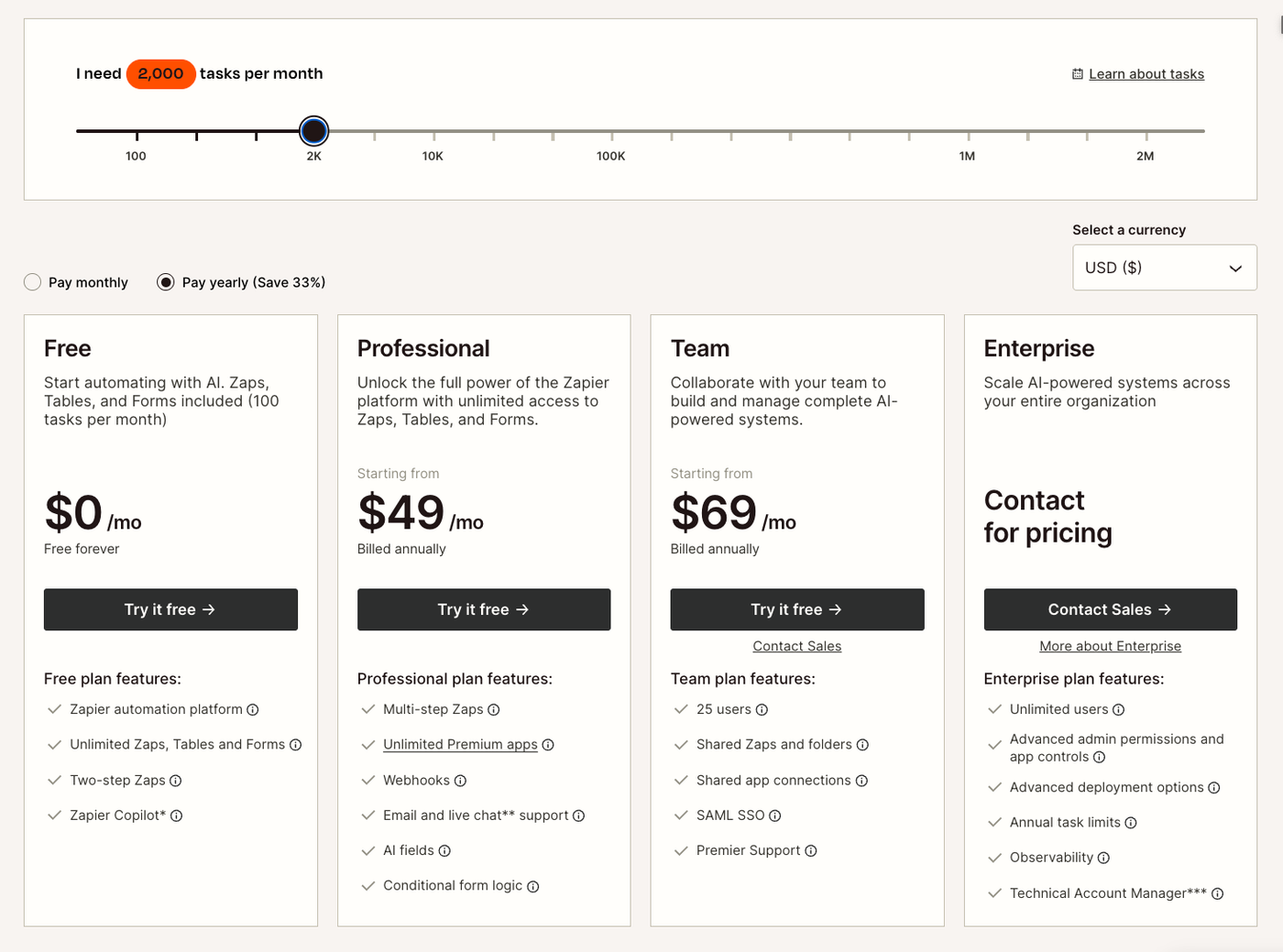
Zapier uses a per-action pricing model. Though Zapier has a free plan, this plan has limited functionality. Moving to the Professional plan gives you more functionality, but you start paying exponentially based on the number of tasks you need for the month.
A task is an action your automated workflow successfully completes. For example, if your Zap has an action to create new Google Contacts, each contact Zapier creates will count as one task.
Here is the rub: if your workflow creates 1,000 contacts, and you only have 2,000 actions available per month, you only have half your credits left for your other workflows. This works well for low-volume automations with little variation, but can become unpredictable as usage grows.
- Free plan with very limited functionality
- Paid plans based on tasks and features
- Costs increase as workflows run more often or become more complex
The image below shows how pricing changes based on 2,000 Actions.
Stepper pricing
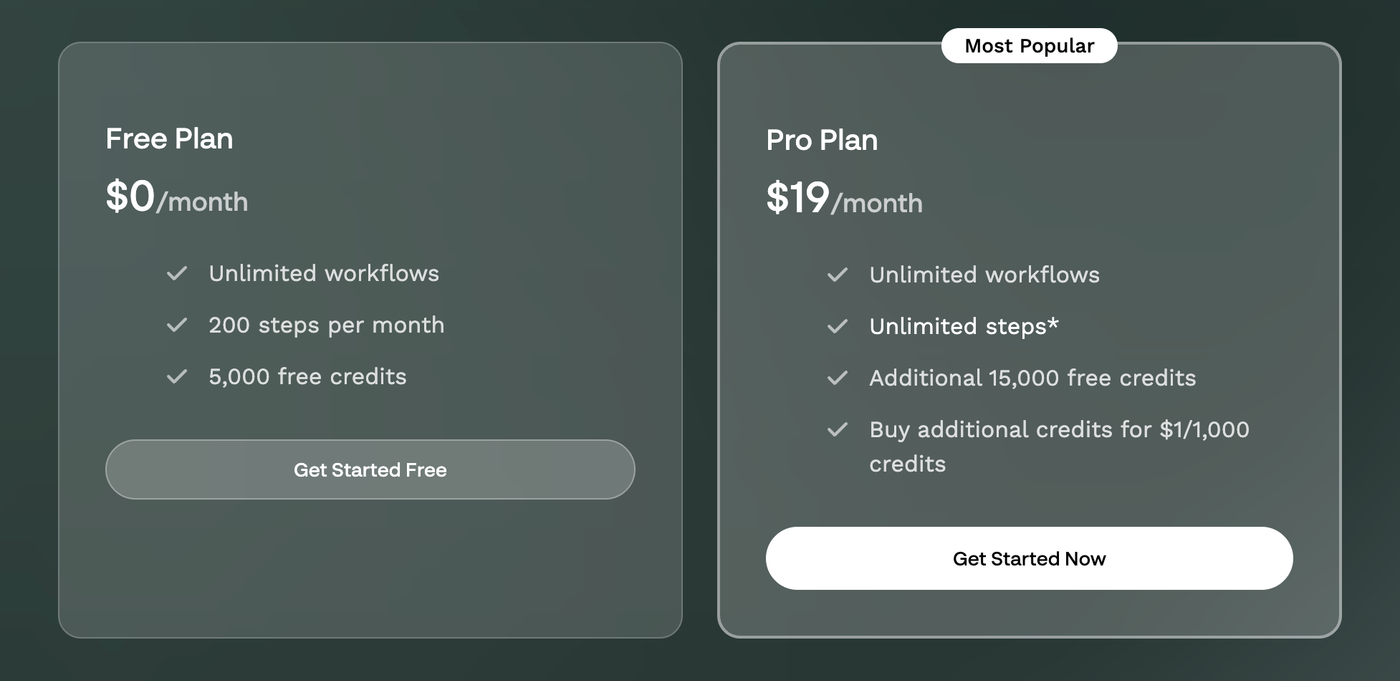
Stepper is built to run complex workflows at a fraction of the cost. With unlimited steps on the Pro plan, you don't have to worry if automating will be too expensive. This predictable pricing takes the guesswork out of budgeting and scaling your business.
- Free plan: Unlimited workflows with limited steps
- Pro plan: $19/month with unlimited workflows and unlimited steps
Stepper uses flat pricing, which makes it easier for SMBs to budget as automation usage increases.
Zapier vs Stepper: Feature Comparison
| Feature | Zapier | Stepper |
|---|---|---|
| Pricing model | Task-based | Flat pricing |
| Free plan | Yes (limited) | Yes |
| Paid plans start at | Varies by usage | $19/month |
| Workflow complexity | Simple to moderate | Moderate to advanced |
| AI-assisted building | Limited | Core feature |
| Reusable logic | Limited | Built-in components |
| Cost predictability for SMBs | Lower | High |
Learning Curve and Ease of Use
Zapier is often easier to understand at first, especially for very simple automations. Most users can create their first Zap in minutes.
Stepper’s AI-assisted approach helps offset complexity. While the platform supports more advanced workflows, users don’t need to learn everything upfront. Many start with plain-language descriptions and refine workflows over time.
For SMBs that expect their processes to evolve, this can reduce long-term friction.
When Zapier Makes More Sense
Zapier may still be the better choice if:
- You rely on a niche integration not available elsewhere
- Your workflows are very simple and low-volume
- You’re deeply embedded in Zapier’s ecosystem and satisfied with the cost
Zapier remains a solid tool, especially for straightforward automation needs.
When Stepper Makes More Sense
Stepper tends to be a better fit if:
- You want predictable automation costs
- You’re building multi-step workflows
- You need functionality that builds with you to save you time
- You value visibility and control
- You want to move faster without becoming an automation specialist
For many SMBs, this combination becomes more important as operations mature.
How to Choose the Right Tool for Your Business
If you’re deciding between Zapier and Stepper, consider:
- How complex your workflows are today — and how complex they’ll be in a year
- Whether predictable pricing matters to your budget
- How much time you want to spend maintaining automations
- How important visibility and clarity are for your processes
Frequently Asked Questions
Is Stepper a full replacement for Zapier?
No. Stepper is an alternative designed for different needs. Some businesses use both, depending on the workflow.
Is Stepper suitable for non-technical users?
Yes. Stepper is built to support non-technical users through AI-assisted workflow creation and clear visual debugging. Users can use the native AI not just to build, but to ask questions about workflow needs and approach.
How much does Stepper cost?
Stepper offers a free plan and a Pro plan that starts at $19/month with unlimited workflows and steps.
Can I try Stepper before committing?
Yes. You can try Stepper free and build real workflows before deciding.
Final Takeaway
Zapier is still one of the most recognizable automation tools available and works well for simple use cases. Stepper offers a newer approach, focused on powerful AI-assisted building, reusable components, and flat pricing that aligns well with how small businesses scale.
If you’re evaluating automation tools for your business, the best next step is hands-on experience.