Best Form Builders for Wix in 2026
The best form builder for a Wix site that sells, books or qualifies anything is Paperform: it embeds through Wix's HTML element, restyles to match your template with custom CSS, and carries unlimited submissions on paid plans. Jotform is the pick if you want a Wix App Market install. For a plain contact form, Tally is free and enough.
Every tool ranked below was judged on how it behaves on a Wix page specifically: whether it installs from the Wix App Market or goes in through the Embed HTML element, how far its styling controls go before an embedded form starts looking like somebody else's widget, and what it adds that Wix's built-in form tool does not reach. Pricing, feature and compliance data was re-verified against each vendor's live pricing page on 22 September 2026.
Two Wix-specific facts shape the whole ranking. The first is that the embed mechanism barely differentiates these tools. An HTML embed on Wix is a paste and a resize, and the App Market saves you roughly one step, so anybody ranking on "native plugin versus embed" alone is ranking on almost nothing. The second is that Wix Forms already handles basic capture, which means the reason to add a second tool is always a capability gap: payments through a processor you chose, logic that changes the form as it is filled, or a submission that has to travel somewhere after it lands.
| Feature | Paperform | Jotform | Typeform | Google Forms | Cognito Forms | Tally |
|---|---|---|---|---|---|---|
| Payments | ||||||
| Stripe payments | Yes | Yes starter | Yes basic | No | Yes | Yes |
| PayPal payments | Yes | Yes starter | No | No | Yes team | No |
| Square payments | Yes | Yes starter | No | No | Yes team | No |
| Braintree payments | Yes | Yes starter | No | No | No | No |
| Google Pay | Yes | Yes starter | No | No | Yes | No |
| Design & Customization | ||||||
| Template gallery | 30,000+ | 20,000+ (starter) | 1,500+ | 20+ | Yes | Yes |
| Unsplash and Giphy integration | Yes | No | Yes | No | No | No |
| Image editor | Yes | No | No | No | No | No |
| Adobe Creative Cloud | Yes | No | No | No | No | No |
| Language translation | Yes | Yes starter | Yes basic | No | Yes pro | Yes |
| Integrations & API | ||||||
| Native integrations | 4,000+ | 150+ (starter) | 120+ (basic) | No | No | 17+ |
| Webhooks | Yes pro | Yes starter | Yes basic | No | Yes | Yes |
| Standard API | Yes pro | No | No | Yes | Yes | Yes |
| Business API | Yes business | No | No | No | No | No |
| WordPress plugin | Yes | Yes starter | Yes | No | Yes | Yes |
 #1 Paperform — Best for Wix Sites Where the Form Takes Money

Paperform goes onto a Wix page through the Embed HTML element and offers inline, popup, slider and popover modes, so a booking form can sit in the page flow while a lead capture triggers over it. What separates it from the rest of this list on a Wix site is the styling ceiling: advanced theming plus custom HTML and CSS per form on Pro, which is enough to match a Wix template's typography, spacing and button treatment instead of approximating it. Branding comes off on paid plans, and a custom form URL keeps the address on brand as well, with custom domains available at $20/month each.
The capability gap it fills is the expensive one. Excel-style calculations drive live pricing, and those formulas also control which questions and pages appear, which confirmation email fires, what gets pushed to each integration and what the success page says. A Wix services business can quote a job, apply a coupon, charge a deposit and route the follow-up from a single embedded page. Payments run through Stripe, PayPal, Square and Braintree plus Google Pay with subscriptions, tax rules and no transaction fee on top, against a Wix checkout that expects store products. Papersign then turns the submission into a contract for signature, and Stepper runs the approval chain behind it, both in the same subscription rather than as a second and third vendor.
Pricing is where the argument lands for a growing Wix site. Pro is $59/month, or $49/month billed annually, with unlimited submissions and unlimited team members under fair use; Business is $149/month, or $124 annually, adding 10 workspaces, SSO and the Business API. A Wix page that converts ten times better next quarter costs the same. The company has been bootstrapped and profitable since 2016 and holds SOC 2 Type II, GDPR and CCPA. It is not HIPAA compliant and signs no BAAs.
- Wix fit: Embed HTML element with inline, popup, slider and popover modes; custom CSS per form on Pro; custom form URL and optional custom domain.
- Best for: Wix sites running paid bookings, quotes, applications or client onboarding rather than a contact box.
- Pricing: Pro $59/month, $49 annually. Business $149/month, $124 annually. Enterprise on quote.
- Key limitation: No Wix App Market listing, no HIPAA, and the highest paid entry price in this group.
 #2 Jotform — Best Wix App Market Install and Payment Coverage
Jotform supports more than 40 payment processors, which is the widest coverage of any tool on this list and the single best reason for a Wix store to pick it. If your business banks through a regional gateway that Stripe and PayPal do not replace, this is the shortest path to taking card payments on a Wix page. It is also the only tool here that installs from the Wix App Market rather than through an embed snippet, and it brings 20,000-plus templates, native mobile apps for collecting responses offline, and HIPAA compliance with a BAA on the Gold plan at $99/month annual.
The cost of that breadth shows up in two places. Forms built in Jotform tend to keep a recognisable Jotform look on a Wix page unless someone writes CSS, and reviewers regularly report that individual widgets and conditions behave inconsistently, which is a poor trait in something embedded on a live site. The pricing model is the harder problem: Bronze at $34/month annual stops accepting responses at 1,000 a month, forms are capped on every tier including Gold's 100, and every self-serve plan is a single user, so the second person who needs edit access is an Enterprise conversation rather than an upgrade. See Jotform alternatives for the wider picture.
- Wix fit: Native Wix App Market app, 40+ payment processors, 20,000+ templates, HIPAA on Gold.
- Best for: Wix stores with an unusual payment gateway, or health and education sites needing a BAA.
- Pricing: Free Starter (5 forms, 100 submissions/month). Bronze $39/$34. Silver $49/$39. Gold $129/$99.
- Key limitation: Submissions, forms, views and seats are all metered, and forms keep a recognisable house style.
 #3 Tally — Best Cheap Embed for a Straightforward Wix Form
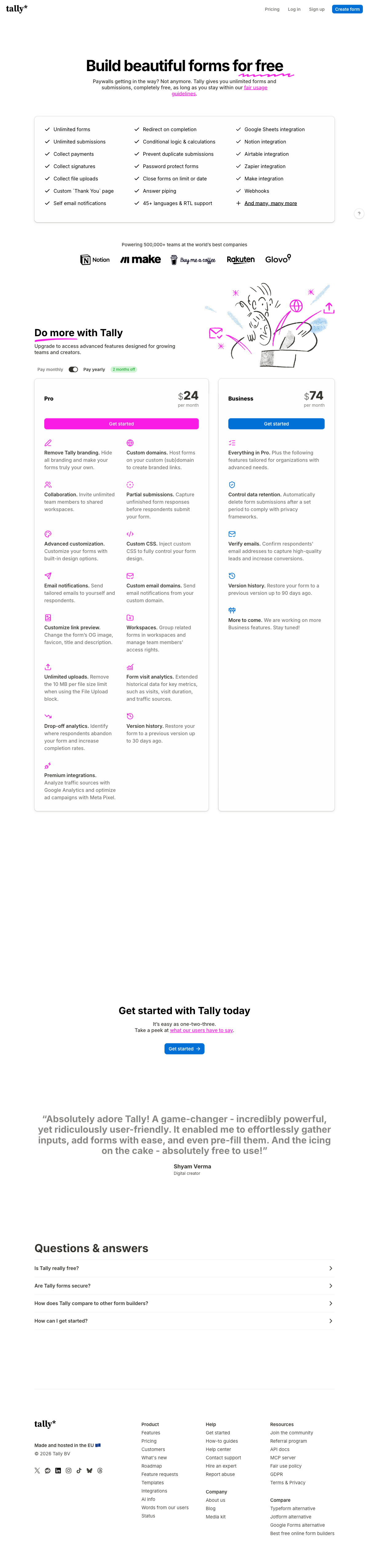
Tally's free plan carries unlimited forms and unlimited submissions under a fair use policy, along with conditional logic, a formula editor, Stripe payments and e-signatures. For a Wix site that needs one good-looking embedded form and nothing behind it, that is a genuinely better deal than anything else here, and we will say so plainly. Pro at $24/month annual removes the Tally branding, adds custom CSS, custom domains, drop-off analytics and unlimited team members, which is half the price of Paperform's entry plan for a form that mostly needs to look right and collect answers.
The ceiling arrives at the compliance page and the process. Tally has no SOC 2 audit, no SSO and no 2FA on any tier including Business at $74/month annual, so a Wix site belonging to a business that gets sent security questionnaires will run out of road quickly. Payments are Stripe only. There is no workflow layer, so anything that happens after submission is handed to Zapier, Make or n8n, which puts you in the middle holding three subscriptions together. The team is under ten people in Ghent, founded in 2020, which is young for something you wire into every page of a commercial site. If Tally is your starting point, our Tally alternatives guide covers where people move next.
- Wix fit: Embed HTML element, custom CSS and custom domains on Pro, document-style editor that produces clean pages.
- Best for: Wix sites wanting an unbranded, well-designed form at the lowest possible price.
- Pricing: Free (unlimited under fair use). Pro $29/month, $24 annually. Business $89/month, $74 annually.
- Key limitation: Stripe-only payments, no SOC 2, no SSO, and no automation beyond third-party connectors.
 #4 Cognito Forms — Best Calculation Engine at the Low End
Cognito Forms puts a serious formula engine, repeating sections, data lookups and Stripe payments on a free plan capped at 100 entries a month, which makes it the cheapest way to get a real quote calculator onto a Wix page. Custom CSS themes arrive on Pro at $19/month annual, Square and PayPal on Team at $39, and HIPAA compliance with a BAA on Enterprise at $129, the lowest published price for HIPAA in this group.
Two things hold it back on Wix. The forms are utilitarian: the design language is built for internal workflows and government intake, so an embedded Cognito form is the one most likely to read as a bolted-on system rather than part of a designed Wix page. And the billing meters four separate things, with entries, users, storage and guest access each carrying their own limit and their own overage. Extra users are $5 a month each and guest packs run from $25 to $250, so a small team's real bill drifts well above the headline. A live pricing experiment running since September 2026 also means some visitors see a different five-tier lineup. See Cognito Forms alternatives.
- Wix fit: Embed HTML element, CSS themes from $19/month, calculations and Stripe payments on the free tier.
- Best for: Wix pages built around pricing logic on a small budget, or the cheapest route to HIPAA.
- Pricing: Free (100 entries/month). Pro $24/$19. Team $49/$39. Enterprise $174/$129.
- Key limitation: Four separate meters, and the weakest visual polish of the paid tools here.
 #5 Typeform — Best When You Want the Form to Be Noticed
Typeform embeds on Wix as an inline block, a popup or a slider, and on the right site the result is the most arresting form here: one question at a time, generous typography, video and image backgrounds. For a Wix page in hospitality, fashion or events, where the form is part of the presentation rather than an administrative step, that is a real advantage. Compliance is a strength too, with HIPAA, SOC 2, ISO 27001 and the ISO/IEC 42001 AI management certification added in June 2026.
The format is also the limitation, because it cannot be dialled down. An embedded Typeform will always look like a Typeform sitting inside your Wix template rather than a section of it, and it fights any long or multi-section form. The metering is unusually aggressive: Basic at $28/month annual allows 100 responses and one user, Plus at $56 allows 1,000 and three, Business at $91 allows 10,000 and five, and Growth Flow at $266 raises neither of those last two numbers. Payments are Stripe only, and branding removal starts at Plus. See Typeform alternatives.
- Wix fit: Inline, popup and slider embeds; striking conversational format that cannot be restyled into the page.
- Best for: Brand-led Wix sites running short, high-visibility surveys or lead captures.
- Pricing: Free (10 responses/month). Basic $39/$28. Plus $79/$56. Business $129/$91. Growth Flow $379/$266.
- Key limitation: Responses and seats capped on every tier, Stripe-only payments, and a look you cannot hide.
 #6 Google Forms — Free, Unlimited, and Visibly Not Yours
Google Forms takes unlimited responses at no cost, embeds into a Wix page as an iframe, and writes every answer into a Google Sheet without configuration. For an internal signup, a volunteer roster or an event RSVP on a Wix site, that combination is hard to argue with, and Google's compliance coverage runs from HIPAA and SOC 2 through FedRAMP.
On a commercial Wix page it struggles for the reason everyone already suspects. The form keeps Google's own styling inside your layout, theming is limited to colours, fonts and a header image, and there is no way to remove the Google identity. It takes no payments at all, has no calculation fields, and its native integration list is roughly twenty apps, so anything past a spreadsheet means Apps Script or Zapier. Our Google Forms alternatives guide goes deeper on where the wall sits.
- Wix fit: Free iframe embed, unlimited responses, and a visible Google look you cannot theme away.
- Best for: Internal, community or event forms on a Wix site where appearance and payment are irrelevant.
- Pricing: Free with any Google account. Workspace Business Standard $16.80/month, $14 annually per user.
- Key limitation: No payments, no calculations, minimal styling, and around 20 native integrations.
See Them in Action
The Five Dimensions That Decide a Wix Embed
Pricing model
Paperform and Tally are the only two tools here that meter neither submissions nor seats on paid plans; the other four meter at least one. Tally's Pro plan is $24/month billed annually and Paperform's Pro is $49, so Tally is the cheaper unlimited option and Paperform the more capable one. Jotform cuts responses off at 1,000 a month on Bronze, Typeform caps both responses and seats on every tier, Cognito Forms runs four separate meters, and Google Forms is free with no cap at all. For a Wix page whose whole purpose is to convert traffic, the honest test is what the bill looks like at triple today's volume.
Integrations and API
Paperform lists 4,000-plus integrations, Tally around 1,000 including its automation connectors, Jotform 150-plus, Typeform 120-plus, Cognito Forms roughly 50, and Google Forms about 20. Every paid tool here exposes webhooks and a REST API, which matters on Wix because the site itself is not going to route your data anywhere useful. The number to care about is whether your CRM is on the native list or behind a connector subscription.
Conditional logic and calculations
All six support branching on an answer, and two run a formula engine deep enough to price a job. Paperform's calculations are Excel-style and drive question and page visibility, conditional emails, integration payloads and success page content, not just a total at the bottom. Cognito Forms has a comparably serious engine at a lower price. Tally's formula editor handles scoring and simple pricing well. Typeform puts advanced logic and calculations behind the $56/month Plus tier, and Google Forms has no calculation fields whatsoever.
Payments
Jotform supports 40-plus payment processors, Paperform four gateways plus Google Pay with subscriptions, coupons, tax and inventory built in, and Cognito Forms four including its own Stripe-powered Cognito Pay. Typeform and Tally are Stripe only. Google Forms takes no payments at all, which is the most common single reason a Wix owner starts looking for an embed in the first place.
Compliance
Four of the six can be made HIPAA compliant: Jotform on Gold, Cognito Forms on Enterprise, Typeform, and Google Workspace. Paperform and Tally cannot, and Paperform signs no BAAs. All six claim GDPR compliance. SOC 2 is held by Paperform, Jotform, Typeform, Cognito Forms and Google, and is absent from Tally, which also has no SSO or 2FA on any tier. If your Wix site belongs to a business that fields security reviews, that last clause narrows the list before anyone looks at a feature.
Full Pricing Comparison
Every published tier across the six tools. Embedding on Wix costs nothing on the Wix side, so these are the only numbers involved.
Paperform
Jotform
| Product | Plan | Monthly Price | Annual Price (per month) | Free Plan | Free Trial | Limits |
|---|---|---|---|---|---|---|
| Paperform | Free | Free | Free | Yes | 7 days | forms: Unlimited, submissions: 30/month, storage: Unlimited, users: Unlimited, file uploads: 100 MB |
| Paperform | Pro | $59/mo | $49/mo billed annually | forms: Unlimited, submissions: Unlimited, storage: Unlimited, users: Unlimited, file uploads: 10 GB | ||
| Paperform | Business | $149/mo | $124/mo billed annually | forms: Unlimited, submissions: Unlimited, storage: Unlimited, users: Unlimited, file uploads: 100 GB | ||
| Jotform | Starter | Free | Free | Yes | No | forms: 5, submissions: 100/month, storage: 100 MB, users: 1 |
| Jotform | Bronze | $39/mo | $34/mo billed annually | forms: 25, submissions: 1,000/month, storage: 1 GB, users: 1 | ||
| Jotform | Silver | $49/mo | $39/mo billed annually | forms: 50, submissions: 2,500/month, storage: 10 GB, users: 1 | ||
| Jotform | Gold | $129/mo | $99/mo billed annually | forms: 100, submissions: 10,000/month, storage: 100 GB, users: 1 | ||
| Typeform | Free | Free | Free | Yes | No | forms: 10, submissions: 10/month, users: 1 |
| Typeform | Basic | $39/mo | $28/mo billed annually | forms: Unlimited, submissions: 100/month, users: 1 | ||
| Typeform | Plus | $79/mo | $56/mo billed annually | forms: Unlimited, submissions: 1,000/month, users: 3 | ||
| Typeform | Business | $129/mo | $91/mo billed annually | forms: Unlimited, submissions: 10,000/month, users: 5 | ||
| Typeform | Growth Flow | $379/mo | $266/mo billed annually | forms: Unlimited, submissions: 10,000/month, users: 5 | ||
| Typeform | Talent | $169/mo | $119/mo billed annually | forms: Unlimited, users: HR teams | ||
| Google Forms | Free (Personal) | Free | Free | Yes | 14 days | forms: Unlimited, submissions: Unlimited, storage: 15 GB (shared across Google Drive), users: 1, file uploads: Included in 15 GB storage |
| Google Forms | Business Starter | $8.4/mo | $7/mo billed annually | forms: Unlimited, submissions: Unlimited, storage: 30 GB per user, users: Up to 300, file uploads: Included in storage | ||
| Google Forms | Business Standard | $16.8/mo | $14/mo billed annually | forms: Unlimited, submissions: Unlimited, storage: 2 TB per user, users: Up to 300, file uploads: Included in storage | ||
| Google Forms | Business Plus | $26.4/mo | $22/mo billed annually | forms: Unlimited, submissions: Unlimited, storage: 5 TB per user, users: Up to 300, file uploads: Included in storage | ||
| Cognito Forms | Individual (Free) | Free | Free | Yes | 14 days | forms: Unlimited, submissions: 100 entries/month, storage: 100 MB, users: 1 |
| Cognito Forms | Pro | $24/mo | $19/mo billed annually | forms: Unlimited, submissions: 2,000 entries/month, storage: 1 GB, users: 2 | ||
| Cognito Forms | Team | $49/mo | $39/mo billed annually | forms: Unlimited, submissions: 10,000 entries/month, storage: 10 GB, users: 5 | ||
| Cognito Forms | Enterprise | $174/mo | $129/mo billed annually | forms: Unlimited, submissions: Unlimited, storage: 100 GB, users: 20 | ||
| Tally | Free | Free | Free | Yes | No | forms: Unlimited, submissions: Unlimited, storage: N/A, users: 1, file uploads: 10 MB per file |
| Tally | Pro | $29/mo | $24/mo billed annually | forms: Unlimited, submissions: Unlimited, storage: N/A, users: Unlimited, file uploads: Unlimited | ||
| Tally | Business | $89/mo | $74/mo billed annually | forms: Unlimited, submissions: Unlimited, storage: N/A, users: Unlimited |
Full Feature Comparison
Every tracked capability across the six tools, grouped by category.
| Feature | Paperform | Jotform | Typeform | Google Forms | Cognito Forms | Tally |
|---|---|---|---|---|---|---|
| Form Building | ||||||
| Document-style editor | Yes | No | No | No | No | Yes |
| AI form creation | Yes | Yes starter | Yes | Yes paid | Yes | Yes |
| Field types | 26+ | 30+ (starter) | 20+ | 11 | 20+ | 20+ |
| File uploads | Yes | Yes starter | Yes basic | Yes | Yes | Yes |
| Multi-page forms | Yes | Yes starter | Yes basic | Yes | Yes | Yes |
| Guided mode (one question at a time) | Yes | Yes starter | Yes | No | No | No |
| Conditional logic | Yes | Yes starter | Yes basic | Yes | Yes | Yes |
| Calculations field | Yes pro | Yes starter | Yes plus | No | Yes | Yes |
| AI calculations assistant | Yes pro | No | No | No | No | No |
| Scoring | Yes pro | Yes starter | Yes plus | Yes | Yes | Yes |
| Answer piping | Yes | Yes starter | Yes basic | No | Yes | Yes |
| Pre-filling and hidden fields | Yes pro | Yes starter | Yes basic | Yes | Yes | Yes |
| Save and resume | Yes | Yes starter | No | No | Yes pro | No |
| Auto-close by number | Yes pro | Yes starter | Yes basic | Yes | Yes | Yes |
| Auto-close by date | Yes pro | Yes starter | Yes basic | Yes | Yes | Yes |
| Appointment/booking field | Yes | Yes starter | Yes basic | No | No | No |
| Signature field | Yes | Yes starter | Yes basic | No | Yes team | Yes |
| Color picker field | Yes | No | No | No | No | No |
| API-powered dropdowns | Yes business | No | No | No | Yes | No |
| Google address search | Yes business | No | No | No | Yes | No |
| Drag-and-drop builder | No | Yes starter | No | No | No | No |
| Form widgets | No | Yes starter | No | No | No | No |
| Template gallery | No | 20,000+ (starter) | No | No | No | No |
| Question display logic | No | No | Yes basic | No | No | No |
| AI follow-up questions | No | No | Yes business | No | No | No |
| AI extended thinking & memory | No | No | Yes growth | No | No | No |
| Typeform AI connectors | No | No | Yes growth | No | No | No |
| Workflow / automation builder | No | No | Yes growth | No | No | No |
| AI-moderated research (Research Flow) | No | No | Yes enterprise | No | No | No |
| Video questions | No | No | Yes basic | No | No | No |
| AI quiz generation | No | No | No | Yes paid | No | No |
| Formula editor | No | No | No | No | No | Yes |
| Import from other form builders | No | No | No | No | No | Yes |
| PDF generation | No | No | No | No | No | Yes |
| Payments | ||||||
| Stripe payments | Yes | Yes starter | Yes basic | No | Yes | Yes |
| PayPal payments | Yes | Yes starter | No | No | Yes team | No |
| Square payments | Yes | Yes starter | No | No | Yes team | No |
| Braintree payments | Yes | Yes starter | No | No | No | No |
| Google Pay | Yes | Yes starter | No | No | Yes | No |
| Product sales (eCommerce) | Yes pro | Yes starter | No | No | Yes | Yes |
| Subscriptions | Yes pro | Yes starter | Yes basic | No | No | Yes |
| Coupons and discounts | Yes pro | Yes starter | No | No | Yes | No |
| Custom pricing rules | Yes pro | Yes starter | No | No | Yes | Yes |
| Tax calculations | Yes | Yes starter | No | No | Yes | No |
| Quotes/invoices | Yes | No | No | No | Yes team | No |
| Refunds | Yes | No | No | No | No | No |
| 3D Secure | Yes | No | Yes basic | No | No | No |
| 40+ payment gateways | No | Yes starter | No | No | No | No |
| No transaction fees | No | Yes starter | No | No | No | No |
| Cognito Pay (native card processing) | No | No | No | No | Yes | No |
| Design & Customization | ||||||
| Template gallery | 30,000+ | 20,000+ (starter) | 1,500+ | 20+ | Yes | Yes |
| Rich media (images, GIFs, videos) | Yes | Yes starter | Yes | Yes | Yes | Yes |
| Unsplash and Giphy integration | Yes | No | Yes | No | No | No |
| Image editor | Yes | No | No | No | No | No |
| Adobe Creative Cloud | Yes | No | No | No | No | No |
| Language translation | Yes | Yes starter | Yes basic | No | Yes pro | Yes |
| Advanced theming | Yes pro | Yes starter | Yes plus | No | Yes pro | Yes pro |
| Custom form URL | Yes pro | No | Yes plus | No | No | Yes |
| Custom domains | Yes pro | Yes enterprise | Yes enterprise | No | No | Yes pro |
| Custom HTML & CSS | Yes pro | Yes starter | Yes business | No | Yes pro | Yes pro |
| Remove branding | Yes pro | Yes bronze | Yes plus | No | Yes pro | Yes pro |
| Custom email domains | Yes business | No | No | Yes Business Starter | No | Yes pro |
| Form themes | No | Yes starter | No | No | No | No |
| Analytics | ||||||
| Submission results and reports | Yes | Yes starter | Yes | Yes | Yes | Yes |
| AI report insights | Yes pro | No | Yes business | Yes Business Standard | No | No |
| Paperform analytics | Yes pro | No | No | No | No | Yes pro |
| Drop-off analysis | Yes pro | No | Yes business | No | No | No |
| Google Analytics & Facebook Pixel | Yes pro | No | Yes basic | No | Yes pro | Yes pro |
| Custom analytics scripts | Yes pro | No | Yes basic | No | No | No |
| Partial submissions | Yes pro | No | Yes plus | No | No | Yes pro |
| Form analytics | No | Yes starter | No | No | No | No |
| Google Analytics integration | No | Yes starter | No | No | No | No |
| Cross-form Insights dashboard | No | No | Yes business | No | No | No |
| Answer Insights | No | No | No | No | No | Yes |
| Collaboration | ||||||
| Multi-user accounts | Yes pro | Yes bronze | Yes plus | Yes | Yes pro | Yes pro |
| User permissions and management | Yes pro | Yes enterprise | Yes plus | Yes | Yes team | Yes pro |
| Advanced permissions & admin | Yes enterprise | Yes enterprise | Yes enterprise | Yes Business Starter | Yes enterprise | No |
| Form sharing (templates) | Yes | No | Yes | Yes | Yes | Yes |
| Spaces and tag management | Yes | No | No | No | No | Yes pro |
| Form sharing | No | Yes starter | No | No | No | No |
| Assign forms | No | Yes enterprise | No | No | No | No |
| Workspace organization | No | No | Yes | No | No | No |
| Security | ||||||
| SOC 2 Type II | Yes | Yes enterprise | Yes | Yes | No | No |
| GDPR compliant | Yes | Yes starter | Yes | Yes | Yes | Yes |
| SSL encryption | Yes | Yes starter | Yes | Yes | Yes | Yes |
| Two-factor authentication | Yes | Yes starter | Yes | Yes | Yes | No |
| Enforce 2FA for all users | Yes business | No | No | Yes Business Starter | No | No |
| SSO (SAML) | Yes business | Yes enterprise | Yes enterprise | Yes Business Plus | Yes enterprise | No |
| reCAPTCHA | Yes | Yes starter | Yes business | No | Yes | Yes |
| Local data residency | Yes enterprise | No | No | Yes Business Plus | No | Yes |
| Custom S3 storage (BYO) | Yes business | No | No | No | No | No |
| HIPAA compliant | No | Yes gold | Yes enterprise | No | No | No |
| 256-bit SSL | No | Yes starter | No | No | No | No |
| Data residency | No | Yes enterprise | No | No | No | No |
| Form encryption | No | Yes starter | No | No | No | No |
| PCI DSS | No | Yes starter | Yes | No | No | No |
| ISO 27001 | No | No | Yes | No | No | No |
| Integrations & API | ||||||
| Native integrations | 4,000+ | 150+ (starter) | 120+ (basic) | No | No | 17+ |
| Zapier | Yes | Yes starter | Yes basic | Yes | Yes | Yes |
| Make (Integromat) | Yes | Yes starter | Yes basic | Yes | Yes | Yes |
| Webhooks | Yes pro | Yes starter | Yes basic | No | Yes | Yes |
| Standard API | Yes pro | No | No | Yes | Yes | Yes |
| Business API | Yes business | No | No | No | No | No |
| WordPress plugin | Yes | Yes starter | Yes | No | Yes | Yes |
| oEmbed support | Yes | No | No | No | Yes | Yes |
| API | No | Yes starter | Yes basic | No | No | No |
| Smartsheet integration | No | Yes starter | No | No | No | No |
| Canvas LMS integration | No | Yes enterprise | No | No | No | No |
| Salesforce AppExchange | No | Yes starter | No | No | No | No |
| Embed options | No | Yes starter | Yes | No | No | No |
| Mobile apps | No | Yes starter | No | No | No | No |
| Claude / MCP server | No | No | Yes basic | No | No | No |
| AI data enrichment | No | No | Yes growth | No | No | No |
| Automations integrations (Contacts & Automations) | No | No | Yes growth | No | No | No |
| MCP connector (AI app access) | No | No | No | No | Yes pro | No |
| AI assistant connectors (MCP / ChatGPT / Claude) | No | No | No | No | No | Yes |
| Integration failure alerts | No | No | No | No | No | Yes |
Review Ratings Across Platforms
Aggregated ratings from G2, Capterra, GetApp, Trustpilot and TrustRadius.
How We Evaluated These Form Builders for Wix
Weighting reflects what actually varies between these tools on a Wix page. Styling control (30%) came first, because the embed mechanism is nearly identical across the field and the visible difference is whether a form can be made to match a Wix template. Capability beyond Wix Forms (30%) covered payment gateways, calculation depth, logic and integration counts, since that gap is the only reason to add a tool at all. Pricing model (25%) was scored on total cost at three times current volume rather than the entry price, which is where metered plans separate from unlimited ones. Compliance and vendor stability (15%) closed it out, because an embedded form is a dependency you carry for years.
Install method was noted but deliberately not weighted heavily. A Wix App Market listing is convenient and saves about a minute; it does not make a form better. For the ranking outside the Wix context, see our best form builders list, or the platform-specific guides for Squarespace and Shopify.
The Verdict for Wix Owners
Start with what the form has to do. If it collects a name and a message, keep Wix Forms or embed Tally for free and spend nothing. If it has to take money, calculate a price, branch on an answer or feed a CRM, Paperform is the strongest fit: it themes to your template with custom CSS, runs four gateways plus Google Pay, and does not raise the bill when the page converts. Choose Jotform for an unusual payment processor, a Wix App Market install or a BAA, Cognito Forms for heavy pricing logic on a small budget, Typeform when the form is meant to be the centrepiece, and Google Forms when it is internal and the look does not matter.
Frequently Asked Questions
Which form builders install as a Wix app instead of an embed code?
Of the tools ranked here, Jotform is the one with a dedicated listing in the Wix App Market, so it installs as an element you configure from the Wix dashboard. Paperform, Typeform, Cognito Forms, Tally and Google Forms all go in through Wix's Embed HTML element instead. In practice the App Market saves a paste, not a workflow: an HTML embed takes about a minute and gives you a standalone form URL you can also send by email or link from a Wix button.
What can an embedded form do that Wix Forms cannot?
Three things, mainly. Calculations, so a booking or quote form can price itself while the visitor fills it in. Payment processors of your choosing: Jotform connects 40-plus, Paperform runs Stripe, PayPal, Square and Braintree plus Google Pay, and Typeform and Tally are Stripe only. And the integration layer, where Paperform lists 4,000-plus connections against Wix's much shorter native list, so a submission can reach your CRM, your accounting tool and your team chat without a manual export.
Will an embedded form look like part of my Wix design?
It depends entirely on the styling controls. Paperform gives you advanced theming plus custom HTML and CSS per form on Pro, which is the closest match to a Wix template you can get without building the form yourself. Tally also ships custom CSS on its $24/month Pro plan, and Cognito Forms has CSS themes from $19/month. Typeform's one-question-at-a-time layout cannot be styled into something anonymous, and an embedded Google Form keeps Google's own chrome no matter what you do to the page around it.
Is it worth paying for a form builder when Wix already includes one?
For a contact box, no. Wix Forms captures a name, an email and a message perfectly well, and adding a subscription for that is waste. The case for paying starts when the form carries money or a process behind it: a deposit through a specific gateway, an application that branches, a signed agreement, a lead that has to land in a CRM the same minute it arrives. That is the point where the embedded tool earns its price, and where the cheaper option is often the one that costs more later.
Which of these tools bills me more as my Wix site gets more traffic?
Most of them. Jotform's Bronze plan stops accepting responses at 1,000 a month, Typeform caps responses on every published tier including the $266/month one, and Cognito Forms meters entries, users, storage and guest access separately. Paperform and Tally are the two exceptions: both carry unlimited submissions and unlimited team members on paid plans under a fair use policy, so a Wix page that suddenly converts well does not turn into a billing event.
Can I take a deposit on a Wix page without using the Wix checkout?
Yes, and an embedded form is usually the cleanest route, because Wix's own payment flow is built around store products rather than form fields. Paperform handles deposits, subscriptions, coupons, tax rules and custom pricing logic inside the form across four gateways, with no transaction fee added on top. Jotform covers the widest processor list if you use a regional gateway. Cognito Forms takes Stripe on its free plan, with Square and PayPal arriving on the $39/month Team tier.
Which of these vendors is the safest thing to embed across a whole Wix site?
An embed is a long-term dependency, so vendor stability is a real criterion. Jotform (2006) and Paperform (2016) are both bootstrapped and profitable, which means no investor clock pushing a pivot or a repricing. Google Forms will obviously still exist. Typeform has raised $193M across a Series C, and Tally is a small Belgian team of under ten people with no SOC 2 audit, which is fine for a personal site and harder to defend on a security questionnaire.
Is any of these form builders HIPAA compliant for a Wix health practice site?
Jotform on its Gold plan ($99/month annual) and Cognito Forms on Enterprise ($129/month annual) are both HIPAA compliant and sign BAAs, and Typeform and Google Workspace support HIPAA on the right agreements. Paperform is not HIPAA compliant and does not sign BAAs, so a clinic collecting patient information through a Wix page should use Jotform or Cognito Forms. Paperform holds SOC 2 Type II, GDPR and CCPA for every other kind of compliance review.
Sources & References
- The 13 Best Online Form Builder Apps — Zapier, 2026
- Best Online Form Builder to Use in 2026 — Top 20 Tools — EmailToolTester, 2026
- Tally Review 2026: Honest Verdict + 15 Real User Reviews — Hackceleration, 2026
- Typeform Achieves ISO/IEC 42001 Certification for Responsible AI Management — Typeform, June 2026
- Jotform Review 2026: Pricing, Features, Pros & Cons, Ratings & More — Research.com, 2026
Last updated September 22, 2026
Ready to try Paperform?
Create beautiful forms, payment pages, and workflows — no code required.