Paperform vs Typeform: Which Is Better in 2026?
Paperform and Typeform take fundamentally different approaches to form building. Typeform pioneered the one-question-at-a-time conversational format — beautiful, focused, and intentionally constrained. Paperform built a document-style editor where forms are pages: text, images, and fields coexist freely, with a calculation engine and five payment gateways turning forms into revenue tools. One optimises for engagement. The other optimises for versatility.
This comparison breaks down where each platform genuinely excels, where each falls short, and — critically — what you're actually paying for at each price tier. The pricing gap is significant, and the feature gap is even larger.
Quick Verdict
Choose Paperform if:
- You need payment processing (5 gateways vs Typeform's Stripe-only)
- You want forms that double as landing pages
- You need calculations, e-signatures, or workflow automation
- You want more value per dollar at every tier
Choose Typeform if:
- You only need short engagement surveys or quizzes (under 10 questions)
- Completion rate on micro-surveys is your primary metric
- You need HIPAA compliance (Typeform has it; Paperform doesn't)
- The conversational brand aesthetic is essential to your use case
Feature Comparison
Side-by-side across every feature category. Paperform is highlighted for reference.
| Feature | Paperform | Typeform |
|---|---|---|
| Form Building | ||
| Document-style editor | Yes | No |
| AI form creation | Yes | Yes |
| Field types | 26+ | 20+ |
| File uploads | Yes | Yes basic |
| Multi-page forms | Yes | Yes basic |
| Guided mode (one question at a time) | Yes | Yes |
| Conditional logic | Yes | Yes basic |
| Calculations field | Yes essentials | Yes plus |
| AI calculations assistant | Yes essentials | No |
| Scoring | Yes essentials | Yes plus |
| Answer piping | Yes | Yes basic |
| Pre-filling and hidden fields | Yes essentials | Yes basic |
| Save and resume | Yes | No |
| Auto-close by number | Yes essentials | Yes basic |
| Auto-close by date | Yes pro | Yes basic |
| Appointment/booking field | Yes | Yes basic |
| Signature field | Yes | No |
| Color picker field | Yes | No |
| API-powered dropdowns | Yes business | No |
| Google address search | Yes business | No |
| AI follow-up questions | No | Yes business |
| Video questions | No | Yes basic |
| Payments | ||
| Stripe payments | Yes | Yes basic |
| PayPal payments | Yes | No |
| Square payments | Yes | No |
| Braintree payments | Yes | No |
| Google Pay | Yes | No |
| Product sales (eCommerce) | Yes essentials | No |
| Subscriptions | Yes essentials | Yes basic |
| Coupons and discounts | Yes essentials | No |
| Custom pricing rules | Yes essentials | No |
| Tax calculations | Yes | No |
| Quotes/invoices | Yes | No |
| Refunds | Yes | No |
| 3D Secure | Yes | Yes basic |
| Design & Customization | ||
| Template gallery | 30,000+ | 1,500+ |
| Rich media (images, GIFs, videos) | Yes | Yes |
| Unsplash and Giphy integration | Yes | Yes |
| Image editor | Yes | No |
| Adobe Creative Cloud | Yes | No |
| Language translation | Yes | Yes basic |
| Advanced theming | Yes pro | Yes plus |
| Custom form URL | Yes pro | Yes plus |
| Custom domains | Yes pro | No |
| Custom HTML & CSS | Yes pro | Yes business |
| Remove branding | Yes pro | Yes plus |
| Custom email domains | Yes business | No |
| Analytics | ||
| Submission results and reports | Yes | Yes |
| AI report insights | Yes pro | Yes business |
| Paperform analytics | Yes pro | No |
| Drop-off analysis | Yes pro | Yes business |
| Google Analytics & Facebook Pixel | Yes essentials | Yes basic |
| Custom analytics scripts | Yes pro | Yes basic |
| Partial submissions | Yes pro | Yes plus |
| Collaboration | ||
| Multi-user accounts | Yes pro | Yes plus |
| User permissions and management | Yes pro | Yes plus |
| Advanced permissions & admin | Yes enterprise | Yes enterprise |
| Form sharing (templates) | Yes | Yes |
| Spaces and tag management | Yes | No |
| Workspace organization | No | Yes |
| Security | ||
| SOC 2 Type II | Yes | Yes |
| GDPR compliant | Yes | Yes |
| SSL encryption | Yes | Yes |
| Two-factor authentication | Yes | Yes |
| Enforce 2FA for all users | Yes business | No |
| SSO (SAML) | Yes business | Yes enterprise |
| reCAPTCHA | Yes | Yes business |
| Local data residency | Yes enterprise | No |
| Custom S3 storage (BYO) | Yes business | No |
| HIPAA compliant | No | Yes enterprise |
| ISO 27001 | No | Yes |
| PCI DSS | No | Yes |
| Integrations & API | ||
| Native integrations | 2,000+ | 120+ (basic) |
| Zapier | Yes | Yes basic |
| Make (Integromat) | Yes | Yes basic |
| Webhooks | Yes pro | Yes basic |
| Standard API | Yes pro | No |
| Business API | Yes business | No |
| WordPress plugin | Yes | Yes |
| oEmbed support | Yes | No |
| API | No | Yes basic |
| Embed options | No | Yes |
Where Paperform Wins

Payment Processing That Actually Works
This is the single biggest gap between the two platforms. Paperform connects five payment gateways — Stripe, PayPal, Square, Braintree, and Google Pay — on every plan, including free. It includes full eCommerce capabilities: product management, subscriptions, coupons, discount codes, tax calculations, and refund processing. Typeform only supports Stripe, and payment processing is locked behind the $91/month Business plan. If your forms collect money, Paperform offers five times the flexibility at a third of the price.
The Calculation Engine
Paperform's Excel-style calculations are the feature that has no equivalent in Typeform. These aren't simple "if X show Y" conditionals — they're formulas that compute dynamic pricing, risk scores, quiz results, tax amounts, and conditional totals across questions, pages, emails, and success pages. A photographer can build a session pricing calculator. A SaaS company can create an interactive plan configurator. An agency can generate dynamic quotes. Typeform offers basic conditional logic (logic jumps), but nothing that computes values or drives pricing in real time.
Built-in Platform Products
Paperform includes Papersign (e-signatures for contracts and consent forms) and Stepper (multi-step workflow automation) at no additional cost. These aren't half-baked add-ons — they're standalone products bundled into the platform. Typeform has no e-signature capability and no built-in workflow automation beyond basic Zapier triggers. For businesses that currently use a form tool + a signing tool + an automation tool, Paperform consolidates all three.
Template Volume
Paperform offers 30,000+ professionally designed templates versus Typeform's roughly 1,500. The 20x gap isn't just about quantity — Paperform templates span eCommerce, bookings, payments, and document workflows that Typeform's templates can't match because Typeform lacks the underlying features (payments, calculations, signatures).
Free Plan Value
Paperform's free plan includes unlimited forms, 30 submissions/month, conditional logic, five payment gateways, calculations, 2,000+ integrations, and AI form generation. Typeform's free plan caps at 10 forms, 10 responses/month, 10 questions per form, basic question types, and basic reporting. Paperform's free tier is a usable product. Typeform's is a demo.
Where Typeform Wins

The Conversational Experience (For Short Forms)
Typeform's one-question-at-a-time format remains the gold standard for short engagement interactions. For NPS surveys, post-purchase feedback, quick lead qualification, and quizzes under 10 questions, the format reduces cognitive load and drives higher completion rates. Typeform claims 3.5x better completion than traditional forms for these use cases, and independent reviews support the claim for short-form interactions.
Brand Recognition
Typeform is the name most people think of when they hear "beautiful forms." Trusted by 95% of the Fortune 500 with $141M in 2024 revenue, Typeform has significant market mindshare. For businesses where choosing a well-known vendor matters (enterprise procurement, conservative industries), Typeform's brand carries weight that Paperform's smaller footprint can't match.
HIPAA Compliance
Typeform offers HIPAA compliance with BAA on enterprise plans, along with SOC 2 Type II and ISO 27001 certifications. Paperform has SOC 2 Type II and GDPR compliance but does not currently offer HIPAA. For healthcare organisations that need to collect Protected Health Information through forms, this is a genuine and important gap.
AI Capabilities
Typeform has invested heavily in AI with three distinct features: Creator AI (form generation), Interaction AI (adaptive follow-up questions based on responses), and Insights AI (automated response analysis). Paperform offers AI form generation and AI report insights, but Typeform's Interaction AI — which dynamically adapts questions based on previous answers — is a capability Paperform doesn't match. For research-oriented surveys where adaptive questioning matters, Typeform has an edge.
Where Paperform Falls Short
- No HIPAA compliance: Healthcare organisations collecting PHI need to look elsewhere — Typeform, Jotform, or FormAssembly offer HIPAA-compliant tiers
- Smaller brand footprint: With ~498 total reviews across platforms versus Typeform's thousands, Paperform is less established in enterprise procurement conversations
- No mobile editor: Forms are fully responsive for respondents, but there's no dedicated mobile app for building or editing forms on the go
- No adaptive AI questioning: Typeform's Interaction AI dynamically adjusts follow-up questions based on responses — Paperform's conditional logic is rule-based, not AI-adaptive
Where Typeform Falls Short
- Stripe-only payments behind a paywall: Payment processing requires the $91/month Business plan and only works with Stripe — no PayPal, Square, or Braintree. For comparison, Paperform includes five gateways on its free plan.
- Rigid one-question format: Every form is forced into the conversational one-question-per-screen layout. Longer forms (applications, intake, detailed registrations) become tedious. Respondents can't skip ahead or see the full form. Paperform offers both guided and traditional layouts.
- No eCommerce, e-signatures, or workflow automation: No product management, subscription handling, coupons, tax calculations, digital signatures, or multi-step workflows. Businesses that need any of these require additional tools alongside Typeform.
- Aggressive pricing for basic features: CAPTCHA spam protection, drop-off analytics, and custom CSS are locked to the $91/month Business plan. Paperform includes CAPTCHA on all plans (including free) and analytics on Pro ($49/month).
- Performance complaints: Multiple G2 and Capterra reviews report lag, slow page refreshes, and slow form loading times — a notable concern for a tool built around user experience.
- Smaller template library: 1,500 templates versus Paperform's 30,000+. The gap is amplified by the fact that Typeform's templates can't include payment forms, calculators, or signature workflows because the platform doesn't support them.
Pricing Comparison
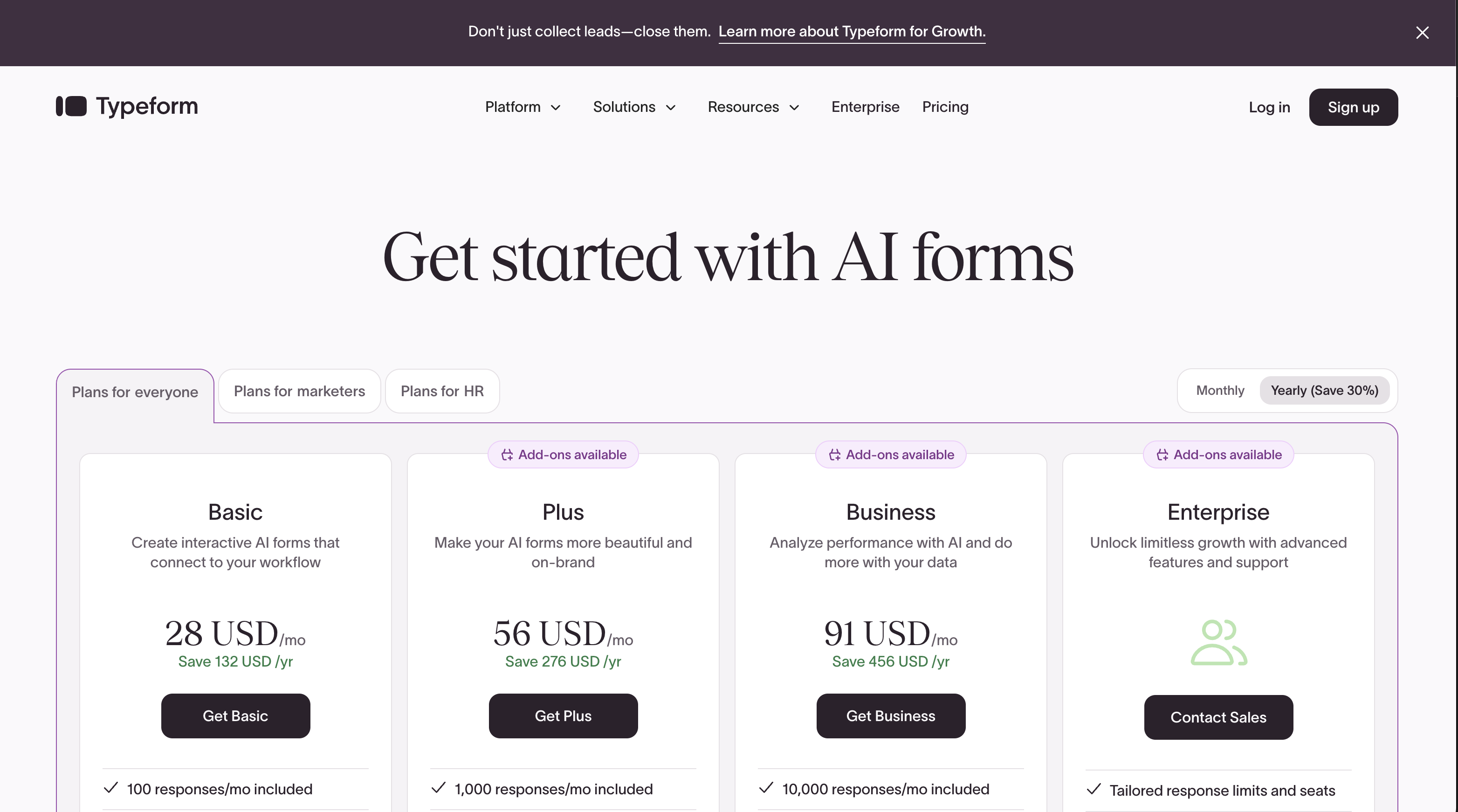
At every tier, Paperform includes more features at a lower price. Here's the direct comparison:
| Tier | Paperform | Typeform | Key Difference |
|---|---|---|---|
| Free | 30 responses, 5 payment gateways, calculations | 10 responses, 10 questions, no payments | Paperform free is usable; Typeform free is a demo |
| ~$25-29/mo | Essentials: 100 responses, payments, eCommerce | Basic: 100 responses, Stripe only | Paperform adds full eCommerce for $10 less |
| ~$49-56/mo | Pro: 1,000 responses, custom CSS, analytics, API | Plus: 1,000 responses, remove branding, advanced logic | Paperform includes analytics; Typeform charges $91+ for analytics |
| ~$91-99/mo | Business: 10,000 responses, SSO, API, S3 | Business: 10,000 responses, Salesforce, CAPTCHA, CSS | Typeform finally adds CAPTCHA and CSS at $91/mo (free on Paperform) |
All prices shown are annual billing rates. Monthly billing adds approximately 25-30% at both platforms.
Paperform
Typeform
| Product | Plan | Monthly Price | Annual Price (per month) | Free Plan | Free Trial | Limits |
|---|---|---|---|---|---|---|
| Paperform | Free | Free | Free | Yes | 14 days | forms: Unlimited, submissions: 30/month, storage: 100 submissions, users: 1, file uploads: 100 MB |
| Paperform | Essentials | $29/mo | $24/mo billed annually | forms: Unlimited, submissions: 100/month, storage: 1,000 submissions, users: 1, file uploads: 1 GB | ||
| Paperform | Pro | $59/mo | $49/mo billed annually | forms: Unlimited, submissions: 1,000/month, storage: 10,000 submissions, users: 3, file uploads: 10 GB | ||
| Paperform | Business | $129/mo | $99/mo billed annually | forms: Unlimited, submissions: 10,000/month, storage: 100,000 submissions, users: 5, file uploads: 100 GB | ||
| Typeform | Free | Free | Free | Yes | No | forms: 10, submissions: 10/month, users: 1 |
| Typeform | Basic | $39/mo | $28/mo billed annually | forms: Unlimited, submissions: 100/month, users: 1 | ||
| Typeform | Plus | $79/mo | $56/mo billed annually | forms: Unlimited, submissions: 1,000/month, users: 3 | ||
| Typeform | Business | $129/mo | $91/mo billed annually | forms: Unlimited, submissions: 10,000/month, users: 5 | ||
| Typeform | Growth Pro | $379/mo | $266/mo billed annually | forms: Unlimited, submissions: Expanded, users: Expanded |
What Users Say
Paperform averages 4.8/5 across ~498 reviews, with particularly high marks for customer support (4.7-4.9). Typeform has significantly more reviews due to its larger user base, with strong design/UX scores but recurring pricing criticism — 46% of reviewers mention pricing as a negative, according to independent review analysis. As Hackceleration's 2026 review noted, Typeform's feature-gating creates frustration among users who feel basic capabilities should be included at lower tiers.
See Them in Action
The Verdict
Paperform is the better choice for most use cases. It offers more features at every price tier — five payment gateways versus one, 30,000 templates versus 1,500, built-in e-signatures and workflow automation, and an Excel-style calculation engine that Typeform simply doesn't have. The document-style editor creates forms that look like landing pages, not generic survey widgets. And at $29/month versus $39/month for the same 100-response tier, it costs less while delivering more.
Typeform is the better choice in two specific scenarios: short engagement surveys where the conversational format maximises completion rates, and healthcare applications where HIPAA compliance is non-negotiable. If either of those is your primary use case, Typeform justifies its premium. For everything else — payment forms, order pages, client intake, lead capture, bookings, registrations, applications — Paperform delivers more value per dollar.
Both platforms are stable long-term bets, though through different models. Paperform is bootstrapped and profitable — growth funded by revenue, not investors. Typeform has raised $193M in venture capital — powerful resources, but pricing reflects the need to generate VC-scale returns. For details on more options, see our complete Typeform alternatives analysis or the full best form builders ranking.
Frequently Asked Questions
Can Paperform replicate Typeform's one-question-at-a-time experience?
Yes. Paperform's Guided Mode presents one question per screen with smooth transitions — functionally identical to Typeform's conversational format. But Paperform also offers a traditional multi-field layout, and you can mix both styles within the same form. Typeform locks you into one-question-at-a-time for everything. If you want the conversational experience for some forms and a traditional layout for others, Paperform handles both from one account. Paperform has reported a 91% conversion rate increase when users switch to Guided Mode.
Why is Typeform so much more expensive than Paperform?
Typeform has raised $193M in venture capital and employs 450-1,000 people. Paperform is bootstrapped with 11-50 employees. Typeform's pricing reflects VC-funded growth economics — the platform needs to extract more revenue per customer to satisfy investors. Specifically: Typeform's Basic plan costs $39/month for 100 responses (no payments). Paperform's Essentials costs $29/month for the same 100 responses but includes five payment gateways, product management, and coupons. The $10/month difference compounds, but the feature gap is where the value really diverges — Paperform includes payment processing, e-signatures, and workflow automation that Typeform charges $91+/month to access.
Does Typeform or Paperform have better payment processing?
Paperform wins decisively. Paperform connects five payment gateways (Stripe, PayPal, Square, Braintree, Google Pay) on all plans including free, with full eCommerce features: subscriptions, coupons, tax calculations, refunds, and product management. Typeform only supports Stripe, and payment processing is restricted to the $91/month Business plan. For any business that collects money through forms, Paperform offers 5x the gateway options at a fraction of the cost.
Which is better for short surveys: Typeform or Paperform?
For surveys under 10 questions focused purely on engagement and completion rates, Typeform's conversational format has a slight edge — it was designed specifically for this use case and claims 3.5x higher completion rates. For surveys that also need to collect payments, route respondents based on answers, calculate scores, or trigger complex workflows, Paperform is stronger because its calculation engine and integration depth go far beyond what Typeform can do within the survey itself. If your surveys are short and simple, either works. If they need to do anything beyond collect answers, Paperform is more capable.
Can I migrate my forms from Typeform to Paperform?
There's no one-click migration tool, but Paperform's 30,000+ templates mean you can likely find a starting point similar to your existing Typeform. For complex forms, rebuild them in Paperform's document-style editor — most users find Paperform's editor faster to work with once they adjust to the document metaphor. Export your Typeform response data as CSV and import it into your new system. Integrations (Zapier, Make) connected to Typeform can be repointed to Paperform with minimal reconfiguration since both platforms support the same integration ecosystem.
Sources & References
- Typeform Review 2026: We Tested Everything — Hackceleration, 2026
- Honest Take on Typeform — 2026 Review — The Marketing Agency, 2026
- Paperform — Complete Beginners Guide (YouTube) — AppFind, 2025
- Best Online Form Builder to Use in 2026 — Top 20 Tools — EmailToolTester, 2026
Last updated March 21, 2026
Ready to try Paperform?
Create beautiful forms, payment pages, and workflows — no code required.