Paperform vs Jotform: Which Is Better in 2026?
Paperform and Jotform represent two fundamentally different philosophies in form building. Jotform has spent 20 years building the widest feature set in the market -- 40+ payment gateways, hundreds of widgets, HIPAA compliance, and a user base of 35 million. Paperform has spent 10 years building fewer features that work beautifully -- a document-style editor, an Excel-style calculation engine, 5 deeply integrated payment gateways, and built-in e-signatures and workflows. One platform builds everything. The other builds the right things well.
The tension between these two approaches matters because it affects daily usage. Jotform's breadth means you can almost certainly find a feature for any need -- but you'll spend time hunting through menus, working around inconsistencies, and accepting that some features are better than others. Paperform's focus means each feature is polished and tightly integrated -- but you might occasionally hit a wall where a niche capability simply doesn't exist yet.
This comparison breaks down where each platform genuinely excels, where each falls short, and what you're actually paying for at each price tier. Both are bootstrapped and profitable -- a rarity in SaaS -- which means both are safe long-term platform bets. Neither is burning through investor capital or at risk of sudden pricing changes driven by VC pressure.
Quick Verdict
Choose Paperform if:
- You want forms that look like designed landing pages, not generic widgets
- You need calculations -- dynamic pricing, scoring, or conditional totals
- You want e-signatures (Papersign) and workflow automation (Stepper) included
- You value a clean, fast editor over maximum feature breadth
- You want lower entry pricing ($29/mo vs $39/mo)
Choose Jotform if:
- You need a specific niche payment gateway (40+ options vs 5)
- You need HIPAA compliance for healthcare data
- You want a larger free tier (5 forms, 100 submissions)
- You need enterprise features like SSO and SLA agreements
- You prefer a traditional drag-and-drop editor with maximum widget options
Feature Comparison
Side-by-side across every feature category. Paperform is highlighted for reference. The table below pulls from verified feature data -- where a feature is marked as available, we've confirmed it exists on the platform's current plans. Pay particular attention to the payments, calculations, and eCommerce rows, where the two platforms diverge most significantly.
| Feature | Paperform | Jotform |
|---|---|---|
| Form Building | ||
| Document-style editor | Yes | No |
| AI form creation | Yes | Yes starter |
| Field types | 26+ | 30+ (starter) |
| File uploads | Yes | Yes starter |
| Multi-page forms | Yes | Yes starter |
| Guided mode (one question at a time) | Yes | Yes starter |
| Conditional logic | Yes | Yes starter |
| Calculations field | Yes essentials | Yes starter |
| AI calculations assistant | Yes essentials | No |
| Scoring | Yes essentials | Yes starter |
| Answer piping | Yes | Yes starter |
| Pre-filling and hidden fields | Yes essentials | Yes starter |
| Save and resume | Yes | Yes starter |
| Auto-close by number | Yes essentials | Yes starter |
| Auto-close by date | Yes pro | Yes starter |
| Appointment/booking field | Yes | Yes starter |
| Signature field | Yes | Yes starter |
| Color picker field | Yes | No |
| API-powered dropdowns | Yes business | No |
| Google address search | Yes business | No |
| Drag-and-drop builder | No | Yes starter |
| Form widgets | No | Yes starter |
| Template gallery | No | 20,000+ (starter) |
| Payments | ||
| Stripe payments | Yes | Yes starter |
| PayPal payments | Yes | Yes starter |
| Square payments | Yes | Yes starter |
| Braintree payments | Yes | Yes starter |
| Google Pay | Yes | Yes starter |
| Product sales (eCommerce) | Yes essentials | Yes starter |
| Subscriptions | Yes essentials | Yes starter |
| Coupons and discounts | Yes essentials | Yes starter |
| Custom pricing rules | Yes essentials | Yes starter |
| Tax calculations | Yes | Yes starter |
| Quotes/invoices | Yes | No |
| Refunds | Yes | No |
| 3D Secure | Yes | No |
| 40+ payment gateways | No | Yes starter |
| No transaction fees | No | Yes starter |
| Design & Customization | ||
| Template gallery | 30,000+ | 20,000+ (starter) |
| Rich media (images, GIFs, videos) | Yes | Yes starter |
| Unsplash and Giphy integration | Yes | No |
| Image editor | Yes | No |
| Adobe Creative Cloud | Yes | No |
| Language translation | Yes | Yes starter |
| Advanced theming | Yes pro | Yes starter |
| Custom form URL | Yes pro | No |
| Custom domains | Yes pro | Yes enterprise |
| Custom HTML & CSS | Yes pro | Yes starter |
| Remove branding | Yes pro | Yes bronze |
| Custom email domains | Yes business | No |
| Form themes | No | Yes starter |
| Analytics | ||
| Submission results and reports | Yes | Yes starter |
| AI report insights | Yes pro | No |
| Paperform analytics | Yes pro | No |
| Drop-off analysis | Yes pro | No |
| Google Analytics & Facebook Pixel | Yes essentials | No |
| Custom analytics scripts | Yes pro | No |
| Partial submissions | Yes pro | No |
| Form analytics | No | Yes starter |
| Google Analytics integration | No | Yes starter |
| Collaboration | ||
| Multi-user accounts | Yes pro | Yes bronze |
| User permissions and management | Yes pro | Yes enterprise |
| Advanced permissions & admin | Yes enterprise | Yes enterprise |
| Form sharing (templates) | Yes | No |
| Spaces and tag management | Yes | No |
| Form sharing | No | Yes starter |
| Assign forms | No | Yes enterprise |
| Security | ||
| SOC 2 Type II | Yes | Yes enterprise |
| GDPR compliant | Yes | Yes starter |
| SSL encryption | Yes | Yes starter |
| Two-factor authentication | Yes | Yes starter |
| Enforce 2FA for all users | Yes business | No |
| SSO (SAML) | Yes business | Yes enterprise |
| reCAPTCHA | Yes | Yes starter |
| Local data residency | Yes enterprise | No |
| Custom S3 storage (BYO) | Yes business | No |
| HIPAA compliant | No | Yes gold |
| 256-bit SSL | No | Yes starter |
| Data residency | No | Yes enterprise |
| Form encryption | No | Yes starter |
| PCI DSS | No | Yes starter |
| Integrations & API | ||
| Native integrations | 2,000+ | 150+ (starter) |
| Zapier | Yes | Yes starter |
| Make (Integromat) | Yes | No |
| Webhooks | Yes pro | Yes starter |
| Standard API | Yes pro | No |
| Business API | Yes business | No |
| WordPress plugin | Yes | Yes starter |
| oEmbed support | Yes | No |
| API | No | Yes starter |
| Salesforce AppExchange | No | Yes starter |
| Embed options | No | Yes starter |
| Mobile apps | No | Yes starter |
| Additional Products | ||
| Jotform Tables | No | Yes starter |
| Jotform Sign | No | Yes starter |
| Jotform Apps | No | Yes starter |
| Jotform Workflows | No | Yes starter |
| Jotform Report Builder | No | Yes starter |
| Jotform AI Agents | No | Yes starter |
| Jotform Store Builder | No | Yes starter |
Where Paperform Wins

The Document-Style Editor
This is the core design difference. Paperform treats every form like a page: you type content, add images, embed videos, and drop in fields inline -- like writing a document in Notion or Google Docs. The result is forms that look like branded landing pages, not generic survey widgets. You can add rich text between fields, embed explanatory content, and create a guided experience that feels intentional rather than transactional.
Jotform uses a traditional drag-and-drop grid editor with widgets you place into rows and columns. It's functional and powerful -- you can build complex multi-page forms with dozens of field types -- but the output looks like a form. The visual vocabulary is rows, columns, and input fields. For businesses where design quality and brand experience matter -- client-facing intake forms, booking pages, event registrations, branded lead capture -- Paperform's editor produces noticeably more polished results with less effort. For internal-facing forms where aesthetics matter less (HR intake, IT requests), Jotform's approach is perfectly adequate.
The Calculation Engine
Paperform's Excel-style calculation engine is the feature Jotform simply cannot match. These aren't basic conditional rules -- they're formulas that compute dynamic pricing, risk scores, quiz results, tax amounts, and conditional totals across questions, pages, emails, integrations, and success pages. The calculations use familiar spreadsheet syntax, so anyone comfortable with Excel or Google Sheets can build complex logic without writing code.
Real-world examples: a photographer builds a session pricing calculator that adjusts based on location, duration, and package selection. A SaaS company creates an interactive plan configurator where the price updates as users toggle features. An accountant generates dynamic quotes based on complexity scores computed from intake answers. A fitness studio calculates membership costs with pro-rated start dates and add-on services.
Jotform has basic conditional logic (show/hide fields based on answers) and simple math widgets, but nothing that computes values dynamically across an entire form workflow. The calculation results in Paperform flow into emails, success pages, payment amounts, and integration payloads -- making the form an active computation layer, not just a data collection tool. For any use case involving real-time calculations, Paperform is in a different category entirely.
Built-in Platform Products
Paperform includes Papersign (legally binding e-signatures for contracts and consent forms) and Stepper (multi-step workflow automation) at no additional cost. These are standalone products bundled into the platform, not afterthoughts. Papersign handles the full signature workflow: document upload, signer assignment, signing order, and completion tracking. Stepper lets you build multi-step processes where form submissions trigger sequential actions -- approvals, notifications, follow-up forms, and data routing.
Jotform offers Jotform Sign as a separate product, but it requires its own pricing tier and isn't as tightly integrated into the form workflow. Jotform also offers approval workflows, but they're limited to basic approve/reject flows rather than the multi-step, branching automation that Stepper provides. For businesses that currently juggle a form tool + a signing tool + an automation tool, Paperform consolidates all three into one platform and one bill.
Design Quality and Template Consistency
Paperform's 30,000+ templates are designed within the document-style editor, so they maintain a consistent visual standard -- clean typography, intentional spacing, and forms that look like they belong on a brand's website. Because every template inherits the document-style layout, there's a baseline quality floor that ensures even the simplest template looks professionally designed.
Jotform's 20,000+ templates vary widely in quality because the library includes community-submitted templates alongside professionally designed ones. Some are excellent; others look dated or poorly structured. If you're starting from a template and want a professional result with minimal customization, Paperform's library is more reliably polished. If you need a template for a very specific niche use case, Jotform's broader library might have it -- but expect to spend time customizing it to match your brand standards.
Lower Entry Price with More Included
Paperform's Essentials plan starts at $29/month with 100 submissions, 5 payment gateways, calculations, conditional logic, and 2,000+ integrations. Jotform's equivalent Starter plan costs $39/month for 100 submissions. The $10/month gap compounds to $120/year, and Paperform includes deeper eCommerce features (subscriptions, coupons, tax handling) at that lower price. The gap widens at higher tiers: at the same $49/month price point, Paperform's Pro plan offers 1,000 submissions while Jotform's Bronze offers only 250.
Integration Depth
Both platforms connect to 2,000+ services through Zapier and Make, but Paperform's integrations are notable for how they interact with the calculation engine. A Paperform integration can pass computed values -- dynamic totals, conditional scores, calculated dates -- directly into CRM fields, email templates, or Google Sheets. With Jotform, integrations pass form field values but not computed results from within the form, because there's no calculation layer to compute them.
This distinction matters for automated workflows. A Paperform form that calculates a dynamic quote can send the final price to Stripe, the line-item breakdown to a Google Sheet, and a personalised summary to the customer's email -- all in one submission. With Jotform, you'd need to handle the calculation logic in Zapier or Make, adding complexity and potential failure points. For workflows where the form does meaningful data transformation before passing results downstream, Paperform's integration depth is meaningfully richer.
Where Jotform Wins

The Largest Free Tier
Jotform's free plan offers 5 forms, 100 monthly submissions, and 100 MB storage -- one of the most generous free tiers in the form builder space. Paperform's free plan allows unlimited forms but caps at 30 submissions per month. For individuals, students, or small projects that need moderate submission volume without paying, Jotform's free tier goes further. The 100-submission limit is enough for a small business to run a contact form, a feedback survey, and a registration page simultaneously without hitting a wall.
The trade-off: Paperform's free plan includes 5 payment gateways, the calculation engine, and 2,000+ integrations. Jotform's free plan includes basic form building and limited integrations. If you need a free form tool that collects payments or does calculations, Paperform is the choice. If you need a free form tool with higher submission volume for basic data collection, Jotform is the choice.
Payment Gateway Breadth
Jotform supports 40+ payment gateways including Stripe, PayPal, Square, Mollie, Payfast, iyzico, PayJunction, and dozens of regional processors. Paperform supports 5 gateways (Stripe, PayPal, Square, Braintree, Google Pay). For most businesses in North America, Europe, and Australia, Paperform's 5 gateways cover standard needs with deeper eCommerce integration. But for businesses operating in markets where Stripe and PayPal aren't dominant -- parts of Asia, Africa, Eastern Europe, Latin America -- Jotform's gateway breadth is a genuine and important advantage.
The trade-off is depth versus breadth. Paperform's 5 gateways come with full eCommerce tooling: subscriptions, coupons, discount codes, tax calculations, refund processing, and product management. Jotform's 40+ gateways function more like embedded payment widgets -- they process transactions, but the surrounding eCommerce features are thinner. If you need to sell products with variants, offer recurring subscriptions, or handle tax compliance through your forms, Paperform's deeper integration matters more than Jotform's wider gateway selection.
20-Year Track Record and Scale
Founded in 2006 by Aytekin Tank, Jotform has grown to 35 million users and $144.9 million in annual revenue -- entirely bootstrapped. That's 20 years of continuous operation without venture capital, which signals exceptional long-term stability. Paperform, founded in 2016, is also bootstrapped and profitable but with a smaller footprint. Both companies deserve credit for building sustainable businesses without external funding -- but Jotform's two-decade track record and revenue scale make it one of the most proven platforms in the space.
For enterprise procurement teams evaluating vendor stability, Jotform's numbers are hard to argue with. Thirty-five million users means extensive battle-testing across industries, edge cases, and scale scenarios. The platform's longevity also means a mature ecosystem of third-party resources: tutorials, community forums, integration templates, and agency partners who specialise in Jotform implementations.
HIPAA Compliance
Jotform offers HIPAA compliance with Business Associate Agreements (BAA) on paid plans (Bronze and above). This allows healthcare organisations, medical practices, therapists, and any business handling Protected Health Information to use Jotform for patient intake, appointment booking, and medical surveys. HIPAA compliance isn't just a checkbox -- it requires specific data handling, encryption, access controls, and audit logging that Jotform has invested in building.
Paperform has SOC 2 Type II and GDPR compliance but does not currently offer HIPAA. For healthcare use cases where collecting PHI through web forms is required, this is a non-negotiable gap. If HIPAA is on your requirements list, Jotform (along with FormAssembly and Typeform) should be on your shortlist, and Paperform should not.
Enterprise Features
Jotform's higher tiers include enterprise-grade features: SSO (Single Sign-On), SLA agreements, dedicated support, and advanced team management. With an enterprise tier designed for large organisations, Jotform can serve companies that need formal compliance and procurement processes. Paperform's Business plan includes API access and custom S3 storage, but the enterprise feature set is leaner than Jotform's.
Mobile App for Form Management
Jotform offers a dedicated mobile app that lets you manage forms, view submissions, receive push notifications for new responses, and make basic edits from your phone. The app is available on both iOS and Android and supports offline data collection -- useful for events, field work, and situations with unreliable internet. For field workers, event staff, sales teams at trade shows, or anyone who needs to check form responses on the go, this is a practical advantage.
Paperform's forms are fully mobile-responsive for respondents, but there's no dedicated mobile app for form creators. Form building and management require a desktop browser. If managing forms from a phone is a regular part of your workflow, Jotform has a clear edge.
Where Paperform Falls Short
- No HIPAA compliance: Healthcare organisations collecting PHI need to look elsewhere -- Jotform, Typeform, or FormAssembly offer HIPAA-compliant tiers. This is the single biggest regulatory gap.
- Smaller brand footprint: With ~498 total reviews across platforms versus Jotform's tens of thousands, Paperform is less established in enterprise procurement conversations. For teams that need vendor approval from a procurement department, Jotform's scale is easier to justify.
- No mobile editor: Forms are fully responsive for respondents, but there's no dedicated mobile app for building or editing forms on the go. Jotform's mobile app lets you manage forms, check submissions, and make basic edits from your phone.
- Fewer payment gateways: 5 gateways versus 40+ means businesses needing niche or regional payment processors may find Paperform limiting. If you need Mollie, Payfast, iyzico, or another regional processor, Jotform has it and Paperform doesn't.
- Smaller free tier submissions: 30 monthly submissions on the free plan versus Jotform's 100. For users who need a free tool with moderate volume, Jotform's free tier stretches further.
Where Jotform Falls Short
- Cluttered interface: 20 years of feature additions have produced an editor packed with menus, widgets, and options. Multiple reviewers (EmailToolTester, Zapier) note the learning curve and visual density. Finding specific settings often requires navigating nested menus. New users frequently report feeling overwhelmed by the number of configuration options presented simultaneously.
- Performance issues: Complex forms with many fields or conditional logic can slow down significantly. G2 and Capterra reviews consistently mention lag, slow loading times, and sluggish form rendering -- a meaningful concern for respondent experience. Form preview and editing performance degrades noticeably as form complexity increases.
- Inconsistent feature quality: Jotform builds broadly rather than deeply. Individual features (PDF editor, approval workflows, e-signatures) exist but don't always work as smoothly as dedicated tools. The "quantity over quality" pattern is a recurring theme in user feedback. A feature being listed doesn't guarantee it works reliably for production use cases.
- Higher base price: Jotform's Starter plan costs $39/month for 100 submissions -- $10 more than Paperform's Essentials plan for the same submission volume, with less integrated eCommerce tooling. At the $49/month tier, the gap widens: Paperform offers 1,000 submissions versus Jotform's 250.
- No calculation engine: Jotform has basic math widgets and conditional logic, but nothing comparable to Paperform's Excel-style formulas. Dynamic pricing, scoring, and computed values across form elements require workarounds or external tools. This is the single biggest feature gap between the two platforms.
- Template quality variance: While 20,000+ templates sounds impressive, quality is inconsistent because the library includes community-submitted templates alongside professionally designed ones. Finding a polished starting point can require sifting through lower-quality options.
- Design output ceiling: Jotform's drag-and-drop editor produces functional forms, but the visual output tends to look like forms -- grid-based layouts with standard field styling. Paperform's document-style approach produces output that looks like a designed web page. For brand-conscious businesses, this aesthetic gap matters.
Pricing Comparison
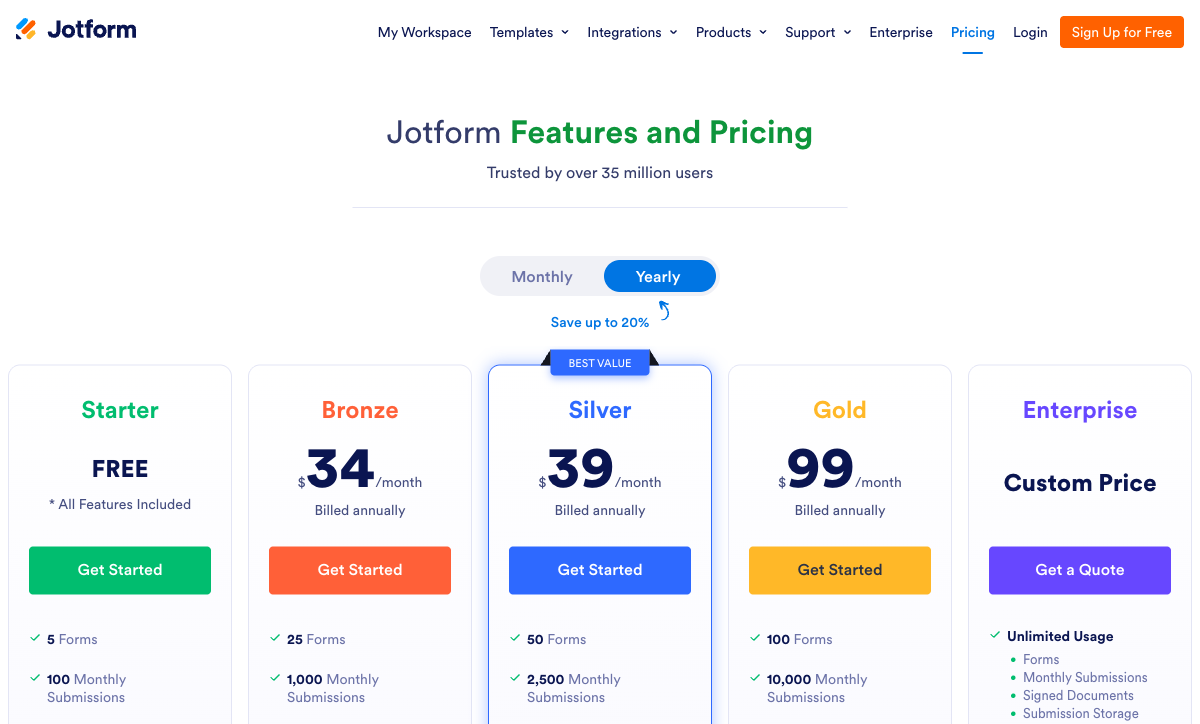
Both platforms use submission-based pricing, but the value per dollar diverges sharply. Paperform consistently offers more submissions and more included features at each price point. The exception is the free tier, where Jotform's 100 submissions outpace Paperform's 30 -- though Paperform's free plan includes payment processing and calculations that Jotform's doesn't. Here's how the tiers line up:
| Tier | Paperform | Jotform | Key Difference |
|---|---|---|---|
| Free | Unlimited forms, 30 submissions, 5 payment gateways, calculations | 5 forms, 100 submissions, 100 MB storage | Jotform: more submissions. Paperform: more features per submission. |
| ~$29-39/mo | Essentials: $29/mo, 100 submissions, payments, eCommerce | Starter: $39/mo, 100 submissions, 100 MB storage | Paperform is $10/mo cheaper with deeper eCommerce |
| ~$49-59/mo | Pro: $49/mo, 1,000 submissions, custom CSS, analytics, API | Bronze: $49/mo, 250 submissions, 1 GB storage | Same price, but Paperform offers 4x the submissions |
| ~$99/mo | Business: $99/mo, 10,000 submissions, SSO, API, S3 | Silver: $99/mo, 1,000 submissions, 10 GB storage, HIPAA | Same price, Paperform: 10x submissions. Jotform: HIPAA included. |
All prices shown are annual billing rates. Monthly billing adds approximately 25-30% at both platforms. Note the submission volume gap at the $99/month tier: Paperform offers 10,000 submissions while Jotform offers 1,000. For high-volume use cases (events, registrations, large surveys), Paperform's scaling economics are significantly more favourable.
Paperform
Jotform
| Product | Plan | Monthly Price | Annual Price (per month) | Free Plan | Free Trial | Limits |
|---|---|---|---|---|---|---|
| Paperform | Free | Free | Free | Yes | 14 days | forms: Unlimited, submissions: 30/month, storage: 100 submissions, users: 1, file uploads: 100 MB |
| Paperform | Essentials | $29/mo | $24/mo billed annually | forms: Unlimited, submissions: 100/month, storage: 1,000 submissions, users: 1, file uploads: 1 GB | ||
| Paperform | Pro | $59/mo | $49/mo billed annually | forms: Unlimited, submissions: 1,000/month, storage: 10,000 submissions, users: 3, file uploads: 10 GB | ||
| Paperform | Business | $129/mo | $99/mo billed annually | forms: Unlimited, submissions: 10,000/month, storage: 100,000 submissions, users: 5, file uploads: 100 GB | ||
| Jotform | Starter | Free | Free | Yes | No | forms: 5, submissions: 100/month, storage: 100 MB, users: 1 |
| Jotform | Bronze | $39/mo | $34/mo billed annually | forms: 25, submissions: 1,000/month, storage: 1 GB, users: 1 | ||
| Jotform | Silver | $49/mo | $39/mo billed annually | forms: 50, submissions: 2,500/month, storage: 10 GB, users: 1 | ||
| Jotform | Gold | $129/mo | $99/mo billed annually | forms: 100, submissions: 10,000/month, storage: 100 GB, users: 1 |
What Users Say
Paperform averages 4.8/5 across ~498 reviews, with particularly high marks for customer support (4.7-4.9) and ease of use. Users consistently highlight the document-style editor as the standout feature, alongside the calculation engine and payment processing depth. The most common criticism is that Paperform is less well-known than competitors -- a brand awareness gap rather than a product gap.
Jotform carries a massive review footprint -- tens of thousands of reviews across G2, Capterra, and Trustpilot -- with solid overall ratings (4.6-4.7/5). Common praise includes template variety, integration breadth, and the generous free tier. Common criticism centres on interface complexity, performance degradation on large forms, and the gap between feature existence and feature polish. As EmailToolTester's 2026 review noted, Jotform offers "everything but the kitchen sink" -- the challenge is finding what you need in the kitchen. Zapier's 2025 roundup praised Jotform's breadth but noted the interface could benefit from simplification.
See Them in Action
The best way to understand the design philosophy difference is to see both editors in use. Paperform's document-style approach and Jotform's drag-and-drop builder create visibly different workflows and outputs.
Who Is Each Platform Best For?
Paperform is ideal for: SMBs, freelancers, agencies, photographers, consultants, and any business that needs forms to do more than collect data. If your forms collect payments, calculate prices, generate quotes, capture signatures, or trigger multi-step workflows, Paperform consolidates tools you'd otherwise pay for separately. The document-style editor suits anyone who values brand presentation and wants forms that match their website's design quality. The lower price point ($29/mo vs $39/mo at the entry tier) also makes it the better value for cost-conscious teams.
Jotform is ideal for: organisations that need maximum feature breadth, specific regulatory compliance (HIPAA), or niche payment gateways. Large teams, healthcare providers, educational institutions, and enterprises with formal procurement requirements benefit from Jotform's 20-year track record, massive user base, and enterprise feature set. Users who prefer a traditional drag-and-drop editor with extensive widget options will feel at home in Jotform's interface. Teams that need mobile form management also benefit from Jotform's dedicated mobile app.
Neither platform is ideal for: businesses that need advanced adaptive AI questioning (consider Typeform), organisations that need heavy offline form capability, or teams locked into WordPress that want a native plugin experience (consider WPForms or Gravity Forms).
The Verdict
Paperform is the better choice for SMBs that value design quality and integrated tools. Its document-style editor produces more polished forms with less effort, the calculation engine handles use cases Jotform can't touch, and built-in e-signatures and workflow automation eliminate the need for separate tools. At $29/month versus $39/month for the same submission tier, it delivers more features at a lower price. The 30,000+ template library is larger and more consistently designed than Jotform's 20,000+.
The calculation engine alone is worth highlighting as a deciding factor. If your forms need to compute anything -- dynamic pricing, risk scoring, quiz grading, tax calculations, conditional totals -- Paperform is the only option between these two. Jotform has no equivalent, and this single capability transforms forms from data collection tools into interactive business applications.
Jotform is the better choice in three specific scenarios: when you need a specific niche or regional payment gateway (40+ versus 5), when you need HIPAA compliance for healthcare data, or when enterprise procurement requirements demand the scale and longevity of a platform with 35 million users and 20 years of operation. Jotform's free tier is also more generous on submission volume (100 vs 30), making it attractive for budget-constrained users who need higher throughput without paying.
Both platforms are rare bootstrapped success stories -- and this matters more than most buyers realise. Paperform, founded in 2016, has been profitable since its early years with a lean team focused on product quality. Jotform, founded in 2006, has grown to $144.9 million in revenue without a cent of venture capital. Neither is going anywhere, and neither is beholden to investor pressure to raise prices or cut corners. When you choose a form platform, you're choosing infrastructure that your business depends on. Both of these companies have earned that trust through sustained profitability rather than hype cycles.
The choice comes down to philosophy: do you want the platform that builds fewer features beautifully, or the platform that builds everything? For most SMBs -- especially those that need payments, calculations, e-signatures, or workflow automation -- the answer is Paperform. For specific edge cases around HIPAA compliance, niche payment gateway breadth, and enterprise-scale procurement requirements, the answer is Jotform. For more options, see our complete Jotform alternatives analysis or the full best form builders ranking.
Frequently Asked Questions
How do Paperform's 30,000 templates compare to Jotform's 20,000?
Both libraries are massive, but they serve different strengths. Jotform's 20,000+ templates cover a wide range of use cases and are easy to customize in their drag-and-drop editor. Paperform's 30,000+ templates are designed with the document-style editor in mind, so they tend to feel more like branded landing pages than traditional form widgets. The bigger difference is what the templates can do: Paperform templates can include payment processing, calculations, e-signature fields, and multi-step workflows out of the box. Jotform templates can include payment widgets, but calculations and e-signatures require workarounds or third-party tools. If you want a template you can drop in and use immediately for eCommerce or client intake, Paperform's library is more capable per template.
Which is better for collecting payments: Paperform or Jotform?
It depends on what you mean by "better." Jotform supports 40+ payment gateways including Stripe, PayPal, Square, Mollie, Payfast, and dozens of regional processors. If you need a specific niche gateway, Jotform probably has it. Paperform supports 5 gateways (Stripe, PayPal, Square, Braintree, Google Pay) but integrates them more deeply: subscriptions, coupons, tax calculations, refund processing, and product management are all built in. Jotform's payment integrations are more like widget embeds -- they work, but the eCommerce features around them are thinner. For most SMBs, Paperform's 5 well-integrated gateways cover the standard needs with better tooling. For businesses that need a specific regional processor or obscure gateway, Jotform's breadth is the advantage.
Is Jotform's interface really that cluttered?
Jotform has been building features for 20 years, and it shows. The form builder offers hundreds of widgets, integrations, and configuration options -- which is powerful, but the UI can feel overwhelming. Multiple independent reviews (EmailToolTester 2026, Zapier 2025) note that finding specific settings often requires digging through nested menus, and the editor can slow down on complex forms. Paperform's document-style editor is deliberately simpler: you type content and add fields inline, like writing a document. The trade-off is real -- Jotform gives you more knobs to turn, Paperform gives you fewer knobs that are easier to find. If you're technically comfortable and want maximum control, Jotform's depth is fine. If you want to build professional forms quickly without a learning curve, Paperform's cleaner interface is the advantage.
Can I migrate my forms from Jotform to Paperform?
There's no one-click migration tool between the platforms. The practical approach: export your Jotform response data as CSV, then rebuild your forms in Paperform using one of the 30,000+ templates as a starting point. For simple forms (contact, registration, feedback), rebuilding in Paperform's editor is fast -- most users find the document-style interface intuitive once they adjust to it. For complex forms with conditional logic, you'll need to recreate the logic rules manually. Integrations connected through Zapier or Make can be repointed from Jotform to Paperform with minimal reconfiguration since both platforms support the same integration ecosystem. If you're on Jotform's free plan, Paperform's free tier (unlimited forms, 30 submissions) gives you a landing spot without paying to test the migration.
How do the free plans compare between Paperform and Jotform?
Jotform's free plan is more generous in some areas: 5 forms, 100 monthly submissions, and 100 MB storage. Paperform's free plan offers unlimited forms but only 30 submissions per month. Where they diverge is features: Paperform's free plan includes 5 payment gateways, calculations, conditional logic, 2,000+ integrations, and AI form generation. Jotform's free plan includes basic form building, 100+ integrations, and limited payment widgets. If you need higher submission volume on a free plan, Jotform wins. If you need payment processing, calculations, or more integrations without paying, Paperform wins. For most users testing both platforms, the free tiers are sufficient to evaluate which editor and feature set fits their needs.
Does Jotform or Paperform have better security and compliance?
Jotform has an edge for regulated industries. Jotform offers HIPAA compliance with BAA on paid plans (Bronze and above), plus SOC 2 Type II certification. Paperform has SOC 2 Type II and GDPR compliance but does not currently offer HIPAA. For healthcare organisations, medical practices, or anyone collecting Protected Health Information, Jotform is the safer choice. Jotform also offers enterprise features like SSO and SLA agreements on higher tiers. For general business use where HIPAA isn't required, both platforms meet standard security expectations with SOC 2 compliance and encrypted data handling.
Sources & References
- Best Online Form Builder to Use in 2026 -- Top 20 Tools — EmailToolTester, 2026
- The Best Online Form Builders for 2025 — Zapier, 2025
- Paperform -- Complete Beginners Guide (YouTube) — AppFind, 2025
Last updated March 21, 2026
Ready to try Paperform?
Create beautiful forms, payment pages, and workflows — no code required.