Paperform vs Formstack: Which Is Better in 2026?
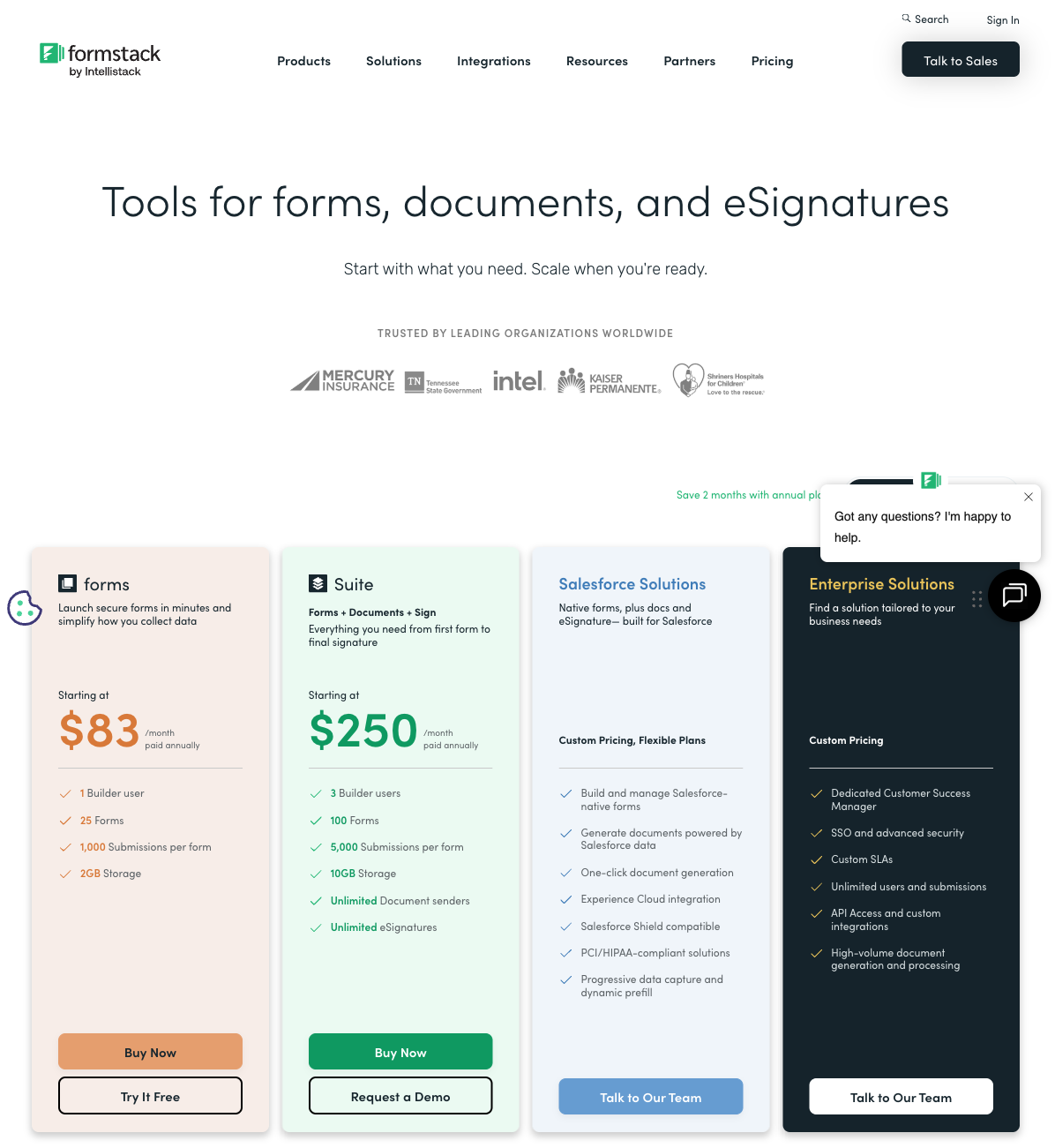
Paperform and Formstack target overlapping territory from opposite directions. Paperform is a bootstrapped, SMB-friendly all-in-one: form builder, payment processor, calculation engine, e-signature tool, and workflow platform — all starting at $29/month. Formstack is a private-equity-backed enterprise suite: forms, document generation, e-signatures, and workflow automation bundled into a platform that starts at $83/month with no free plan.
The core question isn't which is "better" — it's which business model and feature set aligns with your needs and budget. This comparison breaks down where each platform genuinely excels, where each charges too much for too little, and where the 3x pricing gap is justified versus where it isn't.
Who Is Formstack?
Formstack was founded in 2006 in Indianapolis as a straightforward online form builder. Over the years it evolved through acquisitions — adding WebMerge (document generation), QuickSign (e-signatures), and other tools — into what it now calls a "workplace productivity platform." Silversmith Capital Partners (private equity) acquired a majority stake, and the company rebranded under the Intellistack umbrella. Today, Formstack sells three products: Formstack Forms, Formstack Documents, and Formstack Sign, available individually or bundled.
Paperform, founded in 2016 in Sydney, Australia, took a different path. Rather than acquiring separate products, Paperform built forms, payments, calculations, e-signatures (Papersign), and workflow automation (Stepper) as native components of a single platform. The company is bootstrapped and profitable — no venture capital, no private equity. This matters for pricing predictability: PE-backed companies face pressure to increase revenue per customer, which often means price increases and feature gating over time.
Quick Verdict
Choose Paperform if:
- You want powerful forms at $29/mo instead of $83/mo
- You need payment processing (5 gateways vs 2)
- You want a free tier to test before committing
- Your primary need is form building with calculations and payments
Choose Formstack if:
- You need HIPAA compliance with BAA
- You need enterprise SSO/SAML and advanced team management
- Document generation and complex e-signature routing are core workflows
- You need Salesforce-native form integration
Feature Comparison
Side-by-side across every feature category. Paperform is highlighted for reference.
| Feature | Paperform | Formstack |
|---|---|---|
| Form Building | ||
| Document-style editor | Yes | No |
| AI form creation | Yes | Yes forms |
| Field types | 26+ | 15 |
| File uploads | Yes | No |
| Multi-page forms | Yes | Yes forms |
| Guided mode (one question at a time) | Yes | Yes forms |
| Conditional logic | Yes | Yes forms |
| Calculations field | Yes essentials | Yes forms |
| AI calculations assistant | Yes essentials | No |
| Scoring | Yes essentials | No |
| Answer piping | Yes | Yes forms |
| Pre-filling and hidden fields | Yes essentials | Yes forms |
| Save and resume | Yes | Yes forms |
| Auto-close by number | Yes essentials | No |
| Auto-close by date | Yes pro | No |
| Appointment/booking field | Yes | No |
| Signature field | Yes | Yes suite |
| Color picker field | Yes | No |
| API-powered dropdowns | Yes business | Yes forms |
| Google address search | Yes business | No |
| Drag-and-drop builder | No | Yes forms |
| Payments | ||
| Stripe payments | Yes | Yes forms |
| PayPal payments | Yes | Yes forms |
| Square payments | Yes | No |
| Braintree payments | Yes | No |
| Google Pay | Yes | No |
| Product sales (eCommerce) | Yes essentials | No |
| Subscriptions | Yes essentials | No |
| Coupons and discounts | Yes essentials | Yes forms |
| Custom pricing rules | Yes essentials | Yes forms |
| Tax calculations | Yes | No |
| Quotes/invoices | Yes | No |
| Refunds | Yes | No |
| 3D Secure | Yes | No |
| Design & Customization | ||
| Template gallery | 30,000+ | Yes forms |
| Rich media (images, GIFs, videos) | Yes | Yes forms |
| Unsplash and Giphy integration | Yes | No |
| Image editor | Yes | No |
| Adobe Creative Cloud | Yes | No |
| Language translation | Yes | No |
| Advanced theming | Yes pro | Yes forms |
| Custom form URL | Yes pro | Yes forms |
| Custom domains | Yes pro | Yes forms |
| Custom HTML & CSS | Yes pro | Yes forms |
| Remove branding | Yes pro | Yes forms |
| Custom email domains | Yes business | No |
| Analytics | ||
| Submission results and reports | Yes | Yes forms |
| AI report insights | Yes pro | No |
| Paperform analytics | Yes pro | Yes forms |
| Drop-off analysis | Yes pro | No |
| Google Analytics & Facebook Pixel | Yes essentials | Yes forms |
| Custom analytics scripts | Yes pro | No |
| Partial submissions | Yes pro | Yes forms |
| Collaboration | ||
| Multi-user accounts | Yes pro | Yes forms |
| User permissions and management | Yes pro | Yes forms |
| Advanced permissions & admin | Yes enterprise | Yes enterprise |
| Form sharing (templates) | Yes | Yes forms |
| Spaces and tag management | Yes | Yes forms |
| Security | ||
| SOC 2 Type II | Yes | No |
| GDPR compliant | Yes | Yes forms |
| SSL encryption | Yes | Yes forms |
| Two-factor authentication | Yes | Yes forms |
| Enforce 2FA for all users | Yes business | Yes enterprise |
| SSO (SAML) | Yes business | Yes enterprise |
| reCAPTCHA | Yes | Yes forms |
| Local data residency | Yes enterprise | No |
| Custom S3 storage (BYO) | Yes business | No |
| Integrations & API | ||
| Native integrations | 2,000+ | No |
| Zapier | Yes | Yes forms |
| Make (Integromat) | Yes | No |
| Webhooks | Yes pro | Yes forms |
| Standard API | Yes pro | Yes forms |
| Business API | Yes business | Yes enterprise |
| WordPress plugin | Yes | Yes forms |
| oEmbed support | Yes | No |
| 2000+ integrations | No | No |
Where Paperform Wins

Price-to-Value Ratio
This is the elephant in the room. Paperform Essentials costs $29/month. Formstack Forms starts at $83/month. Both include form building, conditional logic, and basic integrations. But Paperform also includes five payment gateways, an Excel-style calculation engine, eCommerce capabilities, and 2,000+ integrations — features Formstack either doesn't offer or charges extra for. For SMBs and mid-market teams, the 3x pricing gap delivers less value at Formstack, not more. The premium buys enterprise compliance and document workflows — not better form building.
Payment Processing
Paperform connects five payment gateways — Stripe, PayPal, Square, Braintree, and Google Pay — on every plan including free. Full eCommerce is built in: product catalogues, subscriptions, recurring payments, coupons, discount codes, tax calculations, and refund processing. Formstack supports Stripe and PayPal with basic payment fields — no product management, no coupon system, no subscription handling, no tax calculations. For businesses that collect money through forms, Paperform is a complete commerce platform. Formstack is a payment field.
The Calculation Engine
Paperform's Excel-style calculations are a differentiator Formstack can't match. These formulas compute dynamic pricing, risk scores, quiz results, tax amounts, and conditional totals — and they work across questions, pages, emails, integrations, and success pages. A consultant builds a dynamic project estimator. An insurance broker creates a risk assessment calculator. A retailer generates quantity-based pricing with automatic discounts.
Formstack has basic conditional logic and field pre-population, but no computational engine that transforms user inputs into dynamic outputs. The calculation gap matters most for businesses that use forms as interactive tools — pricing configurators, assessment instruments, scoring systems, and anything where the form needs to compute, not just collect.
Design Quality
Paperform's document-style editor produces forms that look like designed landing pages — free-flowing text, images, videos, and fields coexisting on a page with full brand customisation. Custom fonts, colour palettes, full-width media, and rich content between questions are native capabilities.
Formstack's form builder is functional but utilitarian — drag-and-drop fields into a standard form layout. The visual quality gap is significant: Paperform forms can serve as standalone landing pages; Formstack forms look like embedded form widgets. For customer-facing forms where design impacts conversion, Paperform delivers noticeably better results.
Free Plan Availability
Paperform offers a free plan: unlimited forms, 30 submissions/month, five payment gateways, calculations, conditional logic, and 2,000+ integrations. Formstack has no free plan and no free trial readily available — you need to request a demo or start a paid subscription. For individuals, freelancers, and small teams wanting to test before committing, Paperform's free tier removes all friction. Formstack's $83/month entry point is a significant barrier for evaluation.
Template Volume
Paperform offers 30,000+ templates spanning eCommerce, payments, bookings, surveys, applications, and workflow automation. Formstack has a template library enhanced by an AI template generator, but the volume is substantially smaller and constrained by the platform's more utilitarian design capabilities. For users who want a head start on form creation, Paperform's library offers dramatically more starting points.
AI Form Generation
Paperform includes AI-powered form generation — describe what you need in plain language and the AI creates a complete form with appropriate fields, logic, and design. This dramatically reduces setup time for common form types. Formstack has introduced AI features including an AI template generator, but Paperform's implementation integrates more deeply with its design system, producing forms that look polished from the first AI-generated draft rather than requiring extensive manual refinement.
Where Formstack Wins
Enterprise Compliance Stack
Formstack offers the full enterprise compliance package: SOC 2 Type II, HIPAA with BAA, SSO/SAML, data encryption at rest and in transit, and role-based access controls. For healthcare organisations collecting Protected Health Information, financial services firms with regulatory requirements, or government agencies needing FedRAMP-adjacent compliance, Formstack checks boxes that Paperform (SOC 2 + GDPR but no HIPAA or SSO) currently cannot. This is a genuine, non-trivial gap for regulated industries.
Document Generation
Formstack Documents (formerly WebMerge) is a dedicated document generation engine. It merges form submission data into PDF, Word, Excel, and PowerPoint templates — automating contracts, proposals, invoices, and reports. Form data flows into pre-designed document templates, generating polished outputs without manual intervention. Paperform can generate PDF receipts and confirmation documents, but it doesn't have an equivalent document templating system for complex multi-page document generation.
E-Signature Depth
Formstack Sign provides enterprise-grade e-signature workflows: multi-party signing, signing order enforcement, document routing, audit trails, and integration with Formstack Documents for end-to-end form-to-signed-document workflows. Paperform's Papersign covers standard e-signatures well — contracts, consent forms, agreements — but lacks the multi-party routing and document generation integration that Formstack offers. For organisations with complex signing workflows involving multiple stakeholders, Formstack has deeper capability.
Team Collaboration at Scale
Formstack is built for large teams: granular permissions, workspace management, team-level analytics, and admin controls designed for 50+ user organisations. Paperform supports collaboration but is architected more for small teams and individual users. If you're managing form operations across multiple departments with different access levels and compliance requirements, Formstack's team infrastructure is more mature.
Salesforce Native Integration
Formstack offers a Salesforce-native form product (Formstack for Salesforce) that lives entirely within the Salesforce ecosystem — forms built from Salesforce objects, submissions mapped directly to records, no external data transfer. For Salesforce-heavy organisations, this native integration eliminates middleware and reduces data handling risk. Paperform integrates with Salesforce through Zapier/Make but doesn't offer a native in-platform experience. If Salesforce is the centre of your data operations, Formstack's native product is a genuine differentiator worth the premium.
Where Paperform Falls Short
- No HIPAA compliance: Healthcare organisations collecting PHI need Formstack, Jotform, or FormAssembly — Paperform doesn't offer HIPAA or BAA
- No SSO/SAML: Enterprise teams requiring single sign-on need to look elsewhere — Formstack includes SSO on its enterprise tier
- No document generation: Paperform can't merge form data into PDF/Word templates for automated document creation — Formstack Documents handles this natively
- Lighter team management: For organisations with 50+ form builders needing granular permissions and departmental controls, Paperform's collaboration features are less mature
- No Salesforce-native product: Paperform integrates with Salesforce through third-party connectors; Formstack offers a native in-Salesforce form builder
Where Formstack Falls Short
- No free plan: $83/month minimum with no free tier or straightforward trial. Evaluation requires a demo request or immediate paid commitment — a significant barrier for SMBs and freelancers.
- 3x the price, not 3x the form builder: Formstack's premium buys compliance and document workflows, but the core form building experience isn't 3x better than Paperform's. Design flexibility, payment processing, and calculations are all weaker.
- Limited payment gateways: Stripe and PayPal only, with basic payment fields. No Square, Braintree, or Google Pay. No product management, subscriptions, coupons, or tax calculations.
- No calculation engine: Formstack has conditional logic and field pre-population but no Excel-style formulas for computing dynamic pricing, scores, or totals across form elements.
- Utilitarian design: Forms look functional but generic. The drag-and-drop builder produces standard form layouts without the design freedom of Paperform's document-style editor.
- Private equity ownership: Acquired by Silversmith Capital Partners, Formstack's pricing and product decisions are influenced by PE return expectations. This can mean price increases, feature gating, and reduced investment in lower-tier plans over time. Paperform is bootstrapped and profitable — growth funded by revenue.
Pricing Comparison
The pricing gap is substantial. Here's what you get at each level.
| Tier | Paperform | Formstack | Key Difference |
|---|---|---|---|
| Free | 30 responses, 5 payment gateways, calculations | No free plan | Paperform lets you evaluate for free; Formstack requires a demo |
| Entry Paid | Essentials: $29/mo — 100 responses, payments, eCommerce | Forms Starter: $83/mo — forms + basic workflows | Paperform is $54/mo cheaper with more payment features |
| Mid-Tier | Pro: $49/mo — 1,000 responses, CSS, analytics, API | Forms Pro: $125/mo — more submissions, advanced features | Paperform Pro costs less than Formstack's entry tier |
| Full Suite | Business: $99/mo — 10,000 responses, SSO, S3 | Suite: $250+/mo — forms + documents + e-signatures | Formstack Suite bundles document generation; Paperform Business is 60% cheaper |
All prices shown are annual billing rates. Formstack's monthly rates are significantly higher.
Paperform
Formstack
| Product | Plan | Monthly Price | Annual Price (per month) | Free Plan | Free Trial | Limits |
|---|---|---|---|---|---|---|
| Paperform | Free | Free | Free | Yes | 14 days | forms: Unlimited, submissions: 30/month, storage: 100 submissions, users: 1, file uploads: 100 MB |
| Paperform | Essentials | $29/mo | $24/mo billed annually | forms: Unlimited, submissions: 100/month, storage: 1,000 submissions, users: 1, file uploads: 1 GB | ||
| Paperform | Pro | $59/mo | $49/mo billed annually | forms: Unlimited, submissions: 1,000/month, storage: 10,000 submissions, users: 3, file uploads: 10 GB | ||
| Paperform | Business | $129/mo | $99/mo billed annually | forms: Unlimited, submissions: 10,000/month, storage: 100,000 submissions, users: 5, file uploads: 100 GB | ||
| Formstack | Forms | $99/mo | $83/mo billed annually | No | 14 days | forms: 25, submissions: 1,000/form, storage: 2 GB, users: 1, file uploads: 2 GB |
| Formstack | Suite | $299/mo | $250/mo billed annually | forms: 100, submissions: 5,000/form, storage: 10 GB, users: 3, file uploads: 10 GB |
What Users Say
Paperform averages 4.8/5 across review platforms with particularly strong marks for customer support and ease of use. Formstack averages around 4.2/5 on G2, with positive reviews for its enterprise capabilities but recurring criticism of pricing complexity and a steeper learning curve. Common Formstack reviewer feedback: "powerful but expensive" and "great for enterprises, overkill for small teams." Paperform reviewers consistently highlight design quality and value for money.
The review patterns tell a clear story about target markets. Formstack's positive reviews tend to come from larger organisations using the compliance and document generation features — the enterprise stack justifies the price for them. Negative reviews overwhelmingly come from smaller teams who found the pricing unjustifiable for basic form building. Paperform's reviews are more uniformly positive across business sizes, reflecting its broader value proposition at accessible pricing.
See Them in Action
The Verdict
Paperform is the better choice for SMBs, freelancers, and mid-market teams. It offers superior form building — better design, more payment gateways, a calculation engine Formstack lacks, and 30,000+ templates — at $29/month versus $83/month. The free plan lets you evaluate without commitment. For organisations where form building, payments, and calculations are the core need, Paperform delivers more for less.
Formstack is the better choice for enterprises with specific compliance needs. If you need HIPAA with BAA, SSO/SAML, document generation from form data, complex multi-party e-signature workflows, or Salesforce-native forms, Formstack justifies its premium. These are real capabilities that Paperform doesn't match today. But if you're paying Formstack prices for basic form building without using the compliance and document stack, you're overpaying by a factor of three.
The 3x price gap is the clearest signal: Formstack's $83/month entry point buys enterprise infrastructure, not a better form builder. If you need that infrastructure, pay for it. If you don't, Paperform gives you a more capable form builder with more payment options, better design tools, and a powerful calculation engine — at a price that respects small business budgets.
Both platforms are stable long-term choices, but through different models. Paperform is bootstrapped and profitable since 2016 — a company that grows with its revenue. Formstack, founded in 2006, is backed by private equity — powerful resources but pricing reflects investor return expectations. For details on more options, see our complete Formstack alternatives analysis or the full best form builders ranking.
Frequently Asked Questions
Why does Formstack cost so much more than Paperform?
Formstack is owned by private equity (Silversmith Capital Partners acquired the majority stake) and positions itself as an enterprise platform spanning forms, documents, and e-signatures. Its $83/month starting price reflects enterprise sales economics — high per-seat costs, compliance certifications (SOC 2, HIPAA, SSO), and multi-product bundling. Paperform is bootstrapped and profitable, pricing at $29/month for its Essentials plan. The 3x price difference is partly about target market (enterprise vs SMB) and partly about business model — PE-backed companies need higher ARPU to satisfy investor returns. For SMBs and mid-market teams, Paperform delivers comparable or superior form-building capabilities at a fraction of the cost.
Does Formstack or Paperform have better e-signature support?
Both offer e-signatures, but they serve different depths. Formstack's Formstack Sign (formerly WebMerge + DocuSign integration) is a dedicated document generation and signing product — it can merge form data into PDF/Word templates, create complex signing workflows with multiple signers, and handle enterprise document routing. Paperform's Papersign is integrated directly into the form platform — simpler to set up for standard contracts, consent forms, and agreements, but less capable for complex multi-party document workflows. If e-signatures are your primary use case, Formstack has more depth. If you need signatures as part of a broader form workflow, Paperform is more cost-effective.
Can Paperform handle enterprise compliance requirements like Formstack?
Formstack has a compliance edge at the enterprise level. It offers SOC 2 Type II, HIPAA (with BAA), SSO/SAML, and data encryption at rest and in transit — the full enterprise compliance stack. Paperform has SOC 2 Type II and GDPR compliance but does not currently offer HIPAA or SSO. For organisations in healthcare, financial services, or government where HIPAA or SSO are hard requirements, Formstack meets those needs. For most SMBs and mid-market companies where SOC 2 and GDPR are sufficient, Paperform's compliance posture is adequate at a much lower price.
Which has better payment processing: Paperform or Formstack?
Paperform wins decisively on payments. Paperform connects five payment gateways (Stripe, PayPal, Square, Braintree, Google Pay) on all plans including free, with full eCommerce: subscriptions, coupons, tax calculations, refund processing, and product management. Formstack supports Stripe and PayPal on its forms product, with basic payment field capabilities. No product catalogues, no coupon engine, no subscription management, no tax calculations. For any business collecting money through forms, Paperform offers more gateway options and deeper commerce features at less than half the price.
Is Formstack worth the price for small businesses?
For most small businesses, no. Formstack's $83/month starting price (billed annually) assumes enterprise needs: HIPAA compliance, document generation, multi-team collaboration, and complex signing workflows. A small business running contact forms, order pages, registrations, and client intake will use a fraction of what Formstack offers — and pay 3x what Paperform charges for comparable (or superior) form-building capabilities. The calculation is different for enterprises that need the compliance stack, but SMBs are better served by Paperform's $29/month Essentials plan, which includes five payment gateways, calculations, and 2,000+ integrations.
Sources & References
- Best Online Form Builder to Use in 2026 — Top 20 Tools — EmailToolTester, 2026
- Formstack Review: Features, Pricing, and Alternatives — G2, 2026
- Paperform — Complete Beginners Guide (YouTube) — AppFind, 2025
Last updated March 21, 2026
Ready to try Paperform?
Create beautiful forms, payment pages, and workflows — no code required.