Paperform vs Formsite: Which Is Better in 2026?
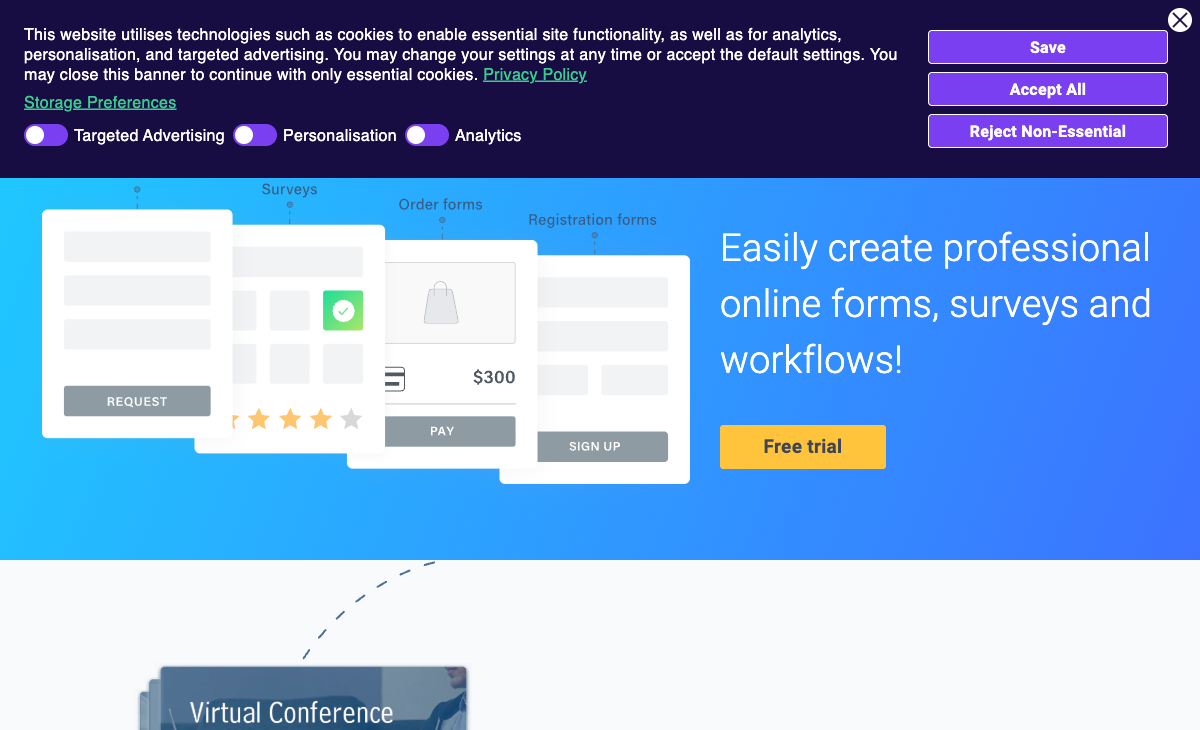
Formsite is one of the oldest form builders on the internet. Founded in 1998 — 28 years ago — it predates Google Forms, Typeform, and nearly every competitor in this space. That longevity is impressive, but the product shows its age. The interface feels like it belongs to a different era of web software, and Formsite's acquisition by Formstack in December 2023 raises questions about its independent future. With a team of just 2-10 people and a parent company that already has its own form builder, Formsite's development trajectory is unclear.
Paperform, founded in 2016, takes the opposite approach: a document-style editor that blends text, images, and fields into pages that look like designed landing pages, with an Excel-style calculation engine and five payment gateways built in from the start. As a bootstrapped, profitable company with 11-50 employees, Paperform's trajectory is self-directed and consistently forward-moving.
This comparison breaks down where each platform stands — features, pricing, design, and the question every Formsite user should be asking: is it time to move on?
Quick Verdict
Choose Paperform if:
- You want a modern, actively developed form builder
- You need payment processing on your free or entry-level plan
- You need calculations that drive pricing, scoring, and conditional logic
- You want e-signatures and workflow automation without extra tools
- You value design quality and forms that look like landing pages
Choose Formsite if:
- You need HIPAA compliance and are willing to pay $209/month for it
- You already have years of data in Formsite and migration cost is prohibitive
- Your forms are simple and you don't need modern design or eCommerce features
- You specifically need Authorize.Net as a payment gateway
Feature Comparison
Side-by-side across every feature category. Paperform is highlighted for reference.
| Feature | Paperform | Formsite |
|---|---|---|
| Form Building | ||
| Document-style editor | Yes | No |
| AI form creation | Yes | Yes professional |
| Field types | 26+ | Yes |
| File uploads | Yes | No |
| Multi-page forms | Yes | Yes |
| Guided mode (one question at a time) | Yes | No |
| Conditional logic | Yes | Yes |
| Calculations field | Yes essentials | Yes |
| AI calculations assistant | Yes essentials | No |
| Scoring | Yes essentials | Yes |
| Answer piping | Yes | Yes |
| Pre-filling and hidden fields | Yes essentials | Yes |
| Save and resume | Yes | Yes professional |
| Auto-close by number | Yes essentials | Yes |
| Auto-close by date | Yes pro | Yes |
| Appointment/booking field | Yes | No |
| Signature field | Yes | Yes professional |
| Color picker field | Yes | No |
| API-powered dropdowns | Yes business | No |
| Google address search | Yes business | No |
| Payments | ||
| Stripe payments | Yes | Yes professional |
| PayPal payments | Yes | Yes professional |
| Square payments | Yes | No |
| Braintree payments | Yes | Yes professional |
| Google Pay | Yes | No |
| Product sales (eCommerce) | Yes essentials | No |
| Subscriptions | Yes essentials | No |
| Coupons and discounts | Yes essentials | No |
| Custom pricing rules | Yes essentials | Yes |
| Tax calculations | Yes | No |
| Quotes/invoices | Yes | No |
| Refunds | Yes | No |
| 3D Secure | Yes | No |
| Design & Customization | ||
| Template gallery | 30,000+ | Yes |
| Rich media (images, GIFs, videos) | Yes | Yes professional |
| Unsplash and Giphy integration | Yes | No |
| Image editor | Yes | No |
| Adobe Creative Cloud | Yes | No |
| Language translation | Yes | No |
| Advanced theming | Yes pro | Yes |
| Custom form URL | Yes pro | No |
| Custom domains | Yes pro | No |
| Custom HTML & CSS | Yes pro | Yes |
| Remove branding | Yes pro | Yes professional |
| Custom email domains | Yes business | No |
| Analytics | ||
| Submission results and reports | Yes | Yes |
| AI report insights | Yes pro | No |
| Paperform analytics | Yes pro | No |
| Drop-off analysis | Yes pro | No |
| Google Analytics & Facebook Pixel | Yes essentials | No |
| Custom analytics scripts | Yes pro | No |
| Partial submissions | Yes pro | No |
| Collaboration | ||
| Multi-user accounts | Yes pro | Yes business |
| User permissions and management | Yes pro | Yes business |
| Advanced permissions & admin | Yes enterprise | No |
| Form sharing (templates) | Yes | Yes |
| Spaces and tag management | Yes | No |
| Security | ||
| SOC 2 Type II | Yes | No |
| GDPR compliant | Yes | Yes |
| SSL encryption | Yes | Yes |
| Two-factor authentication | Yes | Yes enterprise |
| Enforce 2FA for all users | Yes business | No |
| SSO (SAML) | Yes business | No |
| reCAPTCHA | Yes | Yes professional |
| Local data residency | Yes enterprise | No |
| Custom S3 storage (BYO) | Yes business | No |
| Custom S3 storage | No | No |
| HIPAA compliance | No | Yes enterprise |
| Integrations & API | ||
| Native integrations | 2,000+ | No |
| Zapier | Yes | Yes professional |
| Make (Integromat) | Yes | No |
| Webhooks | Yes pro | Yes professional |
| Standard API | Yes pro | Yes professional |
| Business API | Yes business | No |
| WordPress plugin | Yes | Yes |
| oEmbed support | Yes | No |
| 2000+ integrations | No | Yes professional |
Where Paperform Wins

Modern Design That Doesn't Look Like 2005
Formsite's interface and form output both feel dated. Forms built in Formsite look like web forms from the mid-2000s — functional but visually flat, with limited typographic control and no concept of forms as designed pages. Multiple G2 reviewers specifically cite the "aging user interface" as their primary complaint.
Paperform's document-style editor produces forms that resemble polished landing pages: full-width images, custom fonts, branded colour schemes, and fields that blend naturally into the page layout. You can add headings, paragraphs, images, and videos between fields — creating an experience closer to a website page than a traditional form widget. For any customer-facing form — lead capture, registrations, bookings, payments — design quality directly impacts conversion rates. Paperform's output looks professionally designed without any custom CSS; Formsite's requires significant work to look even moderately contemporary.
The Calculation Engine
Paperform's Excel-style calculation engine is a genuine differentiator that has no equivalent in Formsite. These aren't basic conditional rules — they're formulas that compute dynamic pricing, quiz scores, risk assessments, tax amounts, and conditional totals across questions, pages, emails, integrations, and success pages. A real estate agent can build a commission calculator. A photographer can create dynamic session pricing. An accountant can generate interactive tax estimates. Formsite has basic calculations, but they lack the depth and cross-form versatility that makes Paperform's engine a business tool rather than just a form feature.
Payment Processing on Every Plan
Paperform includes five payment gateways — Stripe, PayPal, Square, Braintree, and Google Pay — on every plan, including free. Full eCommerce features are included: product management, subscriptions, coupons, discount codes, tax calculations, and refund processing. Formsite supports Stripe, PayPal, Braintree, and Authorize.Net, but only on the Professional plan at $34/month and above. Formsite's free and Personal plans have zero payment capabilities. For businesses collecting money through forms, Paperform is accessible from day one.
Built-in Platform Products
Paperform includes Papersign (e-signatures for contracts and consent forms) and Stepper (multi-step workflow automation) at no additional cost. Formsite has basic workflow automation (routing and approvals), but no e-signature capability. For businesses that currently use a form tool plus a separate signing tool plus an automation tool, Paperform consolidates all three — eliminating multiple subscriptions and integration complexity.
Template Library: 30,000+ vs 100+
Paperform offers 30,000+ templates versus Formsite's 100+. That's a 300x gap. The difference isn't just volume — Paperform templates include payment forms, booking pages, calculators, signature workflows, and eCommerce order pages that Formsite templates can't replicate because the underlying platform lacks those features. For a team that needs to launch a payment form or booking page quickly, Paperform's template library is a genuine productivity multiplier.
Integration Ecosystem
Paperform connects to 2,000+ tools via direct integrations, Zapier, Make, and webhooks — covering CRMs, email marketing, project management, accounting, and virtually every SaaS category. Formsite has integrations with major platforms (Google Sheets, Mailchimp, Salesforce, Microsoft Power Automate), but the breadth is narrower and several key integrations require higher-tier plans. Formsite's API is also read-only, which limits what custom integrations can do. Paperform's API supports both reading and writing, enabling more flexible automation workflows.
AI-Powered Form Creation
Paperform includes AI form generation — describe what you need in plain language, and the AI creates a complete, functional form with appropriate fields, logic, and styling. It also includes AI report insights for analysing submission data. Formsite has no AI capabilities. In a market where AI is rapidly becoming table stakes, this gap will only widen.
Where Formsite Wins
28 Years of Reliability
Formsite has been operating continuously since 1998. That's 28 years of uptime, data handling, and form processing. The platform claims billions of forms submitted and over $500 million in payments processed. For organisations that value track record above all else — especially in regulated industries where platform longevity matters for audits and compliance — Formsite's history is a genuine asset. Few form builders can claim that kind of operational continuity.
That said, longevity alone doesn't guarantee future reliability. Since the Formstack acquisition, the question isn't whether Formsite was reliable for 28 years — it's whether it will remain a separate, maintained product going forward. For businesses evaluating a new platform, past stability matters less than future commitment.
HIPAA Compliance
Formsite offers HIPAA compliance on the Enterprise plan ($209/month), which is relevant for healthcare organisations collecting Protected Health Information. Paperform does not currently offer HIPAA compliance. If your primary use case involves patient intake forms, medical surveys, or any PHI collection, Formsite (or alternatives like Jotform, 123FormBuilder, or FormAssembly) addresses a need Paperform cannot.
Authorize.Net Support
Formsite supports Authorize.Net as a payment gateway — an option Paperform doesn't offer. For businesses already locked into Authorize.Net for merchant processing, particularly in industries with established merchant account relationships, this is a genuine advantage. Paperform covers Stripe, PayPal, Square, Braintree, and Google Pay, which handles the vast majority of use cases, but Authorize.Net remains common in certain verticals and legacy payment infrastructure.
Save and Return
Formsite's "Save and Return" feature lets respondents save their progress on a long form and come back later to complete it. This is particularly useful for lengthy application forms, multi-section surveys, or any form that requires information the respondent may not have immediately at hand. Paperform supports partial submissions on the Pro plan, which captures in-progress data, but Formsite's Save and Return gives the respondent an explicit "save and come back" workflow that's useful for complex data collection.
Where Paperform Falls Short
- No HIPAA compliance: Healthcare organisations collecting PHI cannot use Paperform — Formsite, Jotform, and FormAssembly are options here
- No Authorize.Net: Businesses locked into Authorize.Net for payment processing will need to switch gateways or stay on a platform that supports it
- No mobile editor: Forms are fully responsive for respondents, but there's no dedicated mobile app for building or editing forms on the go
- Newer company: Founded in 2016 versus 1998 — Paperform has 10 years of operation versus Formsite's 28, though Paperform is bootstrapped and profitable while Formsite's future depends on Formstack's strategy
- Smaller review footprint: Paperform has ~498 reviews across platforms versus Formsite's ~180, but both trail larger competitors like Jotform and Typeform in total review volume. Paperform's higher ratings (4.8 vs 4.4) compensate for the smaller sample size.
Where Formsite Falls Short
- Outdated user interface: The editor and form output both feel like they belong to a different decade. Multiple G2 and Capterra reviewers cite the "aging" or "outdated" interface as a primary frustration. For customer-facing forms, visual quality matters.
- Extremely restrictive free plan: 5 forms with 10 results per form is essentially a demo. No email notifications, no file uploads, no integrations, no payments. Paperform's free plan includes unlimited forms, 30 submissions, five payment gateways, and 2,000+ integrations.
- Acquired and uncertain future: Formstack acquired Formsite in December 2023. Formstack already has its own form builder, making Formsite's long-term roadmap unclear. Will it be maintained as a separate product? Merged into Formstack's platform? Gradually sunset? No public commitment has been made, and for businesses choosing a platform to depend on for years, this ambiguity is a real risk.
- No e-signatures or workflow automation: No built-in document signing capability and only basic workflow routing. Businesses that need contract signing, consent forms, NDAs, or multi-step approval workflows require separate tools — adding cost and integration complexity.
- No AI capabilities: No AI form generation, no AI-powered analytics, no intelligent field suggestions. Paperform includes AI form creation and AI report insights, reflecting the direction modern form builders are heading.
- No modern calculation engine: Formsite has basic calculations, but nothing approaching Paperform's Excel-style formulas that drive dynamic pricing, conditional totals, and computed values across the entire form ecosystem.
- Limited template library: 100+ templates versus Paperform's 30,000+. The gap is compounded by the fact that Formsite's templates lack modern design, payment integrations, and calculation capabilities.
- Per-form result limits: Formsite's pricing uses "results per form" limits, not monthly submission totals. This means forms can individually hit caps even if your total usage is modest — an unusual and frustrating pricing model.
- Tiny team post-acquisition: Formsite lists 2-10 employees. For a platform handling forms, payments, and sensitive data, an extremely small team raises questions about development velocity, security response times, and long-term maintenance capacity.
- No conversational or guided mode: Formsite only offers traditional multi-field forms. No one-question-at-a-time experience, no guided flow. Paperform offers both Guided Mode and traditional layouts within the same editor.
Pricing Comparison
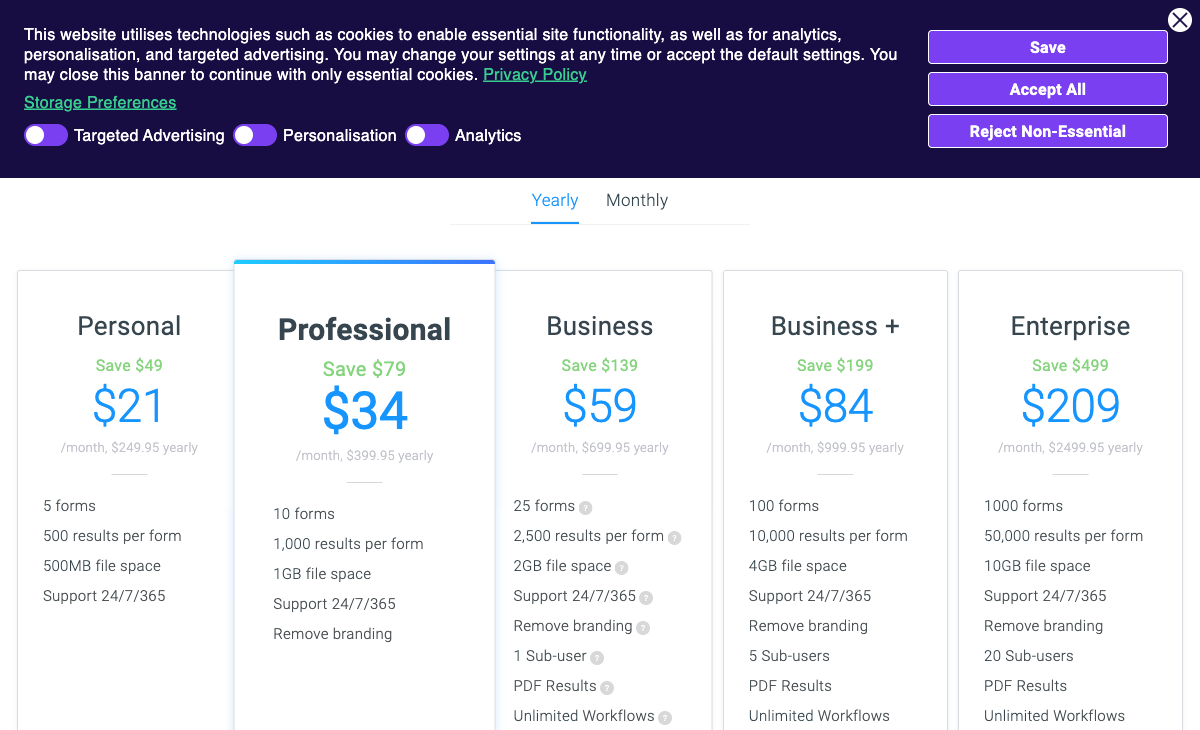
Formsite uses an unusual per-form result limit model, while Paperform uses a simpler monthly submission total. Here's how they compare:
| Tier | Paperform | Formsite | Key Difference |
|---|---|---|---|
| Free | Unlimited forms, 30 responses, 5 payment gateways | 5 forms, 10 results/form, no payments, no integrations | Paperform's free plan is functional; Formsite's is barely a preview |
| ~$21-29/mo | Essentials: 100 responses, payments, eCommerce, calculations | Personal ($21): 500 results/form, no payments, no integrations | Paperform includes payments and integrations; Formsite does not at this tier |
| ~$34-49/mo | Pro: 1,000 responses, custom CSS, analytics, API, webhooks | Professional ($34): 1,000 results/form, payments, API, integrations | Similar volume; Paperform includes analytics and more payment gateways |
| ~$59-99/mo | Business: 10,000 responses, SSO, S3, business API | Business ($59): 2,500 results/form, PDF results, 1 sub-user | Paperform scales to 10K submissions with SSO; Formsite caps at 2,500/form |
| Enterprise | Custom pricing, unlimited everything, SLA, data residency | Enterprise ($209): 50K results/form, HIPAA, SLA, Salesforce | Formsite's HIPAA requires the $209/mo tier; Paperform's enterprise is custom-quoted |
All prices shown are annual billing rates where available. Formsite's annual plans are priced per year (e.g., $249.95/year for Personal), while Paperform uses monthly equivalent pricing on annual billing.
The pricing model difference is notable. Formsite uses per-form result limits — each form has its own cap (e.g., 500 results per form on Personal). If one form gets popular, it can hit its limit even if your other forms are empty. Paperform uses a simpler monthly total submission count across all forms — 100 total submissions on Essentials, 1,000 on Pro. This is more predictable and doesn't penalise you for having one high-traffic form.
Paperform
Formsite
| Product | Plan | Monthly Price | Annual Price (per month) | Free Plan | Free Trial | Limits |
|---|---|---|---|---|---|---|
| Paperform | Free | Free | Free | Yes | 14 days | forms: Unlimited, submissions: 30/month, storage: 100 submissions, users: 1, file uploads: 100 MB |
| Paperform | Essentials | $29/mo | $24/mo billed annually | forms: Unlimited, submissions: 100/month, storage: 1,000 submissions, users: 1, file uploads: 1 GB | ||
| Paperform | Pro | $59/mo | $49/mo billed annually | forms: Unlimited, submissions: 1,000/month, storage: 10,000 submissions, users: 3, file uploads: 10 GB | ||
| Paperform | Business | $129/mo | $99/mo billed annually | forms: Unlimited, submissions: 10,000/month, storage: 100,000 submissions, users: 5, file uploads: 100 GB | ||
| Formsite | Free | Free | Free | Yes | 14 days | forms: 5, submissions: 10 per form, storage: 50 MB, users: 1 |
| Formsite | Personal | $21/mo | $20.83/mo billed annually | forms: 5, submissions: 500 per form, storage: 500 MB, users: 1 | ||
| Formsite | Professional | $34/mo | $33.33/mo billed annually | forms: 10, submissions: 1,000 per form, storage: 1 GB, users: 1 | ||
| Formsite | Business | $59/mo | $58.33/mo billed annually | forms: 25, submissions: 2,500 per form, storage: 2 GB, users: 2 | ||
| Formsite | Business + | $84/mo | $83.33/mo billed annually | forms: 100, submissions: 10,000 per form, storage: 4 GB, users: 6 | ||
| Formsite | Enterprise | $209/mo | $208.33/mo billed annually | forms: 1000, submissions: 50,000 per form, storage: 10 GB, users: 21 |
What Users Say
Paperform averages 4.8/5 across ~498 reviews, with particularly high marks for customer support (4.7-4.9) and ease of use (4.7-4.8). Formsite averages 4.4/5 across ~180 reviews on G2 and Capterra — a solid rating, but notably lower than Paperform across every dimension: ease of use (4.3 vs 4.7), customer support (4.2-4.3 vs 4.7-4.9), and value for money (4.1-4.2 vs 4.6-4.7).
Formsite's reviews consistently praise its reliability and longevity — users who've been on the platform for years appreciate its stability. But the most common complaints centre on its outdated interface, the feeling that "competition innovates faster with better pricing," and features that "haven't changed much while costs increased." The extremely limited free plan (10 results per form) also draws criticism. These patterns suggest a product in maintenance mode rather than active development — which aligns with the post-acquisition reality.
See Them in Action
The Verdict
Paperform is the better choice for the vast majority of use cases. It offers a modern editor that produces professional-looking forms, five payment gateways on every plan including free, an Excel-style calculation engine, built-in e-signatures and workflow automation, 30,000+ templates, and 2,000+ integrations. At every price tier, Paperform delivers more features for less money — and the design quality gap between the two platforms is immediately visible.
Formsite makes sense in two narrow scenarios: organisations that require HIPAA compliance and are prepared to pay $209/month for it, and businesses with deep legacy investment in Formsite where migration cost genuinely outweighs the benefit of switching. For everything else — payment forms, lead capture, client intake, bookings, registrations, surveys — Paperform is the stronger platform.
The elephant in the room is Formsite's acquisition by Formstack in December 2023. When a company with its own competing form builder acquires a 28-year-old form builder with a team of 2-10 people, the path forward for the acquired product is uncertain. Will Formstack invest in modernising Formsite? Merge it into their own platform? Gradually sunset it and migrate users? No public roadmap or commitment has been shared, and for businesses choosing a platform to depend on for years, that ambiguity is a real risk.
Paperform, by contrast, is bootstrapped and profitable — a 10-year-old company whose growth is funded by revenue, not acquisition strategy. Its development roadmap is driven by customer needs, not parent company priorities. For long-term platform stability, that distinction matters. For details on more options, see our complete Formsite alternatives analysis or the full best form builders ranking.
Frequently Asked Questions
Is Formsite still being actively developed after the Formstack acquisition?
Formsite was acquired by Formstack in December 2023, and since then the pace of visible updates has slowed. The core product still works, but the roadmap is unclear. Formstack itself is a larger platform with its own form builder, which raises questions about whether Formsite will continue as a separate product or be absorbed. For businesses choosing a form builder in 2026, this uncertainty is worth weighing. Paperform, by contrast, is independently bootstrapped and profitable — its roadmap is driven by customer needs, not acquisition integration timelines.
How does Formsite's free plan compare to Paperform's?
Formsite's free plan is one of the most restrictive in the industry: 5 forms with a maximum of 10 results per form, 50MB storage, no email notifications, no file uploads, no integrations, and no payments. That's essentially a preview, not a usable tool. Paperform's free plan includes unlimited forms, 30 submissions/month, conditional logic, five payment gateways (Stripe, PayPal, Square, Braintree, Google Pay), 2,000+ integrations, and AI form generation. You can actually run a small business on Paperform's free tier. On Formsite's, you can barely test the product.
Does Formsite have better payment processing than Paperform?
No. Formsite supports Stripe, PayPal, Braintree, and Authorize.Net — but only on the Professional plan ($34/month) and above. There's no payment support on the Free or Personal plans. Paperform includes five payment gateways (Stripe, PayPal, Square, Braintree, Google Pay) on every plan including free, with full eCommerce features: subscriptions, coupons, tax calculations, refunds, and product management. Paperform offers more gateways, more eCommerce functionality, and includes it all at a lower price point.
Is Formsite a good choice for HIPAA-compliant forms?
Formsite does offer HIPAA compliance, but only on the Enterprise plan at $209/month — the most expensive tier. At that price, you get 1,000 forms and 50,000 results per form, which is generous volume. But if all you need is HIPAA compliance for a handful of intake forms, the $209/month floor is steep. Alternatives like 123FormBuilder offer HIPAA at $159/month (Diamond plan), and Jotform includes HIPAA on its Enterprise tier. If HIPAA is non-negotiable, compare the full cost carefully. If you don't need HIPAA, Paperform delivers far more functionality for a fraction of the price.
Can I migrate my forms from Formsite to Paperform?
There's no one-click migration path, but the process is straightforward. Export your Formsite response data as CSV. Formsite's API is read-only, so it can help extract data but won't transfer form structures. Rebuild your forms in Paperform's document-style editor — most users find the editor intuitive and faster than Formsite's dated drag-and-drop builder. Paperform's 30,000+ templates mean you'll likely find a starting point close to your existing forms. Integrations connected via Zapier or Make can be repointed with minimal reconfiguration.
Sources & References
- Formsite Review: Pros, Cons, and Pricing — EmailToolTester, 2025
- Formstack Acquires Formsite — Formstack Blog, 2023
- Best Online Form Builder to Use in 2026 — Top 20 Tools — EmailToolTester, 2026
Last updated March 21, 2026
Ready to try Paperform?
Create beautiful forms, payment pages, and workflows — no code required.