Paperform vs Cognito Forms: Which Is Better in 2026?
Paperform and Cognito Forms share more DNA than most competitors on this list. Both include calculation engines. Both offer payment processing on free plans. Both provide e-signatures. The overlap makes this a closer comparison than most — the differences come down to design philosophy, payment flexibility, and how much you're willing to pay for polish versus pure functionality.
Cognito Forms is the budget pick: generous free tier, low paid pricing, and solid features wrapped in a utilitarian interface. Paperform is the design-forward choice: forms that look like landing pages, five payment gateways, a deeper calculation engine, and a massive template library — at roughly double the price. This comparison helps you decide which trade-off fits your business.
Who Is Cognito Forms?
Cognito Forms was founded in 2013 by Dana Sulistyo in Columbia, South Carolina, as a product of Cognito Apps. The platform focused on workflow-oriented forms with a built-in calculation engine and e-signature support — features that set it apart from simpler form builders. Cognito Forms has since been acquired by private equity interests, though it continues to operate under its original branding. The platform targets budget-conscious users, nonprofits, and small businesses who need capable forms without enterprise pricing.
Paperform was founded in 2016 in Sydney, Australia by Dean and Diony McPherson. Unlike Cognito's PE-backed model, Paperform is bootstrapped and profitable — growth funded entirely by customer revenue. This distinction matters for long-term pricing predictability: bootstrapped companies set prices based on value delivery; PE-backed companies face pressure to increase ARPU to satisfy investor return timelines. Both platforms are functional today, but their financial incentive structures point in different directions.
Quick Verdict
Choose Paperform if:
- Design quality and brand presentation matter for your forms
- You need 5 payment gateways (vs Stripe-only on Cognito)
- You want 30,000+ templates and a deeper integration ecosystem
- You need calculations that flow through emails, integrations, and success pages
Choose Cognito Forms if:
- Budget is the primary concern ($15/mo vs $29/mo)
- You want the most generous free tier (100 submissions vs 30)
- Stripe-only payment processing is sufficient for your needs
- Function matters more than visual design polish
Feature Comparison
Side-by-side across every feature category. Paperform is highlighted for reference.
| Feature | Paperform | Cognito Forms |
|---|---|---|
| Form Building | ||
| Document-style editor | Yes | No |
| AI form creation | Yes | No |
| Field types | 26+ | 20+ |
| File uploads | Yes | Yes |
| Multi-page forms | Yes | Yes |
| Guided mode (one question at a time) | Yes | No |
| Conditional logic | Yes | Yes |
| Calculations field | Yes essentials | Yes |
| AI calculations assistant | Yes essentials | No |
| Scoring | Yes essentials | Yes |
| Answer piping | Yes | Yes |
| Pre-filling and hidden fields | Yes essentials | Yes |
| Save and resume | Yes | Yes pro |
| Auto-close by number | Yes essentials | Yes |
| Auto-close by date | Yes pro | Yes |
| Appointment/booking field | Yes | No |
| Signature field | Yes | Yes team |
| Color picker field | Yes | No |
| API-powered dropdowns | Yes business | Yes |
| Google address search | Yes business | Yes |
| Payments | ||
| Stripe payments | Yes | Yes |
| PayPal payments | Yes | Yes team |
| Square payments | Yes | Yes team |
| Braintree payments | Yes | No |
| Google Pay | Yes | No |
| Product sales (eCommerce) | Yes essentials | Yes |
| Subscriptions | Yes essentials | No |
| Coupons and discounts | Yes essentials | Yes |
| Custom pricing rules | Yes essentials | Yes |
| Tax calculations | Yes | Yes |
| Quotes/invoices | Yes | Yes team |
| Refunds | Yes | No |
| 3D Secure | Yes | No |
| Design & Customization | ||
| Template gallery | 30,000+ | Yes |
| Rich media (images, GIFs, videos) | Yes | Yes |
| Unsplash and Giphy integration | Yes | No |
| Image editor | Yes | No |
| Adobe Creative Cloud | Yes | No |
| Language translation | Yes | Yes pro |
| Advanced theming | Yes pro | Yes pro |
| Custom form URL | Yes pro | No |
| Custom domains | Yes pro | No |
| Custom HTML & CSS | Yes pro | Yes pro |
| Remove branding | Yes pro | Yes pro |
| Custom email domains | Yes business | No |
| Analytics | ||
| Submission results and reports | Yes | Yes |
| AI report insights | Yes pro | No |
| Paperform analytics | Yes pro | No |
| Drop-off analysis | Yes pro | No |
| Google Analytics & Facebook Pixel | Yes essentials | Yes pro |
| Custom analytics scripts | Yes pro | No |
| Partial submissions | Yes pro | No |
| Collaboration | ||
| Multi-user accounts | Yes pro | Yes pro |
| User permissions and management | Yes pro | Yes team |
| Advanced permissions & admin | Yes enterprise | Yes enterprise |
| Form sharing (templates) | Yes | Yes |
| Spaces and tag management | Yes | No |
| Security | ||
| SOC 2 Type II | Yes | No |
| GDPR compliant | Yes | Yes |
| SSL encryption | Yes | Yes |
| Two-factor authentication | Yes | Yes |
| Enforce 2FA for all users | Yes business | No |
| SSO (SAML) | Yes business | Yes enterprise |
| reCAPTCHA | Yes | Yes |
| Local data residency | Yes enterprise | No |
| Custom S3 storage (BYO) | Yes business | No |
| Integrations & API | ||
| Native integrations | 2,000+ | No |
| Zapier | Yes | Yes |
| Make (Integromat) | Yes | Yes |
| Webhooks | Yes pro | Yes |
| Standard API | Yes pro | No |
| Business API | Yes business | No |
| WordPress plugin | Yes | Yes |
| oEmbed support | Yes | Yes |
Where Paperform Wins

Design Quality That Converts
This is the sharpest difference between the two platforms. Paperform's document-style editor creates forms that look like professionally designed landing pages — free-flowing text, images, videos, and fields coexisting on a page with full brand customisation. Custom fonts, colour palettes, full-width media, and rich content between fields are all native. Cognito Forms produces functional forms with a more traditional builder interface — clean but utilitarian. The forms work, but they look like forms, not branded experiences. For customer-facing forms where visual quality impacts completion rates and brand perception, Paperform delivers a meaningfully different result.
Five Payment Gateways vs One
Paperform connects Stripe, PayPal, Square, Braintree, and Google Pay on every plan including free. Full eCommerce is built in: product catalogues, subscriptions, recurring payments, coupons, discount codes, tax calculations, and refund processing. You can run a complete online store through Paperform forms — from browsing products to processing payments to managing subscriptions.
Cognito Forms supports Stripe on the free plan and adds PayPal on paid plans — no Square, no Braintree, no Google Pay. No coupon engine, no tax calculations, no product catalogue management. If your customers use PayPal (still the second-largest online payment method globally) or you need multiple gateway options, Paperform is the only viable choice of the two.
Deeper Calculation Engine
Both platforms include calculations, but Paperform's engine operates at a broader scope. Paperform's Excel-style formulas compute across questions, pages, conditional logic, email notifications, integration payloads, and success pages. A single calculation can drive what price is charged, what email is sent, what data flows to a CRM, and what the confirmation page displays. Cognito Forms' calculations are powerful within the form itself — computing order totals, conditional values, and field math — but the outputs don't propagate as deeply into the platform's email, integration, and success page systems. Both handle basic use cases well; Paperform's engine is more powerful for complex, multi-output workflows.
Template Volume and Variety
Paperform offers 30,000+ professionally designed templates spanning eCommerce, payments, bookings, surveys, calculators, registrations, and workflow automation. Cognito Forms has a more limited template library — functional starting points but fewer options and constrained by the platform's more utilitarian design approach. If you want to start from a polished template and customise from there, Paperform's library offers dramatically more variety.
Integration Ecosystem
Paperform connects to 2,000+ tools through native integrations and connectors via Zapier, Make, and Pabbly — with direct integrations for Slack, Google Sheets, Mailchimp, ActiveCampaign, HubSpot, Notion, and dozens more. Cognito Forms integrates primarily through Zapier and Microsoft Power Automate, with a smaller set of native connections. For teams with complex integration requirements across their marketing, sales, and operations stack, Paperform's ecosystem is broader.
Workflow Automation
Paperform includes Stepper, a built-in multi-step workflow automation tool, at no additional cost. Create approval workflows, multi-stage processes, and automated sequences triggered by form submissions — all within the platform. Cognito Forms has workflow features on its Team plan ($39/month) and above, including approval workflows and conditional routing. Both offer workflow capabilities, but Paperform bundles them more broadly across plans.
AI Form Generation
Paperform includes AI-powered form generation — describe what you need in natural language and the AI builds a complete form with fields, conditional logic, and design. This accelerates form creation dramatically, especially for users building their first forms or exploring new use cases. Cognito Forms' form creation remains primarily manual. For teams that create many forms or want to quickly prototype ideas, Paperform's AI generation saves meaningful time.
Where Cognito Forms Wins
The Most Generous Free Tier
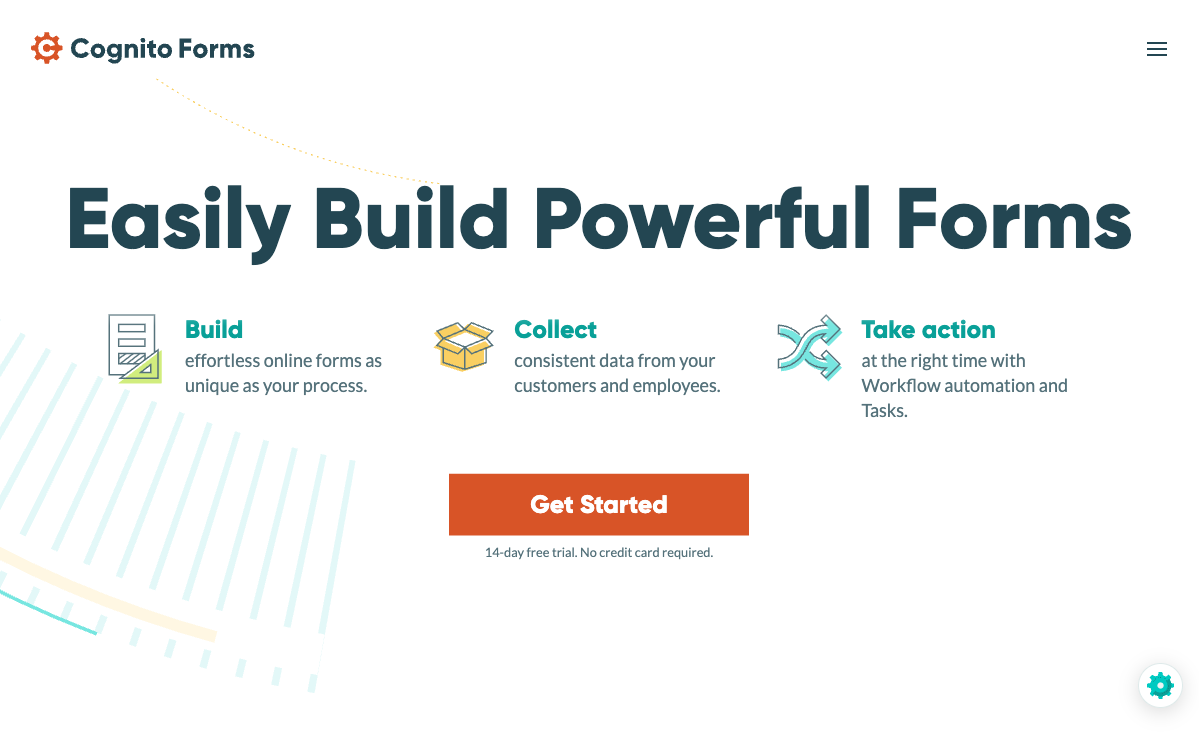
Cognito Forms' free plan is genuinely impressive: unlimited forms, 100 submissions per month, Stripe payment processing, e-signatures, calculations, conditional logic, and file uploads. That's a functional product at zero cost. Paperform's free plan includes unlimited forms and 30 submissions/month with five payment gateways — more gateway options but fewer free submissions. For budget-constrained users, freelancers, or anyone testing the waters, Cognito's free tier offers more headroom before you hit a paywall. The 100 vs 30 submission gap is significant for early-stage businesses.
Lowest Paid Pricing
Cognito Forms Pro costs $15/month (with annual billing) versus Paperform Essentials at $29/month. That's roughly half the price for a capable form builder with calculations, payments, and conditional logic. For small businesses, nonprofits, and individual users where every dollar matters, Cognito's pricing makes it one of the most cost-effective form builders available. The $14/month difference adds up to $168/year — meaningful for budget-conscious teams.
Calculations on Free Plan
Cognito Forms includes its calculation engine on the free plan — field-level formulas, conditional values, and computed totals at zero cost. Paperform also includes calculations on its free plan, so this is more of a parity point at the free tier. But combined with Cognito's higher free submission limit (100 vs 30), the overall free-tier calculation use case is stronger on Cognito for users who need calculations but can't justify paid plans yet.
E-Signatures on Free Plan
Cognito Forms includes e-signature fields on its free plan. Paperform's Papersign is available but the scope on the free tier is more limited. For users who need basic signature collection without paying, Cognito's inclusion of e-signatures at the free level is a genuine advantage for cash-strapped users building consent forms, contracts, or waivers.
HIPAA Compliance
Cognito Forms offers HIPAA compliance with BAA on its Enterprise plan ($129/month). Paperform does not currently offer HIPAA compliance. For healthcare organisations collecting Protected Health Information through forms, Cognito Forms provides a path to compliance that Paperform can't match. Combined with Cognito's lower overall pricing, this makes it a viable option for small healthcare practices that need compliant forms without enterprise budgets.
Microsoft Power Automate Integration
Cognito Forms integrates natively with Microsoft Power Automate (formerly Microsoft Flow), which is a strong advantage for organisations already in the Microsoft 365 ecosystem. Power Automate connections can trigger SharePoint workflows, Teams notifications, Outlook tasks, and other Microsoft services without Zapier as an intermediary. Paperform doesn't have a native Power Automate connector — Microsoft-centric organisations would need Zapier or Make as middleware. For businesses deeply invested in Microsoft tools, this is a relevant integration advantage.
Where Paperform Falls Short
- Higher pricing: Paperform Essentials ($29/month) costs nearly double Cognito Forms Pro ($15/month) — the premium buys design and gateway variety, but budget-focused users may not need either
- Lower free submission limit: 30 submissions/month versus Cognito's 100 — a meaningful gap for very low-volume users relying on a free tier
- No HIPAA compliance: Cognito Forms offers HIPAA on its Enterprise tier; Paperform doesn't offer it at any tier
- Potential overkill for simple use cases: Paperform's document-style editor and feature depth can feel excessive for users who just need a simple data collection form with basic calculations
Where Cognito Forms Falls Short
- Utilitarian design: Forms look functional but lack the visual polish of Paperform's document-style output. For customer-facing forms where brand presentation matters, Cognito's design ceiling is noticeably lower.
- Stripe-only payments (free) / Stripe + PayPal (paid): No Square, Braintree, or Google Pay. No coupon engine, no tax calculations, no product catalogue. For businesses needing multiple payment options, this is a significant limitation.
- Smaller template library: Fewer templates with less design variety than Paperform's 30,000+. Starting from scratch is more common on Cognito Forms.
- Narrower integration ecosystem: Primarily Zapier and Power Automate. Fewer native integrations than Paperform's 2,000+ direct and third-party connections.
- Calculation scope: Formulas work well within form fields but don't propagate as broadly into emails, integration payloads, and success pages as Paperform's engine.
- Private equity ownership: Cognito Forms was acquired by private equity interests. While the platform remains functional, PE ownership can lead to pricing increases, feature gating, and reduced investment in lower-tier plans over time. Paperform is bootstrapped and profitable — a more predictable platform bet for long-term commitment.
Pricing Comparison
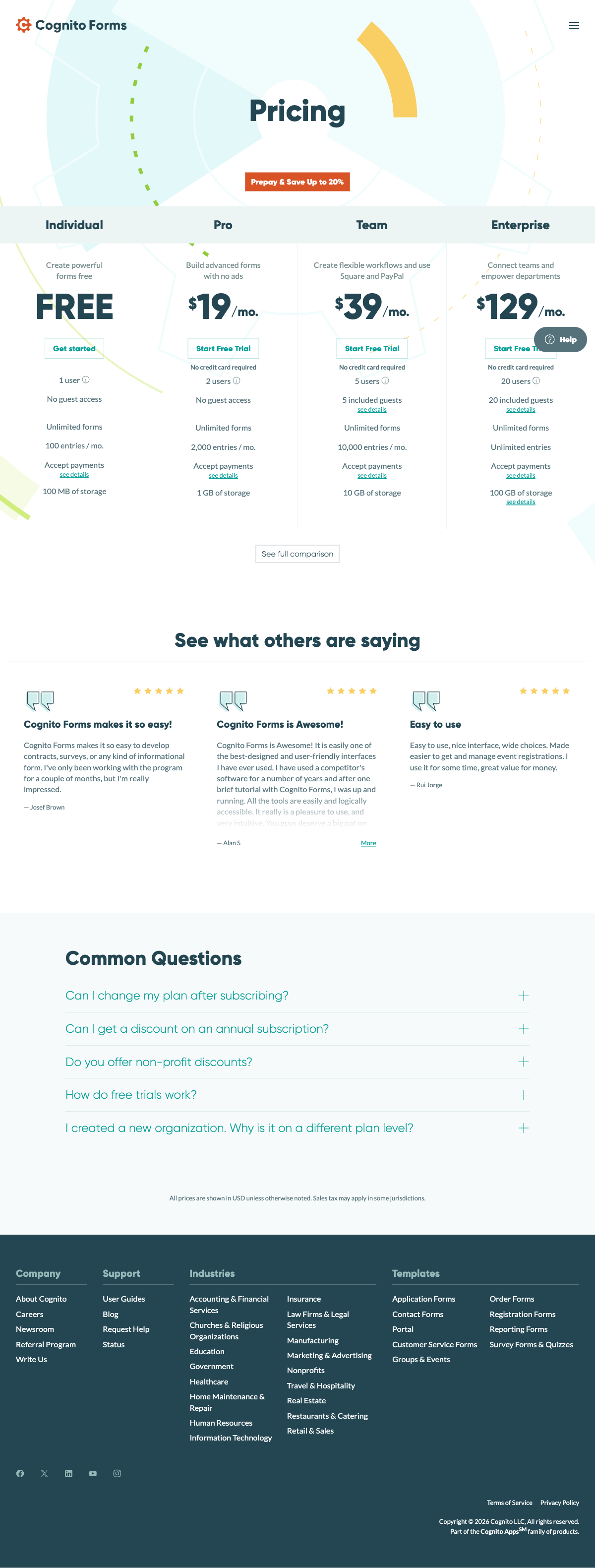
Cognito Forms is cheaper at every tier. The question is whether Paperform's additional features justify the premium.
| Tier | Paperform | Cognito Forms | Key Difference |
|---|---|---|---|
| Free | 30 responses, 5 payment gateways, calculations | 100 responses, Stripe payments, e-sigs, calculations | Cognito has 3x submissions + e-sigs; Paperform has 5x gateways |
| Entry Paid | Essentials: $29/mo — 100 responses, full eCommerce | Pro: $15/mo — 500 responses, remove branding, PayPal | Cognito is half the price with 5x submissions; Paperform has deeper eCommerce |
| Mid-Tier | Pro: $49/mo — 1,000 responses, CSS, analytics, API | Team: $39/mo — 1,000 responses, workflows, team roles | Similar value; Cognito adds workflows, Paperform adds design tools |
| Enterprise | Business: $99/mo — 10,000 responses, SSO, S3 | Enterprise: $129/mo — 25,000 responses, HIPAA, SSO | Cognito adds HIPAA; Paperform is cheaper but lacks HIPAA |
All prices shown are annual billing rates. Monthly billing is higher at both platforms.
Paperform
Cognito Forms
| Product | Plan | Monthly Price | Annual Price (per month) | Free Plan | Free Trial | Limits |
|---|---|---|---|---|---|---|
| Paperform | Free | Free | Free | Yes | 14 days | forms: Unlimited, submissions: 30/month, storage: 100 submissions, users: 1, file uploads: 100 MB |
| Paperform | Essentials | $29/mo | $24/mo billed annually | forms: Unlimited, submissions: 100/month, storage: 1,000 submissions, users: 1, file uploads: 1 GB | ||
| Paperform | Pro | $59/mo | $49/mo billed annually | forms: Unlimited, submissions: 1,000/month, storage: 10,000 submissions, users: 3, file uploads: 10 GB | ||
| Paperform | Business | $129/mo | $99/mo billed annually | forms: Unlimited, submissions: 10,000/month, storage: 100,000 submissions, users: 5, file uploads: 100 GB | ||
| Cognito Forms | Individual (Free) | Free | Free | Yes | 14 days | forms: Unlimited, submissions: 100/month, storage: 100 MB, users: 1 |
| Cognito Forms | Pro | $19/mo | $16/mo billed annually | forms: Unlimited, submissions: 2,000/month, storage: 1 GB, users: 2 | ||
| Cognito Forms | Team | $39/mo | $33/mo billed annually | forms: Unlimited, submissions: 10,000/month, storage: 10 GB, users: 5 | ||
| Cognito Forms | Enterprise | $129/mo | $109/mo billed annually | forms: Unlimited, submissions: Unlimited, storage: 100 GB, users: 20 |
What Users Say
Paperform averages 4.8/5 across review platforms, with particularly high marks for design quality and customer support. Cognito Forms averages around 4.6/5 on G2 and Capterra, with strong marks for value and functionality but noted limitations on design flexibility. Common Cognito reviewer sentiment: "great value, does what it needs to do, but forms look basic." Paperform reviewers consistently highlight the design quality and calculation engine as standout features. Both platforms have positive reputations — the ratings reflect the design-vs-value trade-off.
What's telling is what each platform's users praise most. Cognito reviewers frequently mention the free tier generosity and calculation capability as reasons they chose the platform — they value function over form. Paperform reviewers highlight the visual quality of their forms and the breadth of what a single platform can do — payments, signatures, workflows, and beautiful design in one subscription. The review patterns mirror the core positioning: budget utility versus design-forward versatility.
See Them in Action
The Verdict
Paperform is the better choice when design and payment flexibility matter. If your forms are customer-facing — order pages, booking forms, lead capture, branded surveys — Paperform's document-style editor, five payment gateways, and 30,000+ templates deliver a meaningfully better experience. The calculation engine is broader in scope, the integration ecosystem is deeper, and the visual output is in a different league. The $29/month Essentials plan costs more than Cognito's $15/month Pro, but the design quality and commerce capabilities justify the premium for businesses where forms represent their brand.
Cognito Forms is the better choice when budget is the primary constraint. Its free tier (100 submissions, Stripe payments, e-signatures, calculations) is one of the most generous in the industry. The $15/month Pro plan offers genuine capability at an unbeatable price. If your forms are internal-facing, utilitarian, or your budget simply can't stretch to $29/month, Cognito Forms delivers solid functionality at rock-bottom pricing. Add HIPAA compliance on the Enterprise tier, and small healthcare practices get a compliant form builder that Paperform can't match.
The trade-off is clear: pay more for Paperform and get design quality, gateway variety, and platform confidence from a bootstrapped company. Pay less for Cognito and get functional forms with solid calculations at industry-low prices, with the caveat of PE-backed ownership and more utilitarian output. For most customer-facing use cases, the Paperform premium pays for itself through better presentation and conversion rates. For internal or budget-constrained use cases, Cognito Forms delivers impressive value.
For details on more options, see our complete Cognito Forms alternatives analysis or the full best form builders ranking.
Frequently Asked Questions
Both Paperform and Cognito Forms have calculations — how do they compare?
Both platforms include calculation engines, but they differ in scope and flexibility. Paperform's calculations use an Excel-style formula syntax that works across questions, pages, emails, integrations, and success pages — they drive dynamic pricing, conditional totals, quiz scoring, and custom outputs that flow through the entire form ecosystem. Cognito Forms' calculations are field-level formulas that compute values within the form itself — functional for order totals, field math, and conditional values, but more limited in where outputs can be used. Paperform's calculations also power its eCommerce features (dynamic pricing with coupons and tax) in ways Cognito's don't. Both are capable, but Paperform's engine has broader reach across the platform.
Why is Cognito Forms so much cheaper than Paperform?
Cognito Forms positions as a budget-friendly alternative with a generous free tier (unlimited forms, 100 submissions, Stripe payments, and e-signatures — all free). Its Pro plan at $15/month undercuts Paperform's $29/month Essentials significantly. The price difference reflects trade-offs: Cognito Forms has a more utilitarian design system, fewer payment gateways (Stripe only vs five), a smaller template library, and fewer native integrations. Paperform's higher price buys design quality, gateway variety, deeper eCommerce, and a larger integration ecosystem. Cognito is better value for budget-constrained users who prioritise function over form. Paperform is better value for users who need design quality and payment flexibility.
Which has better payment processing: Paperform or Cognito Forms?
Paperform wins on gateway variety. Paperform connects five gateways — Stripe, PayPal, Square, Braintree, and Google Pay — on all plans including free, with full eCommerce: subscriptions, coupons, tax calculations, product management, and refund processing. Cognito Forms supports Stripe only (included on the free plan) and PayPal on paid plans. No Square, Braintree, or Google Pay. Both platforms handle basic payment collection, but Paperform offers 5x the gateway options and deeper commerce features. If your customers prefer PayPal, Square, or need multiple gateway options, Paperform is the only choice.
Is Cognito Forms' free plan really better than Paperform's?
In several ways, yes. Cognito Forms' free plan includes unlimited forms, 100 submissions/month, Stripe payment processing, e-signatures, and calculations. Paperform's free plan includes unlimited forms but caps at 30 submissions/month, while including five payment gateways and calculations. Cognito gives you 3x more free submissions and includes e-signatures at no cost. Paperform gives you more payment gateways and arguably better design tools on its free tier. If raw free-tier value is your priority, Cognito's free plan is more generous on submission volume. If payment gateway variety matters, Paperform's free plan is stronger.
Can I migrate from Cognito Forms to Paperform?
There's no automated migration tool, but the process is manageable. Export your Cognito Forms submission data as CSV. Rebuild your forms in Paperform — if you used Cognito's calculations, Paperform's Excel-style formulas can replicate and extend that logic. Paperform's 30,000+ templates provide starting points for most common form types. Repoint any Zapier or Make integrations from Cognito to Paperform. The main adjustment is adapting to Paperform's document-style editor, which offers more design freedom but a slightly different workflow than Cognito's more traditional form builder.
Sources & References
- Best Online Form Builder to Use in 2026 — Top 20 Tools — EmailToolTester, 2026
- Cognito Forms Review: Pros, Cons, and Alternatives — G2, 2026
- Paperform — Complete Beginners Guide (YouTube) — AppFind, 2025
Last updated March 21, 2026
Ready to try Paperform?
Create beautiful forms, payment pages, and workflows — no code required.