Jotform vs WPForms: SaaS Platform vs WordPress Plugin in 2026
This comparison pits two fundamentally different products against each other. Jotform is a standalone SaaS form builder — browser-based, platform-independent, serving 35+ million users with 20,000+ templates, 40+ payment gateways, and HIPAA compliance. WPForms is a WordPress plugin — the most popular one in its category, with 6 million+ active installs, 2,100+ templates, and deep WordPress integration. Both build forms. Everything else about how they work, what they cost, and who they serve diverges sharply.
The right choice depends on a single question: are you building on WordPress, or do you need a platform-independent solution? If that answer is obvious, your decision is mostly made. If it's not, this breakdown covers every dimension where the distinction matters.
Quick Verdict
Choose Jotform if:
- You need a standalone form builder that works without any CMS
- You need HIPAA compliance for healthcare forms
- You need 40+ payment gateways including regional processors
- You want mobile apps for building and collecting data on the go
- You need forms that work independently of any website
Choose WPForms if:
- Your website runs on WordPress and you want native integration
- You need unlimited submissions without volume caps
- You want the lowest possible price (from $4.13/month annual)
- You need forms tightly integrated with WordPress users, posts, and plugins
- You manage multiple WordPress sites (Elite covers unlimited sites)
Feature Comparison
Side-by-side across every feature category — a SaaS platform versus a CMS plugin.
| Feature | Jotform | WPForms |
|---|---|---|
| Form Building | ||
| Document-style editor | No | No |
| AI form creation | Yes starter | Yes basic |
| Field types | 30+ (starter) | Yes basic |
| Multi-page forms | Yes starter | Yes basic |
| Guided mode (one question at a time) | Yes starter | Yes pro |
| Conditional logic | Yes starter | Yes basic |
| Calculations field | Yes starter | Yes pro |
| Scoring | Yes starter | Yes pro |
| Answer piping | Yes starter | No |
| Pre-filling and hidden fields | Yes starter | Yes basic |
| Save and resume | Yes starter | Yes pro |
| Auto-close by number | Yes starter | Yes basic |
| Auto-close by date | Yes starter | Yes basic |
| Appointment/booking field | Yes starter | No |
| Signature field | Yes starter | Yes pro |
| Color picker field | No | No |
| File uploads | Yes starter | No |
| Drag-and-drop builder | Yes starter | No |
| Form widgets | Yes starter | No |
| Template gallery | 20,000+ (starter) | No |
| AI calculations assistant | No | No |
| API-powered dropdowns | No | No |
| Google address search | No | Yes pro |
| Payments | ||
| Stripe payments | Yes starter | Yes pro |
| PayPal payments | Yes starter | Yes pro |
| Square payments | Yes starter | Yes pro |
| Braintree payments | Yes starter | No |
| Google Pay | Yes starter | No |
| 40+ payment gateways | Yes starter | No |
| Product sales (eCommerce) | Yes starter | No |
| Subscriptions | Yes starter | Yes pro |
| Coupons and discounts | Yes starter | Yes pro |
| Custom pricing rules | Yes starter | Yes pro |
| Tax calculations | Yes starter | No |
| No transaction fees | Yes starter | No |
| Quotes/invoices | No | No |
| Refunds | No | No |
| 3D Secure | No | No |
| Design & Customization | ||
| Template gallery | 20,000+ (starter) | Yes pro |
| Rich media (images, GIFs, videos) | Yes starter | Yes basic |
| Form themes | Yes starter | No |
| Language translation | Yes starter | Yes basic |
| Advanced theming | Yes starter | Yes basic |
| Custom form URL | No | Yes pro |
| Custom domains | Yes enterprise | Yes basic |
| Custom HTML & CSS | Yes starter | Yes basic |
| Remove branding | Yes bronze | Yes basic |
| Custom email domains | No | No |
| Unsplash and Giphy integration | No | No |
| Image editor | No | No |
| Adobe Creative Cloud | No | No |
| Analytics | ||
| Submission results and reports | Yes starter | Yes basic |
| Form analytics | Yes starter | No |
| Google Analytics integration | Yes starter | No |
| Partial submissions | No | Yes pro |
| AI report insights | No | No |
| Paperform analytics | No | No |
| Google Analytics & Facebook Pixel | No | No |
| Custom analytics scripts | No | No |
| Collaboration | ||
| Multi-user accounts | Yes bronze | Yes basic |
| User permissions and management | Yes enterprise | Yes pro |
| Advanced permissions & admin | Yes enterprise | Yes elite |
| Form sharing | Yes starter | No |
| Assign forms | Yes enterprise | No |
| Form sharing (templates) | No | Yes basic |
| Spaces and tag management | No | No |
| Security | ||
| SOC 2 Type II | Yes enterprise | No |
| GDPR compliant | Yes starter | Yes basic |
| HIPAA compliant | Yes gold | No |
| SSL encryption | Yes starter | Yes basic |
| 256-bit SSL | Yes starter | No |
| Two-factor authentication | Yes starter | No |
| SSO (SAML) | Yes enterprise | No |
| reCAPTCHA | Yes starter | Yes basic |
| Data residency | Yes enterprise | No |
| Form encryption | Yes starter | No |
| PCI DSS | Yes starter | No |
| Enforce 2FA for all users | No | No |
| Local data residency | No | Yes |
| Custom S3 storage | No | No |
| Integrations & API | ||
| Native integrations | 150+ (starter) | No |
| Zapier | Yes starter | Yes pro |
| Make (Integromat) | No | Yes pro |
| Webhooks | Yes starter | Yes elite |
| API | Yes starter | No |
| WordPress plugin | Yes starter | Yes |
| Salesforce AppExchange | Yes starter | No |
| Embed options | Yes starter | No |
| Mobile apps | Yes starter | No |
| 2000+ integrations | No | Yes pro |
| Standard API | No | No |
| Business API | No | No |
| oEmbed support | No | No |
| Additional Products | ||
| Jotform Tables | Yes starter | No |
| Jotform Sign | Yes starter | No |
| Jotform Apps | Yes starter | No |
| Jotform Workflows | Yes starter | No |
| Jotform Report Builder | Yes starter | No |
| Jotform AI Agents | Yes starter | No |
| Jotform Store Builder | Yes starter | No |
Where Jotform Wins

Platform Independence
Jotform works everywhere — standalone pages, embedded on any website, shared via link, or accessed through mobile apps. No hosting to manage, no CMS to maintain, no plugin conflicts to debug. For teams that don't use WordPress, or use multiple platforms, Jotform's independence is non-negotiable. WPForms ties your forms to WordPress, meaning a CMS migration means rebuilding every form from scratch.
HIPAA Compliance
Jotform offers HIPAA compliance on the Gold plan ($99/month annual), including BAA signing, data encryption, and audit logging. WPForms has no HIPAA compliance at any tier. For healthcare organisations collecting patient intake forms, medical questionnaires, or Protected Health Information, WPForms simply cannot be used. Jotform covers this critical compliance requirement.
Payment Gateway Breadth
Jotform connects to 40+ payment gateways on every plan including free — Stripe, PayPal, Square, Venmo, Mollie, PayFast, and dozens of regional processors. WPForms supports Stripe, PayPal, Square, and Authorize.Net, with payments restricted to the Pro plan ($199.50/year) and above. For international businesses or those needing niche payment processors, Jotform's gateway breadth is unmatched.
Mobile Apps and Offline Collection
Jotform provides native iOS and Android apps for both form building and data collection, including offline mode. Field teams can collect data without internet and sync when connected. WPForms has an offline forms addon on the Pro plan, but no native mobile app — form building requires the WordPress admin dashboard on a computer. For mobile-first data collection, Jotform is the clear winner.
Template Library Scale
Jotform offers 20,000+ templates spanning every industry and use case. WPForms provides 2,100+ templates — solid for WordPress, but a fraction of Jotform's library. More templates means faster starts and more niche use cases covered out of the box.
Enterprise Features
Jotform's Enterprise plan includes SSO, SLA, data residency, custom branding, and dedicated support — features that WPForms doesn't offer at any tier. WPForms Elite ($299.50/year) is the ceiling, with no SSO, no SLA, no API, and no data residency. For organisations with enterprise procurement requirements, Jotform meets compliance checklists that WPForms cannot.
Where WPForms Wins
Price-to-Value for WordPress Users
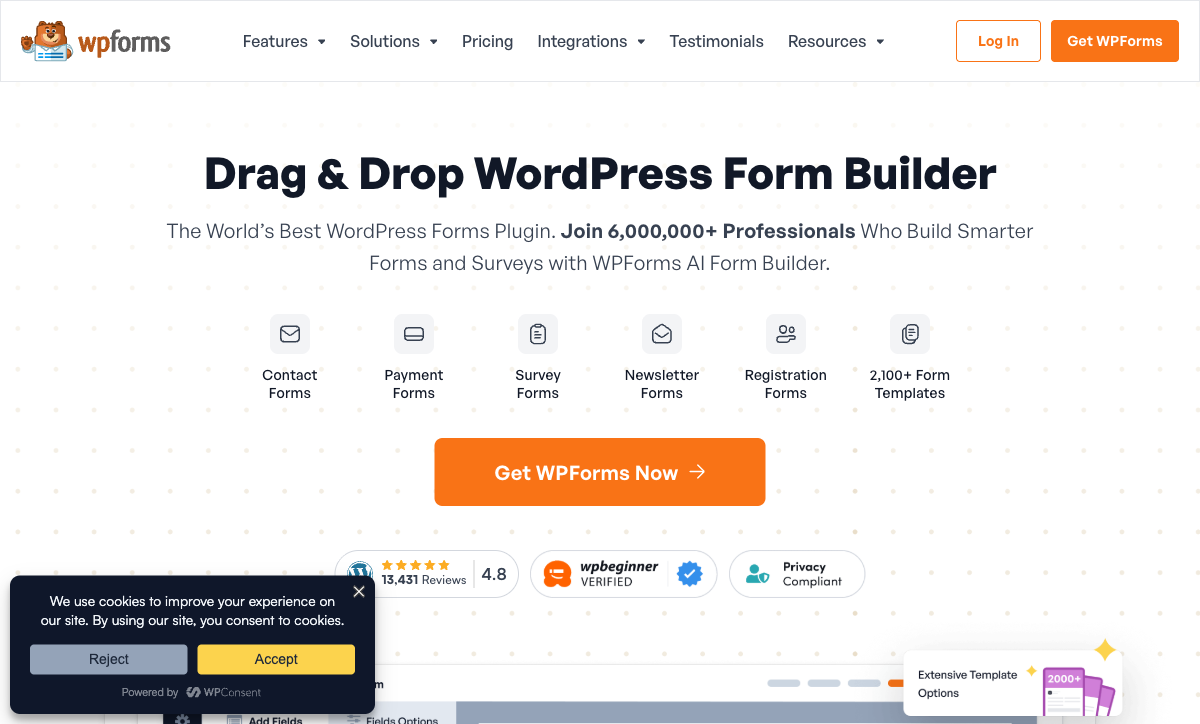
WPForms' pricing is exceptionally competitive. The Pro plan — which includes payments, calculations, digital signatures, conversational forms, Zapier, Google Sheets, surveys, and PDF generation — costs $199.50/year ($16.63/month). Jotform's comparable Silver plan is $39/month annual. That is a 2.3x price difference for similar functionality. The Elite plan at $299.50/year ($24.96/month) adds Salesforce, HubSpot, and unlimited sites. If you already run WordPress, WPForms delivers more features per dollar than Jotform.
Unlimited Submissions
Every WPForms plan — including the free Lite version — allows unlimited forms and unlimited submissions. No monthly caps, no overage charges, no surprise bills. Jotform's submission limits are its biggest friction point: 100/month free, 1,000 on Bronze, 2,500 on Silver, 10,000 on Gold. For high-traffic WordPress sites, WPForms eliminates volume anxiety entirely.
WordPress Ecosystem Integration
WPForms integrates natively with the WordPress ecosystem — user registration, login forms, WooCommerce, Elementor, Divi, and the block editor. Forms can create WordPress users, populate custom post types, and interact with other plugins directly. Jotform embeds on WordPress sites but doesn't integrate at the CMS level — it's a foreign element on the page rather than a native component of the WordPress architecture.
Conversational Forms and Landing Pages
WPForms Pro includes conversational forms (one-question-at-a-time mode) and form landing pages — dedicated standalone pages for each form. These features are built into the WordPress environment, creating polished, distraction-free form experiences. Jotform offers similar standalone form pages, but WPForms' landing pages inherit your WordPress theme's design for visual consistency.
No Branding on Free Plan
WPForms Lite (free) shows minimal WPForms branding. Jotform's free plan displays Jotform branding on every form. Removing branding on Jotform requires the Bronze plan ($34/month). On WPForms, the Basic plan at $4.13/month removes all branding. For budget-conscious users who want clean forms, WPForms' approach is significantly more affordable.
Where Jotform Falls Short
- Submission limits on every plan: Monthly caps range from 100 (free) to 10,000 (Gold at $99/month). High-volume users face difficult tier decisions or overage concerns. WPForms has zero submission limits.
- Higher pricing for comparable features: Jotform Silver ($39/month) delivers roughly what WPForms Pro ($16.63/month) offers. The SaaS model includes hosting, but the 2x+ price gap is significant for cost-sensitive users.
- No WordPress-level integration: Jotform embeds on WordPress sites but cannot interact with WordPress users, custom post types, or WooCommerce at the plugin level.
- Form design is functional, not beautiful: Jotform's drag-and-drop builder produces standard-looking forms. The design output won't win awards for visual polish.
- Free plan branding: Jotform branding on free forms. Removing it requires a $34/month plan, while WPForms achieves it at $4.13/month.
Where WPForms Falls Short
- WordPress lock-in: WPForms only works inside WordPress. No standalone form URLs, no platform-independent hosting, no mobile app. If you leave WordPress, you leave WPForms.
- No HIPAA compliance: Healthcare organisations cannot use WPForms for PHI collection. Jotform, Typeform, and several other SaaS builders offer HIPAA-compliant tiers.
- No enterprise features: No SSO, no SLA, no API, no data residency. The Elite plan ($299.50/year) is the ceiling — there's no enterprise tier for organisations that need compliance checkboxes.
- No mobile app: Form building requires the WordPress admin dashboard. No native mobile app for building forms or collecting data offline.
- Hosting is your responsibility: WPForms doesn't include hosting. You need WordPress hosting ($5-30/month), security, backups, SSL, and ongoing WordPress maintenance — hidden costs that SaaS platforms absorb.
- Fewer templates and payment gateways: 2,100+ templates vs Jotform's 20,000+. Four payment gateways vs Jotform's 40+. The gaps matter for niche use cases and international payment processing.
- Annual billing only: WPForms doesn't offer monthly billing. You pay the full year upfront, which is fine for committed users but inflexible for testing or short-term projects.
Pricing Comparison
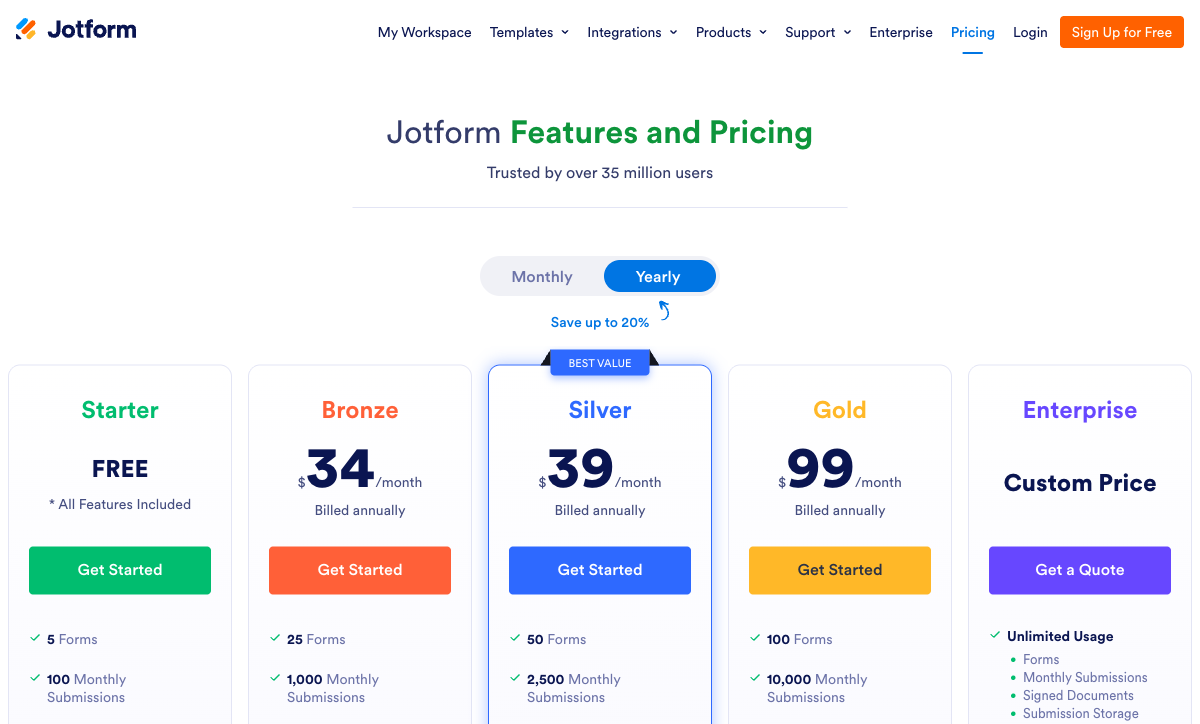
The pricing models are fundamentally different: Jotform charges monthly SaaS fees with submission limits; WPForms charges annual plugin licenses with no limits.
| Feature Level | Jotform | WPForms | Key Difference |
|---|---|---|---|
| Free | 5 forms, 100 subs/mo, 40+ gateways | Unlimited forms, unlimited subs, basic fields | Jotform has payments on free; WPForms has no limits |
| Entry-level paid | Bronze: $34/mo, 1,000 subs, 25 forms | Basic: $4.13/mo (annual), unlimited subs | WPForms is 8x cheaper; Jotform includes more features |
| Mid-tier | Silver: $39/mo, 2,500 subs, 50 forms | Pro: $16.63/mo (annual), payments, Zapier, signatures | WPForms Pro matches Jotform Silver at 42% of the cost |
| Top tier | Gold: $99/mo, 10,000 subs, HIPAA | Elite: $24.96/mo (annual), Salesforce, unlimited sites | Jotform adds HIPAA and enterprise features; WPForms is 4x cheaper |
| Enterprise | Custom pricing, SSO, SLA, data residency | No enterprise tier | Jotform serves enterprise needs; WPForms caps at Elite |
WPForms' annual-only pricing (no monthly option) means lower per-month costs but requires upfront commitment. Jotform's monthly billing offers flexibility but at a higher price point. Factor in WordPress hosting costs ($5-30/month) when comparing WPForms' headline prices to Jotform's all-inclusive SaaS fees.
Jotform
WPForms
| Product | Plan | Monthly Price | Annual Price (per month) | Free Plan | Free Trial | Limits |
|---|---|---|---|---|---|---|
| Jotform | Starter | Free | Free | Yes | No | forms: 5, submissions: 100/month, storage: 100 MB, users: 1 |
| Jotform | Bronze | $39/mo | $34/mo billed annually | forms: 25, submissions: 1,000/month, storage: 1 GB, users: 1 | ||
| Jotform | Silver | $49/mo | $39/mo billed annually | forms: 50, submissions: 2,500/month, storage: 10 GB, users: 1 | ||
| Jotform | Gold | $129/mo | $99/mo billed annually | forms: 100, submissions: 10,000/month, storage: 100 GB, users: 1 | ||
| WPForms | Lite (Free) | Free | Free | Yes | 14 days | forms: Unlimited, submissions: Unlimited, users: Unlimited |
| WPForms | Basic | Not listed | $4.13/mo billed annually | forms: Unlimited, submissions: Unlimited, users: Unlimited | ||
| WPForms | Plus | Not listed | $8.29/mo billed annually | forms: Unlimited, submissions: Unlimited, users: Unlimited | ||
| WPForms | Pro | Not listed | $16.63/mo billed annually | forms: Unlimited, submissions: Unlimited, users: Unlimited | ||
| WPForms | Elite | Not listed | $24.96/mo billed annually | forms: Unlimited, submissions: Unlimited, users: Unlimited |
What Users Say
Jotform averages 4.7/5 across thousands of reviews on G2 and Capterra, with strong marks for template variety, payment integrations, and platform breadth. Common complaints include submission limits, pricing escalation, and occasional form builder slowness on complex forms.
WPForms averages 4.8-4.9/5 on WordPress.org (8,000+ reviews) and 4.7-4.8 on G2/Capterra, with consistent praise for ease of use, WordPress integration quality, and customer support. Complaints centre on features being locked behind higher tiers and the annual-only billing model. Both platforms are well-regarded — WPForms edges ahead in user satisfaction, likely because WordPress users find it perfectly tailored to their ecosystem.
Consider Paperform
If neither a WordPress plugin nor a traditional SaaS form builder feels right, Paperform offers a different approach. Its document-style editor creates forms that look like designed landing pages — not generic form widgets. Every plan includes five payment gateways (Stripe, PayPal, Square, Braintree, Google Pay), an Excel-style calculation engine that powers dynamic pricing and scoring across questions, pages, emails, and integrations, built-in e-signatures via Papersign, and 30,000+ templates. Paperform is bootstrapped, profitable, and serves 500,000+ businesses including Deloitte and UNESCO. It combines the platform independence of Jotform with design quality that neither Jotform nor WPForms can match. See the full form builders ranking for details.
Frequently Asked Questions
Can I use WPForms without WordPress?
No. WPForms is exclusively a WordPress plugin — it requires a WordPress installation to function. Your forms live inside your WordPress site, and you manage everything through the WordPress admin dashboard. Jotform is a standalone SaaS platform accessible from any browser with no CMS dependency. If you ever want to move away from WordPress, your WPForms data stays locked inside that ecosystem. Jotform forms work independently on any website via embed codes, standalone URLs, or the Jotform mobile app.
Which is cheaper for a small business?
WPForms is dramatically cheaper on paper: the Pro plan (payments, calculations, signatures, Zapier) costs $199.50/year — roughly $16.63/month. Jotform's comparable Bronze plan is $34/month (annual). However, WPForms requires you to already have WordPress hosting ($5-30/month), a domain, SSL, and ongoing WordPress maintenance. When you factor in hosting costs and the time spent maintaining WordPress (updates, security, backups), the total cost gap narrows significantly. If you already run WordPress, WPForms is the cheaper option. If you don't, Jotform's all-inclusive SaaS model avoids hidden infrastructure costs.
Which has better payment processing?
Jotform supports 40+ payment gateways on its free plan, including Stripe, PayPal, Square, and dozens of regional processors. WPForms supports Stripe, PayPal, Square, and Authorize.Net, but payment features require the Pro plan ($199.50/year) or higher. Jotform's breadth of payment gateways is unmatched — useful for international businesses. WPForms covers the major gateways most small businesses need. For complex eCommerce with subscriptions and coupons, both platforms deliver, but Jotform includes it on lower tiers.
How do submission limits compare?
WPForms has no submission limits on any plan — free or paid. Every WPForms tier offers unlimited forms and unlimited submissions. Jotform enforces strict monthly limits: 100 on the free plan, 1,000 on Bronze ($34/month), 2,500 on Silver ($39/month), and 10,000 on Gold ($99/month). For high-volume use cases, WPForms' unlimited model is a significant advantage. Jotform's limits can become expensive as traffic grows, though the Gold plan at 10,000/month covers most business needs.
Sources & References
- Jotform vs WPForms: Which Form Builder Is Right for You? — G2, 2026
- Best WordPress Form Plugins Compared — WPBeginner, 2026
Last updated March 21, 2026
Ready to try Paperform?
Create beautiful forms, payment pages, and workflows — no code required.