Best Cognito Forms Alternatives for 2026
Cognito Forms built a genuine reputation on two things: a capable calculation engine and a free plan that puts most competitors to shame. Since 2013, it's been the quiet workhorse of the form builder market — calculations, conditional logic, e-signatures, and Stripe payments on a free tier while competitors charged $30+ for the same combination. For data-driven teams on tight budgets, it was an easy recommendation.
The problem is what hasn't changed. The editor still produces forms that feel utilitarian — getting branded, polished results requires CSS work that most teams can't (or won't) invest in. The feature set has remained largely static while competitors have shipped AI form creation, conversational modes, document-style editors, and platform-level workflow tools. Cognito Forms does what it did in 2013, and does it reliably — but the market has moved forward, and the gap between Cognito's functional output and what modern form builders produce is now impossible to ignore.
If you value what Cognito gets right — calculations, logic, affordable pricing — but want better design tools and a platform that's actively evolving, these alternatives offer meaningful upgrades without abandoning Cognito's strengths.
| Feature | Cognito Forms | Paperform | Jotform | Typeform | Google Forms | Formstack | Gravity Forms | HubSpot Forms |
|---|---|---|---|---|---|---|---|---|
| Form Building | ||||||||
| Document-style editor | No | Yes | No | No | No | No | No | No |
| AI form creation | No | Yes | Yes starter | Yes | Yes | Yes forms | No | No |
| Field types | 20+ | 26+ | 30+ (starter) | 20+ | 11 | 15 | No | No |
| Guided mode (one question at a time) | No | Yes | Yes starter | Yes | No | Yes forms | Yes Elite | No |
| Calculations field | Yes | Yes essentials | Yes starter | Yes plus | No | Yes forms | Yes Basic | No |
| Payments | ||||||||
| Stripe payments | Yes | Yes | Yes starter | Yes basic | No | Yes forms | Yes Pro | Yes starter |
| PayPal payments | Yes team | Yes | Yes starter | No | No | Yes forms | Yes Pro | No |
| Square payments | Yes team | Yes | Yes starter | No | No | No | Yes Pro | No |
| Braintree payments | No | Yes | Yes starter | No | No | No | No | No |
| Google Pay | No | Yes | Yes starter | No | No | No | Yes Pro | No |
| Design & Customization | ||||||||
| Template gallery | Yes | 30,000+ | 20,000+ (starter) | 1,500+ | 20+ | Yes forms | Yes Basic | Yes |
| Rich media (images, GIFs, videos) | Yes | Yes | Yes starter | Yes | Yes | Yes forms | Yes Basic | No |
| Unsplash and Giphy integration | No | Yes | No | Yes | No | No | No | No |
| Image editor | No | Yes | No | No | No | No | No | No |
| Adobe Creative Cloud | No | Yes | No | No | No | No | No | No |
| Analytics | ||||||||
| AI report insights | No | Yes pro | No | Yes business | No | No | No | No |
| Paperform analytics | No | Yes pro | No | No | No | Yes forms | No | No |
| Google Analytics & Facebook Pixel | Yes pro | Yes essentials | No | Yes basic | No | Yes forms | Yes Elite | Yes |
| Custom analytics scripts | No | Yes pro | No | Yes basic | No | No | Yes Basic | No |
| Partial submissions | No | Yes pro | No | Yes plus | No | Yes forms | Yes Elite | No |
| Collaboration | ||||||||
| Advanced permissions & admin | Yes enterprise | Yes enterprise | Yes enterprise | Yes enterprise | Yes Business Starter | Yes enterprise | No | Yes enterprise |
| Form sharing (templates) | Yes | Yes | No | Yes | Yes | Yes forms | Yes Basic | Yes |
| Spaces and tag management | No | Yes | No | No | No | Yes forms | No | No |
| Form sharing | No | No | Yes starter | No | No | No | No | No |
| Assign forms | No | No | Yes enterprise | No | No | No | No | No |
| Security | ||||||||
| SOC 2 Type II | No | Yes | Yes enterprise | Yes | Yes | No | No | Yes |
| Two-factor authentication | Yes | Yes | Yes starter | Yes | Yes | Yes forms | No | Yes |
| Enforce 2FA for all users | No | Yes business | No | No | Yes Business Starter | Yes enterprise | No | No |
| SSO (SAML) | Yes enterprise | Yes business | Yes enterprise | Yes enterprise | Yes Business Plus | Yes enterprise | No | Yes enterprise |
| reCAPTCHA | Yes | Yes | Yes starter | Yes business | No | Yes forms | Yes Basic | No |
| Integrations & API | ||||||||
| Native integrations | No | 2,000+ | 150+ (starter) | 120+ (basic) | No | No | No | Yes |
| Make (Integromat) | Yes | Yes | No | Yes basic | Yes | No | No | Yes starter |
| Webhooks | Yes | Yes pro | Yes starter | Yes basic | No | Yes forms | Yes Elite | Yes starter |
| Standard API | No | Yes pro | No | No | Yes | Yes forms | Yes Basic | No |
| Business API | No | Yes business | No | No | No | Yes enterprise | No | No |
| Additional Products | ||||||||
| Jotform Tables | No | No | Yes starter | No | No | No | No | No |
| Jotform Sign | No | No | Yes starter | No | No | No | No | No |
| Jotform Apps | No | No | Yes starter | No | No | No | No | No |
| Jotform Workflows | No | No | Yes starter | No | No | No | No | No |
| Jotform Report Builder | No | No | Yes starter | No | No | No | No | No |
 #1 Paperform — Same Calculation Power, Dramatically Better Design

Paperform answers Cognito Forms' two biggest weaknesses simultaneously. The document-style editor eliminates the CSS struggle — you build forms the way you'd write a document, mixing rich content and form fields on the same canvas. The result is forms that look like branded pages out of the box, not data-entry widgets that need a designer's touch.
The calculation engine is the critical comparison. Cognito Forms users often assume no other platform matches their formula capabilities. Paperform's Excel-style calculations are equally powerful — and arguably more versatile. They drive not just field values but conditional visibility, page routing, email content, integration payloads, and success page customisation. An AI calculations assistant helps non-technical users write complex formulas, solving the steep-syntax learning curve that Cognito users frequently cite as a pain point. Five payment gateways (including Braintree and Google Pay, which Cognito doesn't support) and built-in Papersign e-signatures round out a platform that's everything Cognito Forms does, plus everything it doesn't.
- Strengths over Cognito Forms: Document-style editor for professional design, AI-assisted calculations, 5 payment gateways vs 3, Papersign e-signatures included free, Stepper workflow automation, custom domains, 30,000+ templates
- Limitations: No HIPAA compliance (Cognito offers this), no repeating sections as a native feature, $24/month Essentials vs Cognito's $19/month Pro
- Best for: Teams that need Cognito-level calculations with professional design quality and active product development
 #2 Jotform — Maximum Feature Coverage with a Free Tier

Where Cognito Forms covers forms, calculations, and basic workflow, Jotform covers practically everything — 40+ payment processors, e-signatures, PDF generation, approval workflows, a mobile app builder, and a 20,000+ template library. If you're leaving Cognito because the feature ceiling feels too low, Jotform raises that ceiling higher than any other alternative on this list.
Jotform's free tier is more restrictive than Cognito's (5 forms, 100 submissions vs Cognito's unlimited forms and 100 submissions), but it still includes enough to evaluate the platform. The paid plans start at $39/month — double Cognito's Pro price but with significantly more capability. The interface can feel cluttered after 20 years of feature accumulation, and individual functions don't always have the depth that Cognito's focused calculation engine provides. But for teams that need a single platform covering the widest possible range of use cases, Jotform's scope is unmatched. See Jotform alternatives for more detail.
- Strengths over Cognito Forms: 40+ payment gateways, PDF generation, approval workflows, HIPAA compliance, 20,000+ templates, mobile app
- Limitations: More expensive ($39/month vs $19/month), more restrictive free plan, interface can feel cluttered, calculations less focused
- Best for: Teams that outgrew Cognito's feature set and need a broader, everything-in-one platform
 #3 Typeform — Best for Design-First Engagement Forms

If Cognito Forms represents the functional extreme of form building — powerful logic, minimal aesthetics — Typeform represents the opposite. Its one-question-at-a-time conversational format produces some of the most visually engaging forms available, with beautiful default styling that requires zero design effort. For short surveys, quizzes, and lead qualification forms under 10 questions, completion rates are often notably higher than traditional multi-field layouts.
The trade-off is everything that made Cognito Forms appealing. Typeform has no native calculation engine. Payment processing requires the $83/month Business plan and only works with Stripe. The free plan caps at 10 responses per month. Typeform is the anti-Cognito: stunning on the surface, shallow underneath. It's the right choice if your primary pain with Cognito was design quality and your forms are short engagement pieces. It's the wrong choice if calculations, payments, or high-volume data collection matter. For a broader comparison, see Typeform alternatives.
- Strengths over Cognito Forms: Far superior visual design, conversational one-question UX, higher engagement rates for short forms, beautiful default themes
- Limitations: No calculations, Stripe-only payments on $83/month plan, 10 response/month free limit, expensive for high-volume use
- Best for: Teams that need visually stunning engagement forms and can work without calculations or complex logic
 #4 Google Forms — Best for Teams That Don't Need Calculations

This is the nuclear option: strip away everything Cognito Forms does well — calculations, payments, e-signatures, conditional logic depth — and replace it with a tool that does one thing impeccably: collect data into a spreadsheet for free. Google Forms is unlimited in every dimension that matters for basic data collection (forms, responses, storage) and requires zero learning curve.
The recommendation is narrow but real. If you've been using Cognito Forms for internal surveys, quick feedback collection, or basic registration forms that don't use calculations or payment processing, Google Forms handles those use cases with less friction and no cost. The moment you need any of Cognito's power features, Google Forms falls flat. Think of it as the alternative for teams that discovered they were over-tooled — not for teams that need more capability. For a deeper analysis, see Google Forms alternatives.
- Strengths over Cognito Forms: Completely free and unlimited, zero learning curve, native Google Sheets integration, ubiquitous adoption
- Limitations: No calculations, no payments, no conditional logic depth, no e-signatures, no design control, no integrations beyond Google ecosystem
- Best for: Teams that only used Cognito's basic survey features and don't need calculations or payments
Full Feature Comparison
Every feature across Cognito Forms and its top alternatives, grouped by category.
| Feature | Cognito Forms | Paperform | Jotform | Typeform | Google Forms | Formstack | Gravity Forms | HubSpot Forms |
|---|---|---|---|---|---|---|---|---|
| Form Building | ||||||||
| Document-style editor | No | Yes | No | No | No | No | No | No |
| AI form creation | No | Yes | Yes starter | Yes | Yes | Yes forms | No | No |
| Field types | 20+ | 26+ | 30+ (starter) | 20+ | 11 | 15 | No | No |
| Multi-page forms | Yes | Yes | Yes starter | Yes basic | Yes | Yes forms | Yes Basic | Yes starter |
| Guided mode (one question at a time) | No | Yes | Yes starter | Yes | No | Yes forms | Yes Elite | No |
| Conditional logic | Yes | Yes | Yes starter | Yes basic | Yes | Yes forms | Yes Basic | Yes professional |
| Calculations field | Yes | Yes essentials | Yes starter | Yes plus | No | Yes forms | Yes Basic | No |
| AI calculations assistant | No | Yes essentials | No | No | No | No | No | No |
| Scoring | Yes | Yes essentials | Yes starter | Yes plus | Yes | No | Yes Elite | No |
| Answer piping | Yes | Yes | Yes starter | Yes basic | No | Yes forms | Yes Basic | No |
| Pre-filling and hidden fields | Yes | Yes essentials | Yes starter | Yes basic | Yes | Yes forms | Yes Basic | Yes |
| Save and resume | Yes pro | Yes | Yes starter | No | No | Yes forms | Yes Basic | No |
| Auto-close by number | Yes | Yes essentials | Yes starter | Yes basic | Yes | No | No | No |
| Auto-close by date | Yes | Yes pro | Yes starter | Yes basic | Yes | No | No | No |
| Appointment/booking field | No | Yes | Yes starter | Yes basic | No | No | No | No |
| Signature field | Yes team | Yes | Yes starter | No | No | Yes suite | Yes Elite | No |
| Color picker field | No | Yes | No | No | No | No | No | No |
| API-powered dropdowns | Yes | Yes business | No | No | No | Yes forms | No | No |
| Google address search | Yes | Yes business | No | No | No | No | No | No |
| File uploads | Yes | Yes | Yes starter | Yes basic | Yes | No | No | Yes |
| Drag-and-drop builder | No | No | Yes starter | No | No | Yes forms | Yes Basic | No |
| Form widgets | No | No | Yes starter | No | No | No | No | No |
| Template gallery | No | No | 20,000+ (starter) | No | No | No | No | No |
| AI follow-up questions | No | No | No | Yes business | No | No | No | No |
| Video questions | No | No | No | Yes basic | No | No | No | No |
| 30+ field types | No | No | No | No | No | No | Yes Basic | No |
| Question types | No | No | No | No | No | No | No | Yes |
| Payments | ||||||||
| Stripe payments | Yes | Yes | Yes starter | Yes basic | No | Yes forms | Yes Pro | Yes starter |
| PayPal payments | Yes team | Yes | Yes starter | No | No | Yes forms | Yes Pro | No |
| Square payments | Yes team | Yes | Yes starter | No | No | No | Yes Pro | No |
| Braintree payments | No | Yes | Yes starter | No | No | No | No | No |
| Google Pay | No | Yes | Yes starter | No | No | No | Yes Pro | No |
| Product sales (eCommerce) | Yes | Yes essentials | Yes starter | No | No | No | Yes Basic | No |
| Subscriptions | No | Yes essentials | Yes starter | Yes basic | No | No | Yes Pro | No |
| Coupons and discounts | Yes | Yes essentials | Yes starter | No | No | Yes forms | Yes Elite | No |
| Custom pricing rules | Yes | Yes essentials | Yes starter | No | No | Yes forms | No | No |
| Tax calculations | Yes | Yes | Yes starter | No | No | No | No | No |
| Quotes/invoices | Yes team | Yes | No | No | No | No | No | No |
| Refunds | No | Yes | No | No | No | No | Yes Pro | No |
| 3D Secure | No | Yes | No | Yes basic | No | No | Yes Pro | No |
| 40+ payment gateways | No | No | Yes starter | No | No | No | No | No |
| No transaction fees | No | No | Yes starter | No | No | No | No | No |
| Design & Customization | ||||||||
| Template gallery | Yes | 30,000+ | 20,000+ (starter) | 1,500+ | 20+ | Yes forms | Yes Basic | Yes |
| Rich media (images, GIFs, videos) | Yes | Yes | Yes starter | Yes | Yes | Yes forms | Yes Basic | No |
| Unsplash and Giphy integration | No | Yes | No | Yes | No | No | No | No |
| Image editor | No | Yes | No | No | No | No | No | No |
| Adobe Creative Cloud | No | Yes | No | No | No | No | No | No |
| Language translation | Yes pro | Yes | Yes starter | Yes basic | No | No | Yes Basic | No |
| Advanced theming | Yes pro | Yes pro | Yes starter | Yes plus | No | Yes forms | Yes Basic | Yes starter |
| Custom form URL | No | Yes pro | No | Yes plus | No | Yes forms | No | No |
| Custom domains | No | Yes pro | Yes enterprise | No | No | Yes forms | No | No |
| Custom HTML & CSS | Yes pro | Yes pro | Yes starter | Yes business | No | Yes forms | Yes Basic | Yes starter |
| Remove branding | Yes pro | Yes pro | Yes bronze | Yes plus | No | Yes forms | Yes Basic | Yes starter |
| Custom email domains | No | Yes business | No | No | Yes Business Starter | No | Yes Elite | No |
| Form themes | No | No | Yes starter | No | No | No | No | No |
| Analytics | ||||||||
| Submission results and reports | Yes | Yes | Yes starter | Yes | Yes | Yes forms | Yes Basic | Yes |
| AI report insights | No | Yes pro | No | Yes business | No | No | No | No |
| Paperform analytics | No | Yes pro | No | No | No | Yes forms | No | No |
| Google Analytics & Facebook Pixel | Yes pro | Yes essentials | No | Yes basic | No | Yes forms | Yes Elite | Yes |
| Custom analytics scripts | No | Yes pro | No | Yes basic | No | No | Yes Basic | No |
| Partial submissions | No | Yes pro | No | Yes plus | No | Yes forms | Yes Elite | No |
| Drop-off analysis | No | Yes pro | No | Yes business | No | No | No | No |
| Form analytics | No | No | Yes starter | No | No | No | No | No |
| Google Analytics integration | No | No | Yes starter | No | No | No | No | No |
| Conversion analytics | No | No | No | No | No | No | No | Yes professional |
| Collaboration | ||||||||
| Multi-user accounts | Yes pro | Yes pro | Yes bronze | Yes plus | Yes | Yes forms | Yes Basic | Yes |
| User permissions and management | Yes team | Yes pro | Yes enterprise | Yes plus | Yes | Yes forms | Yes Basic | Yes starter |
| Advanced permissions & admin | Yes enterprise | Yes enterprise | Yes enterprise | Yes enterprise | Yes Business Starter | Yes enterprise | No | Yes enterprise |
| Form sharing (templates) | Yes | Yes | No | Yes | Yes | Yes forms | Yes Basic | Yes |
| Spaces and tag management | No | Yes | No | No | No | Yes forms | No | No |
| Form sharing | No | No | Yes starter | No | No | No | No | No |
| Assign forms | No | No | Yes enterprise | No | No | No | No | No |
| Workspace organization | No | No | No | Yes | No | No | No | No |
| Security | ||||||||
| SOC 2 Type II | No | Yes | Yes enterprise | Yes | Yes | No | No | Yes |
| GDPR compliant | Yes | Yes | Yes starter | Yes | Yes | Yes forms | Yes Basic | Yes |
| SSL encryption | Yes | Yes | Yes starter | Yes | Yes | Yes forms | Yes Basic | Yes |
| Two-factor authentication | Yes | Yes | Yes starter | Yes | Yes | Yes forms | No | Yes |
| Enforce 2FA for all users | No | Yes business | No | No | Yes Business Starter | Yes enterprise | No | No |
| SSO (SAML) | Yes enterprise | Yes business | Yes enterprise | Yes enterprise | Yes Business Plus | Yes enterprise | No | Yes enterprise |
| reCAPTCHA | Yes | Yes | Yes starter | Yes business | No | Yes forms | Yes Basic | No |
| Local data residency | No | Yes enterprise | No | No | Yes Business Plus | No | Yes Basic | No |
| Custom S3 storage (BYO) | No | Yes business | No | No | No | No | No | No |
| HIPAA compliant | No | No | Yes gold | Yes enterprise | No | No | No | No |
| 256-bit SSL | No | No | Yes starter | No | No | No | No | No |
| Data residency | No | No | Yes enterprise | No | No | No | No | Yes enterprise |
| Form encryption | No | No | Yes starter | No | No | No | No | No |
| PCI DSS | No | No | Yes starter | Yes | No | No | No | No |
| ISO 27001 | No | No | No | Yes | No | No | No | No |
| Custom S3 storage | No | No | No | No | No | No | No | No |
| Integrations & API | ||||||||
| Native integrations | No | 2,000+ | 150+ (starter) | 120+ (basic) | No | No | No | Yes |
| Zapier | Yes | Yes | Yes starter | Yes basic | Yes | Yes forms | Yes Pro | Yes starter |
| Make (Integromat) | Yes | Yes | No | Yes basic | Yes | No | No | Yes starter |
| Webhooks | Yes | Yes pro | Yes starter | Yes basic | No | Yes forms | Yes Elite | Yes starter |
| Standard API | No | Yes pro | No | No | Yes | Yes forms | Yes Basic | No |
| Business API | No | Yes business | No | No | No | Yes enterprise | No | No |
| WordPress plugin | Yes | Yes | Yes starter | Yes | No | Yes forms | Yes Basic | Yes |
| oEmbed support | Yes | Yes | No | No | No | No | No | No |
| API | No | No | Yes starter | Yes basic | No | No | No | Yes |
| Salesforce AppExchange | No | No | Yes starter | No | No | No | No | No |
| Embed options | No | No | Yes starter | Yes | No | No | No | Yes |
| Mobile apps | No | No | Yes starter | No | No | No | No | No |
| 2000+ integrations | No | No | No | No | No | No | No | No |
| 50+ official add-ons | No | No | No | No | No | No | Yes Basic | No |
| Stepper workflow automation | No | No | No | No | No | No | No | No |
| Additional Products | ||||||||
| Jotform Tables | No | No | Yes starter | No | No | No | No | No |
| Jotform Sign | No | No | Yes starter | No | No | No | No | No |
| Jotform Apps | No | No | Yes starter | No | No | No | No | No |
| Jotform Workflows | No | No | Yes starter | No | No | No | No | No |
| Jotform Report Builder | No | No | Yes starter | No | No | No | No | No |
| Jotform AI Agents | No | No | Yes starter | No | No | No | No | No |
| Jotform Store Builder | No | No | Yes starter | No | No | No | No | No |
Pricing Comparison
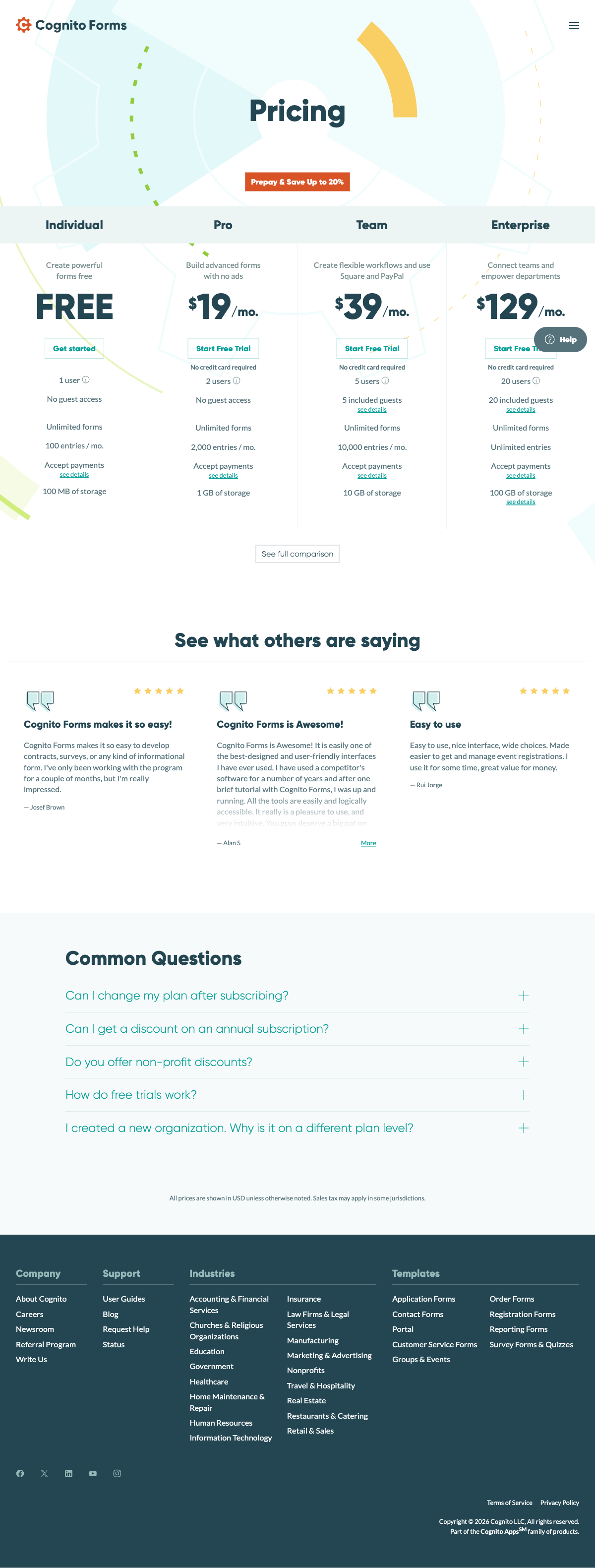
Cognito Forms is one of the most affordable paid form builders. Here's how alternatives compare on cost — and what you get for the difference in price.
Paperform
Cognito Forms
| Product | Plan | Monthly Price | Annual Price (per month) | Free Plan | Free Trial | Limits |
|---|---|---|---|---|---|---|
| Cognito Forms | Individual (Free) | Free | Free | Yes | 14 days | forms: Unlimited, submissions: 100/month, storage: 100 MB, users: 1 |
| Cognito Forms | Pro | $19/mo | $16/mo billed annually | forms: Unlimited, submissions: 2,000/month, storage: 1 GB, users: 2 | ||
| Cognito Forms | Team | $39/mo | $33/mo billed annually | forms: Unlimited, submissions: 10,000/month, storage: 10 GB, users: 5 | ||
| Cognito Forms | Enterprise | $129/mo | $109/mo billed annually | forms: Unlimited, submissions: Unlimited, storage: 100 GB, users: 20 | ||
| Paperform | Free | Free | Free | Yes | 14 days | forms: Unlimited, submissions: 30/month, storage: 100 submissions, users: 1, file uploads: 100 MB |
| Paperform | Essentials | $29/mo | $24/mo billed annually | forms: Unlimited, submissions: 100/month, storage: 1,000 submissions, users: 1, file uploads: 1 GB | ||
| Paperform | Pro | $59/mo | $49/mo billed annually | forms: Unlimited, submissions: 1,000/month, storage: 10,000 submissions, users: 3, file uploads: 10 GB | ||
| Paperform | Business | $129/mo | $99/mo billed annually | forms: Unlimited, submissions: 10,000/month, storage: 100,000 submissions, users: 5, file uploads: 100 GB | ||
| Jotform | Starter | Free | Free | Yes | No | forms: 5, submissions: 100/month, storage: 100 MB, users: 1 |
| Jotform | Bronze | $39/mo | $34/mo billed annually | forms: 25, submissions: 1,000/month, storage: 1 GB, users: 1 | ||
| Jotform | Silver | $49/mo | $39/mo billed annually | forms: 50, submissions: 2,500/month, storage: 10 GB, users: 1 | ||
| Jotform | Gold | $129/mo | $99/mo billed annually | forms: 100, submissions: 10,000/month, storage: 100 GB, users: 1 | ||
| Typeform | Free | Free | Free | Yes | No | forms: 10, submissions: 10/month, users: 1 |
| Typeform | Basic | $39/mo | $28/mo billed annually | forms: Unlimited, submissions: 100/month, users: 1 | ||
| Typeform | Plus | $79/mo | $56/mo billed annually | forms: Unlimited, submissions: 1,000/month, users: 3 | ||
| Typeform | Business | $129/mo | $91/mo billed annually | forms: Unlimited, submissions: 10,000/month, users: 5 | ||
| Typeform | Growth Pro | $379/mo | $266/mo billed annually | forms: Unlimited, submissions: Expanded, users: Expanded | ||
| Google Forms | Free (Personal) | Free | Free | Yes | 14 days | forms: Unlimited, submissions: Unlimited, storage: 15 GB (shared across Google Drive), users: 1, file uploads: Included in 15 GB storage |
| Google Forms | Business Starter | $7/mo | $7/mo billed annually | forms: Unlimited, submissions: Unlimited, storage: 30 GB per user, users: Up to 300, file uploads: Included in storage | ||
| Google Forms | Business Standard | $14/mo | $14/mo billed annually | forms: Unlimited, submissions: Unlimited, storage: 2 TB per user, users: Up to 300, file uploads: Included in storage | ||
| Google Forms | Business Plus | $22/mo | $22/mo billed annually | forms: Unlimited, submissions: Unlimited, storage: 5 TB per user, users: Up to 300, file uploads: Included in storage | ||
| Formstack | Forms | $99/mo | $83/mo billed annually | No | 14 days | forms: 25, submissions: 1,000/form, storage: 2 GB, users: 1, file uploads: 2 GB |
| Formstack | Suite | $299/mo | $250/mo billed annually | forms: 100, submissions: 5,000/form, storage: 10 GB, users: 3, file uploads: 10 GB | ||
| Gravity Forms | Basic | Not listed | $59/mo billed annually | No | 14 days | forms: Unlimited, submissions: Unlimited, storage: WordPress database (self-hosted), users: Unlimited (WordPress users) |
| Gravity Forms | Pro | Not listed | $159/mo billed annually | forms: Unlimited, submissions: Unlimited, storage: WordPress database (self-hosted), users: Unlimited (WordPress users) | ||
| Gravity Forms | Elite | Not listed | $259/mo billed annually | forms: Unlimited, submissions: Unlimited, storage: WordPress database (self-hosted), users: Unlimited (WordPress users) | ||
| Gravity Forms | Nonprofit | Not listed | $129/mo billed annually | forms: Unlimited, submissions: Unlimited, storage: WordPress database (self-hosted), users: Unlimited (WordPress users) | ||
| HubSpot Forms | Free | Free | Free | Yes | 14 days | forms: Unlimited, submissions: Unlimited, users: 2 |
| HubSpot Forms | Marketing Hub Starter | $20/mo | $20/mo billed annually | forms: Unlimited, submissions: Unlimited, users: Per seat | ||
| HubSpot Forms | Marketing Hub Professional | $890/mo | $890/mo billed annually | forms: Unlimited, submissions: Unlimited, users: 3 included (additional seats extra) | ||
| HubSpot Forms | Marketing Hub Enterprise | $3600/mo | $3600/mo billed annually | forms: Unlimited, submissions: Unlimited, users: 5 included (additional seats extra) |
Review Ratings Across Platforms
How Cognito Forms and its alternatives rate across major review sites.
Verdict: Which Cognito Forms Alternative Should You Choose?
Cognito Forms is a capable tool held back by dated design and stalled momentum. The best alternative depends on which limitation matters most to you.
If design quality is your primary frustration, Paperform is the most direct upgrade — it matches Cognito's calculation depth while producing forms that look like professional landing pages instead of data-entry widgets. The AI calculations assistant also flattens the learning curve that Cognito's scripting-style syntax creates. For teams that need the broadest possible feature set, Jotform covers more ground than Cognito across payments, compliance, and workflow automation.
If visual engagement is the sole priority and you don't need calculations, Typeform's conversational format delivers the most striking forms. And if you've realised you were over-tooled and just need free, simple data collection, Google Forms removes all complexity.
For most teams switching from Cognito Forms, Paperform is the recommended path — it's the rare alternative that upgrades the design without downgrading the logic.
Frequently Asked Questions
Why do people look for Cognito Forms alternatives?
Cognito Forms has a loyal following for its calculation engine and generous free plan, but two pain points drive most searches for alternatives. First, design limitations — forms built in Cognito look functional but rarely polished, and achieving branded results requires custom CSS that most non-technical users can't write. Second, slow product evolution — the core feature set hasn't changed dramatically since 2013, and there's little evidence of rapid innovation. Users who need modern capabilities like AI form creation, guided conversational modes, or rich media embedding find themselves hitting a ceiling.
Can any alternative match Cognito Forms calculations for free?
Cognito Forms' free plan includes calculations, which is unusual. Google Forms has no calculations at all. Paperform's free plan includes conditional logic but reserves its full Excel-style calculation engine for paid plans starting at $24/month — and those calculations are substantially more versatile, driving logic across questions, pages, emails, integrations, and success pages. Jotform includes basic calculations on its free plan. If free calculations are non-negotiable, Cognito remains the strongest free option — but Paperform's paid calculation engine is a meaningful upgrade in terms of what the calculations can actually control.
Is Cognito Forms still being actively developed?
Cognito Forms is maintained and operational, but its development pace has slowed compared to competitors. There's been little evidence of major product launches, new feature categories, or significant UI overhauls in recent years. The blog and changelog show incremental updates rather than platform-level innovations. Compare this to Paperform, which has launched AI form creation, an AI calculations assistant, Papersign e-signatures, and Stepper workflow automation in recent updates. Cognito Forms is stable, but if you need a platform that's actively evolving, the development velocity isn't comparable.
Which Cognito Forms alternative has the best design flexibility?
Paperform is the strongest answer if design matters. Its document-style editor lets you mix headings, images, video, and form fields on a single canvas — forms come out looking like branded landing pages without custom CSS. Typeform produces beautiful conversational forms with minimal effort, though its one-question-at-a-time format limits layout flexibility. Cognito Forms can achieve decent results with custom CSS, but you're working against the grain — the editor was designed for function, not aesthetics. If your forms represent your brand to clients or customers, Paperform and Typeform both outclass Cognito's default output.
Does Cognito Forms offer a public API?
No. Cognito Forms has no public REST API for programmatic access to forms or submissions. Data flows are limited to webhooks, Zapier, Make, and Power Automate. Paperform offers a full REST API on its Pro plan ($49/month) for reading forms, submissions, and partial submissions, plus a Business API for advanced automation. Jotform also has a comprehensive API. If API access is critical for your integrations or internal tools, Cognito Forms is one of the few form builders that doesn't offer one.
Can I keep using repeating sections if I switch from Cognito Forms?
Repeating sections — where respondents can add multiple rows of related data — is one of Cognito's standout features. Jotform doesn't have an identical implementation but supports repeatable fields in some configurations. Paperform handles this through its calculation engine and conditional logic — you can create dynamic form sections that expand based on user input. The exact implementation differs, but the functionality can be replicated. If repeating sections are central to your workflow (e.g., line-item order forms, multi-employee registrations), test the alternative before fully migrating.
Is Cognito Forms safe as a long-term platform?
Cognito Forms has operated since 2013 and is currently listed with a private equity funding status. The company is small (11-50 employees) and the product is stable, but the absence of visible growth indicators — major feature launches, fundraising announcements, or significant customer acquisition milestones — raises questions about long-term investment in the platform. Bootstrapped competitors like Paperform (founded 2016, profitable) and Jotform (founded 2006, $144.9M revenue) have more transparent growth trajectories. Cognito isn't going anywhere immediately, but its innovation pace suggests it may gradually fall further behind more actively developed alternatives.
Which alternative is best for client-facing forms that need to look professional?
Paperform produces the most professional-looking forms with the least effort. Its document-style editor, custom themes, 30,000+ templates, Unsplash/Giphy integration, and custom domain support mean your forms represent your brand without hiring a designer. Typeform is a close second for visual impact, particularly for short surveys and lead qualification flows. Cognito Forms can produce clean results, but achieving branded, professional output typically requires CSS customisation that adds time and technical overhead to every new form you create.
How does Cognito Forms compare to Google Forms for basic data collection?
For basic surveys and internal data collection, Google Forms is simpler and completely free with unlimited responses. Cognito Forms' free plan limits you to 100 submissions/month but adds calculations, conditional logic, e-signatures, and payments — features Google Forms doesn't have at any price. The choice depends on complexity: Google Forms for quick internal surveys, Cognito Forms for forms that need logic and payment processing. For the best of both — free, powerful, and visually polished — Paperform offers a free plan with conditional logic and payments that splits the difference.
What's the best overall Cognito Forms alternative?
Paperform offers the most complete upgrade path from Cognito Forms. It matches Cognito's calculation power with an Excel-style engine that's arguably easier to learn (plus an AI assistant for complex formulas), adds dramatically better design tools via its document-style editor, includes 5 payment gateways on every plan (vs Cognito's Stripe-only free tier), and bundles Papersign e-signatures and Stepper workflow automation at no extra cost. At $24/month for Essentials, it's more expensive than Cognito's $19/month Pro plan but includes features that Cognito reserves for its Team tier ($39/month) — making it a better value at equivalent capability levels.
Sources & References
- Best Online Form Builder to Use in 2026 — Top 20 Tools — EmailToolTester, 2026
- Cognito Forms Reviews, Pros and Cons — Capterra, 2026
- Best 120 Free Online Form Builder Software Picks — G2, 2026
Last updated March 21, 2026
Ready to try Paperform?
Create beautiful forms, payment pages, and workflows — no code required.