Paperform provides a 7 day, no credit card required, free trial which includes full access to all features for the plan you're trialing. Register for a free trial by going to paperform.co/register.
You can change the plan you are trialing at any point in your trial via your Account Settings.
You can upgrade at any time in Account Settings → Billing.
Continue with a Paperform Paid Plan
If you would like to automatically continue with a Paperform paid plan once your trial ends, make sure that you have a payment method added to your account. You can do this by heading to Account Settings → Billing, and then clicking the "Billing Portal" button at the top of the page.
Switch to Paperform Free
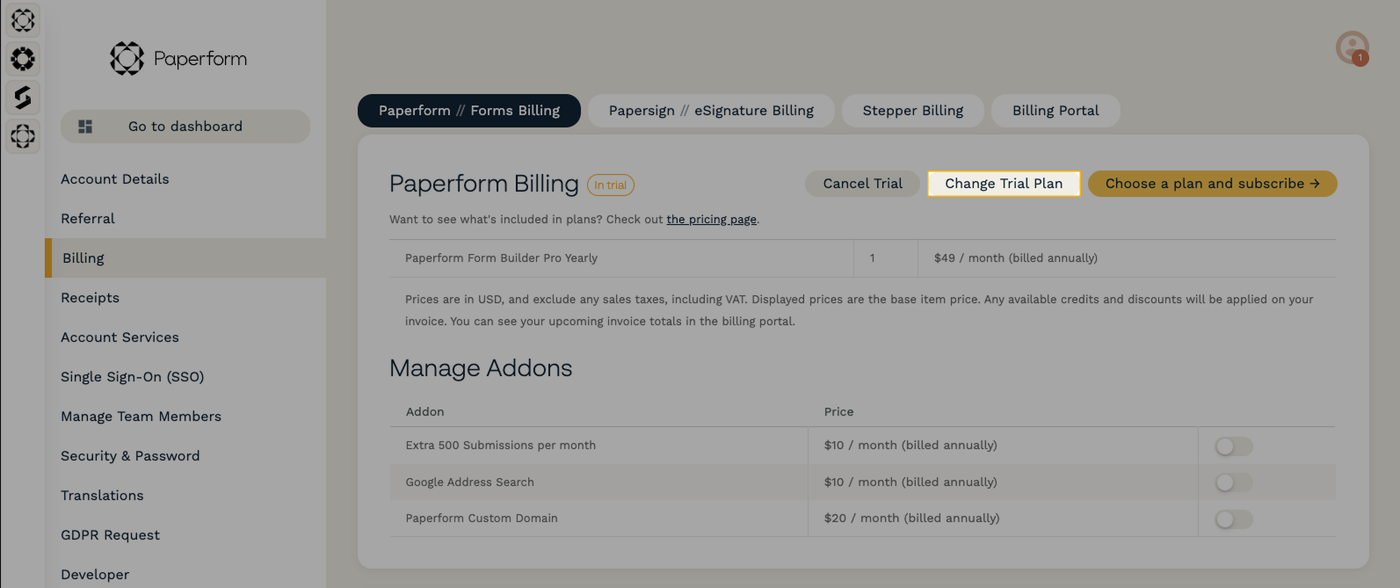
Alternatively, you can switch over to Paperform Free at any point during your trial. Head to Account Settings → Billing, select "Paperform // Forms Billing" from the top of the page, and then click "Change Trial Plan."
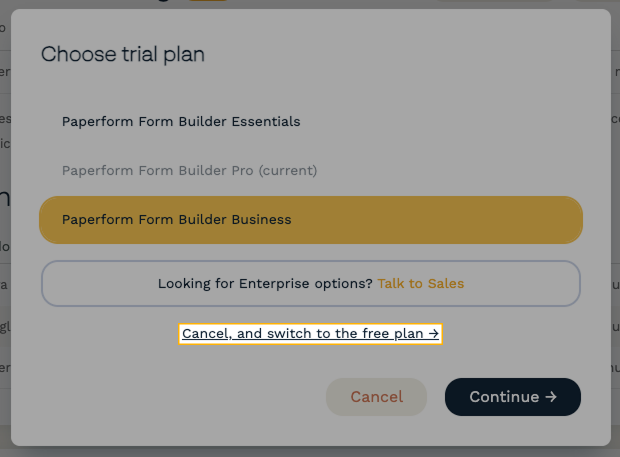
Select "Cancel, and switch to the free plan →" then click "Continue" to switch over.
What if my trial expires first?
If we do not have any payment information on file when your Paperform trial expires, then your subscription will end. You can still sign up for any paid or the free plan from Account Settings → Billing.
Gotchas
Warning: changing to the free plan will automatically unpublish all your forms. You can re-publish any forms that do not use any paid features. For a full list of features and limits on the free plan, see the pricing page.